
Read app screenshots 69% cheaper than GPT-6.1 Sol
Gemma 4 31B on SIE reads your app screenshots into typed records. Give your agent the fields it needs without building an integration for each app.
Gemma 4 31B
Typed app record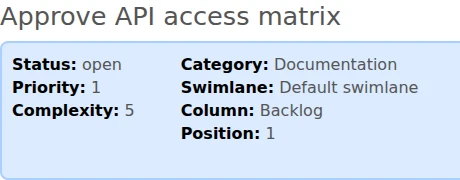
- title
- Approve API access matrix string
- status
- open string
- priority
- 1 number
- category
- Documentation string
A missing accent or reference breaks an exact match
GPT-6 Luna
Name spelling changed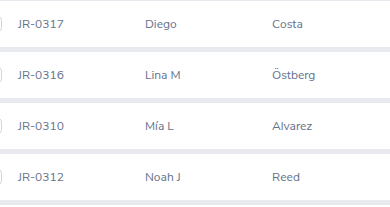

RequestedCopy strings as visibly displayed, preserving spelling, case, diacritics, signs, currency symbols and punctuation.
{ "first_and_middle_name": "Mia L" }An exact-name lookup for Mía L will not match Mia L.
The accent is missing at both medium and high reasoning. Saved comparison
Claude Haiku 5.5
Reference IDs missing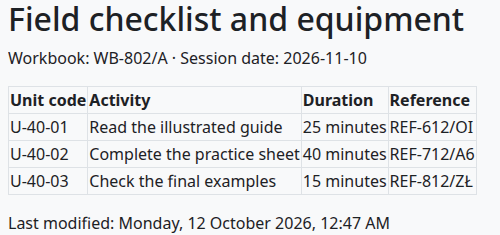

RequestedInclude every complete requested row in visible order.
[{ "reference": null }, { "reference": null }, { "reference": null }]Without the reference IDs, an agent cannot join these units to their source records.
All three references are null at both medium and high effort. Saved comparison
Read app screenshots 75% cheaper than Claude Sonnet 5.5
- Tested
- 100 fictional screenshots from five apps
- Scored
- Mean field agreement on the same 1,645 visible checks
- Prices
- Serverless and provider list prices
Send a screenshot and schema, get typed fields back
from pathlib import Pathimport base64import jsonfrom sie_sdk import SIEClientclient = SIEClient(api_key="API keysk-sie-…")schema = json.loads("""schema{··· "title": {"type": ["string", "null"]},··· "subtasks": {"type": "array", "items": {···}} },···}""")instruction = "instruction···Read only the supplied full screenshot···"prompt = instructionimage = base64.b64encode(Path(imageimage.pngbrowse).read_bytes()).decode("ascii")# Messages: the prompt as the system message, the image as the user message. Copy includes them.result = client.chat_completions( "modelgoogle/gemma-4-31B-it:h100-96k-hires-thinking-budget512-no-spec", messages, max_completion_tokens=32768, extra_body={"temperature":0,"presence_penalty":0}, # Strict JSON-schema response_format. Copy includes it.)# Copy also reads and parses the JSON reply.import { readFile } from 'node:fs/promises';
import { SIEClient } from '@superlinked/sie-sdk';
const client = new SIEClient(undefined, { apiKey: 'sk-sie-…' });
const schema = {···
"title": {"type": ["string", "null"]},···
"subtasks": {"type": "array", "items": {···}}
},···
};
const instruction = "···Read only the supplied full screenshot···";
const prompt = instruction;
const image = await readFile("image.png");
const result = await client.chatCompletions({
model: 'google/gemma-4-31B-it:h100-96k-hires-thinking-budget512-no-spec',
// Messages: the prompt as the system message, the image as the user message. Copy includes them.
max_completion_tokens: 32768,
temperature: 0,
presence_penalty: 0,
// Strict JSON-schema response_format. Copy includes it.
});
// Copy also reads and parses the JSON reply.document_image=$(base64 < 'image.png' | tr -d '\n')
curl https://api.superlinked.com/v1/chat/completions \
-H "Authorization: Bearer sk-sie-…" \
-H "Content-Type: application/json" \
-d "{\"model\":\"google/gemma-4-31B-it:h100-96k-hires-thinking-budget512-no-spec\",\"messages\":[{\"role\":\"system\",\"content\":\"···Read only the supplied full screenshot···\"},{\"role\":\"user\",\"content\":[{\"type\":\"image_url\",\"image_url\":{\"url\":\"data:image/png;base64,$document_image\"}}]}],\"max_completion_tokens\":32768,\"temperature\":0,\"presence_penalty\":0,\"response_format\":{\"type\":\"json_schema\",\"json_schema\":{\"name\":\"fixture_kb01\",\"strict\":true,\"schema\":{\"type\":\"object\",\"properties\":{\"task_reference\":{\"type\":[\"string\",\"null\"]},\"title\":{\"type\":[\"string\",\"null\"]},\"status\":{\"type\":[\"string\",\"null\"]},\"priority\":{\"type\":[\"integer\",\"null\"]},\"complexity\":{\"type\":[\"integer\",\"null\"]},\"category\":{\"type\":[\"string\",\"null\"]},\"swimlane\":{\"type\":[\"string\",\"null\"]},\"column\":{\"type\":[\"string\",\"null\"]},\"position\":{\"type\":[\"integer\",\"null\"]},\"assignee\":{\"type\":[\"string\",\"null\"]},\"creator\":{\"type\":[\"string\",\"null\"]},\"time_estimated\":{\"type\":[\"string\",\"null\"]},\"time_spent\":{\"type\":[\"string\",\"null\"]},\"due_date\":{\"type\":[\"string\",\"null\"]},\"created\":{\"type\":[\"string\",\"null\"]},\"modified\":{\"type\":[\"string\",\"null\"]},\"description\":{\"type\":[\"string\",\"null\"]},\"subtasks\":{\"type\":\"array\",\"items\":{\"type\":\"object\",\"properties\":{\"title\":{\"type\":[\"string\",\"null\"]},\"assignee\":{\"type\":[\"string\",\"null\"]},\"time_tracking\":{\"type\":[\"string\",\"null\"]}},\"required\":[\"title\",\"assignee\",\"time_tracking\"],\"additionalProperties\":false}}},\"required\":[\"task_reference\",\"title\",\"status\",\"priority\",\"complexity\",\"category\",\"swimlane\",\"column\",\"position\",\"assignee\",\"creator\",\"time_estimated\",\"time_spent\",\"due_date\",\"created\",\"modified\",\"description\",\"subtasks\"],\"additionalProperties\":false}}}}"Build the "Screenshot mining" capability into my app using the Superlinked Inference Engine (SIE).
Context
- SIE is an OpenAI-style inference API. Python SDK: `from sie_sdk import SIEClient`; TypeScript: `@superlinked/sie-sdk`.
- Base URL: https://api.superlinked.com (or my regional endpoint). Auth: Bearer key from env `SIE_API_KEY` (never hard-code it).
- Model: google/gemma-4-31B-it:h100-96k-hires-thinking-budget512-no-spec (OpenAI-compatible endpoint: /v1/chat/completions). Keep the model id configurable.
Task
- Input: an uploaded app screenshot plus the fields to extract.
- Behaviour: return every field in the submitted schema as validated JSON
- Send one POST /v1/chat/completions request (SDK: chat_completions / chatCompletions) with a system message and a user message. The system message is "Read only the supplied full screenshot and return one JSON object conforming to the schema. Do not use external knowledge or invent hidden content. Copy strings as visibly displayed, preserving spelling, case, diacritics, signs, currency symbols and punctuation. Values that are absent, blank, only placeholders or not fully readable are null. Checkbox states are booleans; counts are integers; money and dates are strings. Include every complete requested row in visible order. Ignore navigation and fields not requested. Do not output Markdown, commentary or reasoning.\n\nExtract the displayed task reference, title, labelled summary fields, dates and description. Copy the main task values only; exclude action links such as Assign to me. Use null for a requested time-spent value when that line is absent. Include every complete subtask row in its top-to-bottom order, with its displayed time-tracking string.\n" verbatim, without appending the response schema. The user message holds only an image_url part. Base64-encode the original local image bytes as a canonical data:image/png, data:image/jpeg or data:image/webp URI (normalize jpg to image/jpeg). Use max_completion_tokens 32768, temperature 0 and response_format {type: "json_schema", json_schema: {name: "fixture_kb01", strict: true, schema}} with the submitted schema unchanged. Parse choices[0].message.content as JSON and fail loudly when it is missing or invalid. Submitted schema: {
"type": "object",
"properties": {
"task_reference": {
"type": [
"string",
"null"
]
},
"title": {
"type": [
"string",
"null"
]
},
"status": {
"type": [
"string",
"null"
]
},
"priority": {
"type": [
"integer",
"null"
]
},
"complexity": {
"type": [
"integer",
"null"
]
},
"category": {
"type": [
"string",
"null"
]
},
"swimlane": {
"type": [
"string",
"null"
]
},
"column": {
"type": [
"string",
"null"
]
},
"position": {
"type": [
"integer",
"null"
]
},
"assignee": {
"type": [
"string",
"null"
]
},
"creator": {
"type": [
"string",
"null"
]
},
"time_estimated": {
"type": [
"string",
"null"
]
},
"time_spent": {
"type": [
"string",
"null"
]
},
"due_date": {
"type": [
"string",
"null"
]
},
"created": {
"type": [
"string",
"null"
]
},
"modified": {
"type": [
"string",
"null"
]
},
"description": {
"type": [
"string",
"null"
]
},
"subtasks": {
"type": "array",
"items": {
"type": "object",
"properties": {
"title": {
"type": [
"string",
"null"
]
},
"assignee": {
"type": [
"string",
"null"
]
},
"time_tracking": {
"type": [
"string",
"null"
]
}
},
"required": [
"title",
"assignee",
"time_tracking"
],
"additionalProperties": false
}
}
},
"required": [
"task_reference",
"title",
"status",
"priority",
"complexity",
"category",
"swimlane",
"column",
"position",
"assignee",
"creator",
"time_estimated",
"time_spent",
"due_date",
"created",
"modified",
"description",
"subtasks"
],
"additionalProperties": false
}. Preserve top_k when supplied, presence_penalty 0 and the submitted whitespace setting.
Deliverables
- A typed client wrapper, an application-level function for this task, error handling for timeouts/empty input, and unit tests with a stubbed client.
- Wire it into my existing stack (ask me which framework if unclear) and add a short usage example.- task_reference
- Task #1
- title
- Approve API access matrix
- status
- open
- priority
- 1
- complexity
- 5
- category
- Documentation
- swimlane
- Default swimlane
- column
- Backlog
- position
- 1
- assignee
- Inés Ramos
- creator
- Fixture Administrator
- time_estimated
- 7.5 hours
- time_spent
- 1.5 hours
- due_date
- 2026-11-04 00:00
- created
- 2026-10-10 09:00
- modified
- 2026-10-10 09:00
- description
- Check role matrix AX-09 against request CB-207. Approval ceiling: €2,750.00.
| Title | Assignee | Time tracking |
|---|---|---|
| Collect source checklist | Inés Ramos | 1.50h estimated |
| Review literal identifiers | Liam Chen | 0.50h spent / 2.50h estimated |
| Record final sign-off | Zofia Nowak | 1.00h spent / 3.50h estimated |
Full JSON output
{"task_reference": "Task #1", "title": "Approve API access matrix", "status": "open", "priority": 1, "complexity": 5, "category": "Documentation", "swimlane": "Default swimlane", "column": "Backlog", "position": 1, "assignee": "Inés Ramos", "creator": "Fixture Administrator", "time_estimated": "7.5 hours", "time_spent": "1.5 hours", "due_date": "2026-11-04 00:00", "created": "2026-10-10 09:00", "modified": "2026-10-10 09:00", "description": "Check role matrix AX-09 against request CB-207. Approval ceiling: \u20ac2,750.00.", "subtasks": [{"title": "Collect source checklist", "assignee": "In\u00e9s Ramos", "time_tracking": "1.50h estimated"}, {"title": "Review literal identifiers", "assignee": "Liam Chen", "time_tracking": "0.50h spent / 2.50h estimated"}, {"title": "Record final sign-off", "assignee": "Zofia Nowak", "time_tracking": "1.00h spent / 3.50h estimated"}]}Read the screens your agent already uses
SIE Serverless
We host the models; you call one API.
- No idle GPUs, pay for what you use
- Fits your stack: SDK, API, CLI, MCP
- Self-host the same open-source engine
- SOC 2 Type 2, US or EU data residency
- Create an account to try Serverless
SIE Cluster
Kubernetes in your own cloud, backed by our engineers.
- Terraform modules for your cloud
- Apache-2.0, same engine as Serverless
- GPU workers scale to zero between jobs
- Separate worker pools for each tenant
Deploy SIE to our AWS account with the superlinked/sie/aws Terraform module. Docs: superlinked.com/docs/deployment.Deploy SIE to our Google Cloud project with the superlinked/sie/google Terraform module. Docs: superlinked.com/docs/deployment.Deploy SIE to our Azure subscription with the superlinked/sie/azure Terraform module. Docs: superlinked.com/docs/deployment.Deploy SIE to our Alibaba Cloud account with the superlinked/sie/alicloud Terraform module. Docs: superlinked.com/docs/deployment. SIE Local
The open-source server on your own machine.
- NVIDIA GPU, 80 GB
- One container, no cluster
- Process your data fully offline
- Same SDK and model IDs as Serverless
docker run --gpus all -p 8080:8080 ghcr.io/superlinked/sie-server:latest-cuda13-sglang-cu130