
Tag product photos with 2x Amazon Rekognition’s accuracy, 98% cheaper
SIE is the open-source inference engine serving SigLIP so400m. The model matches product photos to your own lists of types, colours and materials, without training.
SIE SigLIP so400m
All three right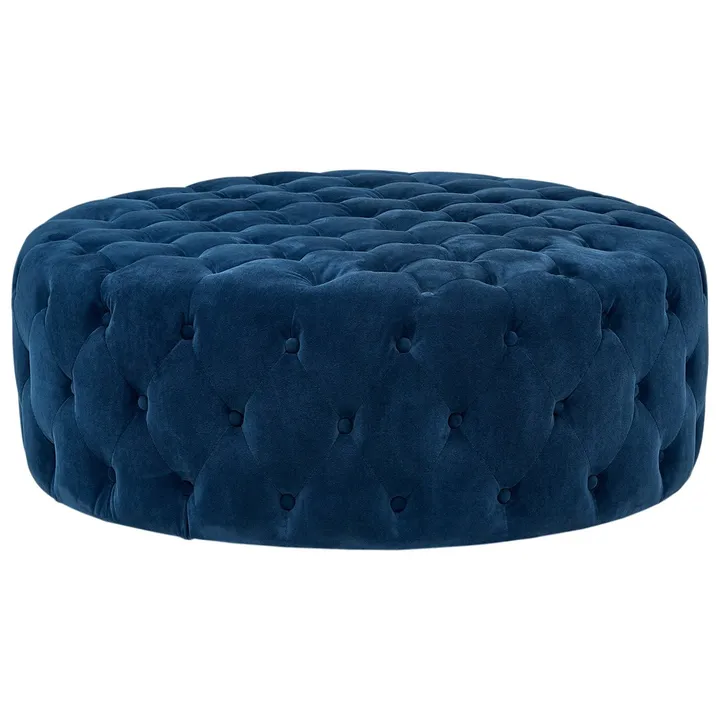
Picked from your own lists
- Type51 choices
- ottoman then stool, sofa
- Colour14 choices
- blue then brown, purple
- Material11 choices
- velvet then suede, fabric
Rekognition and GPT-6 Luna mislabel what you sell
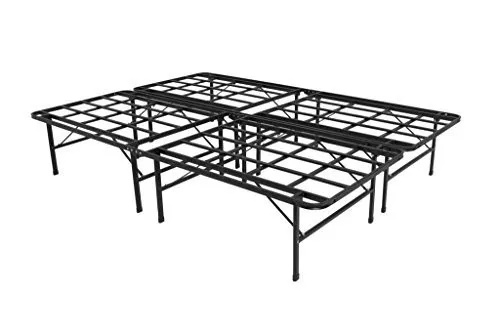
Amazon Rekognition
Filed as a table- Coffee Table100.0
- Furniture100.0
- Table100.0
- Dining Table57.2
- Roof Rack55.0
- Aluminium53.0
- Bench51.3
No “Bed” among its 7 labels. Even a label mapping fitted to the test photos themselves gets only 35% of them fully right.
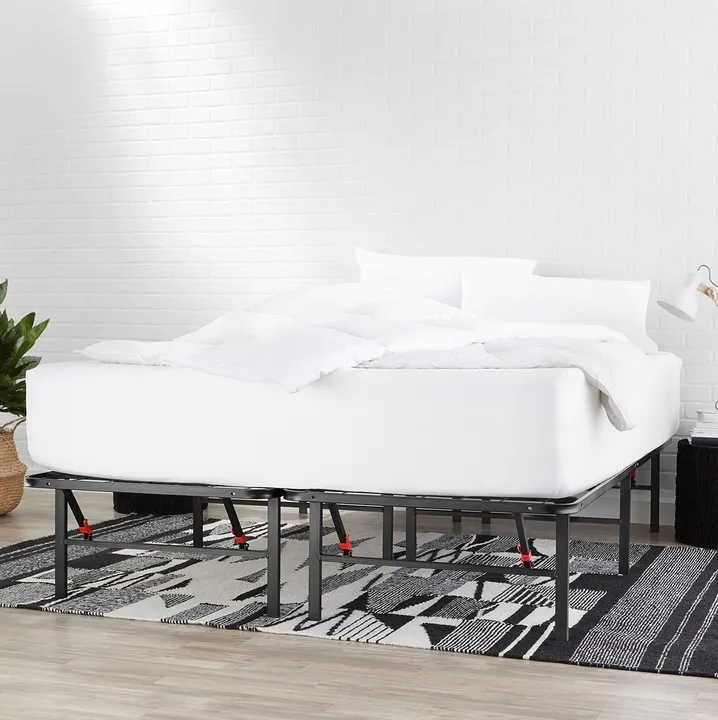
GPT-6 Luna (high reasoning)
Tagged the bedding- Type
- bed
- Colour
- white
- Material
- fabric
Same answer in 3 of 3 runs
- Salsify Press release Salsify survey: 45% of shoppers returned an online order because its product content was wrong
Daily Online Shopping Plunges 57% as Shoppers Return to the Certainty of Stores
“Forty-five percent of shoppers returned an online purchase due to incorrect or misleading information, with millennials returning at the highest rate at 56%.”
2x Amazon Rekognition’s accuracy, 98% cheaper
- Tested
- 938 held-out Amazon product photos; prompts tuned on 311 separate photos
- Scored
- All three fields match the listing: type, colour and material
- Prices
- Serverless rates and provider API usage at list prices
Rank your own labels from a photo
from pathlib import Pathfrom urllib.request import urlopenfrom sie_sdk import SIEClientclient = SIEClient(api_key="API keysk-sie-…")banks = { "type": ["type labelottoman", "type labelstool", "type labelsofa"], "colour": ["colour labelblue", "colour labelbrown", "colour labelpurple"], "material": ["material labelvelvet", "material labelsuede", "material labelfabric"]}templates = { "type": ["a photo of {article} {label}.", "{label}", "a product photo of {article} {label}."], "colour": ["a {label} object."], "material": ["a photo of a product made of {label}."]}image_url = imageblue-velvet-ottoman.jpgbrowsewith urlopen(image_url) as source: image_bytes = source.read()image = {"data": image_bytes, "format": "jpeg"}prompts = [ template.format(label=label, article="an" if label[0].lower() in "aeiou" else "a") for bank, labels in banks.items() for label in labels for template in templates[bank]]vecs = client.encode("modelgoogle/siglip-so400m-patch14-384", [ {"images": [image]}, *[{"text": text} for text in prompts],])print([vector["dense"] for vector in vecs])import { readFile } from 'node:fs/promises';
import { SIEClient } from '@superlinked/sie-sdk';
const client = new SIEClient(undefined, { apiKey: 'sk-sie-…' });
const banks = {
"type": ["ottoman", "stool", "sofa"],
"colour": ["blue", "brown", "purple"],
"material": ["velvet", "suede", "fabric"]
};
const templates = {
"type": ["a photo of {article} {label}.", "{label}", "a product photo of {article} {label}."],
"colour": ["a {label} object."],
"material": ["a photo of a product made of {label}."]
};
const imageUrl = "https://superlinked.com/reference/image-classify/blue-velvet-ottoman.jpg";
const source = await fetch(imageUrl);
if (!source.ok) throw new Error('Could not download the original image.');
const image = new Uint8Array(await source.arrayBuffer());
const names = ['type', 'colour', 'material'] as const;
const prompts = names.flatMap((bank) => banks[bank].flatMap((label) =>
templates[bank].map((template) => template
.replaceAll('{article}', /^[aeiou]/i.test(label) ? 'an' : 'a')
.replaceAll('{label}', label)),
));
const vecs = await client.encode('google/siglip-so400m-patch14-384', [
{ images: [image] },
...prompts.map((text) => ({ text })),
]);
console.log(vecs.map((vector) => vector.dense));image_bytes=$(curl --fail --silent --show-error --location 'https://superlinked.com/reference/image-classify/blue-velvet-ottoman.jpg' | base64 | tr -d '\n')
curl https://api.superlinked.com/v1/encode/google%2Fsiglip-so400m-patch14-384 \
-H "Authorization: Bearer sk-sie-…" \
-H "Content-Type: application/json" \
-d "{\"items\":[{\"images\":[{\"data\":\"$image_bytes\",\"format\":\"jpeg\"}]},{\"text\":\"a photo of an ottoman.\"},{\"text\":\"ottoman\"},{\"text\":\"a product photo of an ottoman.\"},{\"text\":\"a photo of a stool.\"},{\"text\":\"stool\"},{\"text\":\"a product photo of a stool.\"},{\"text\":\"a photo of a sofa.\"},{\"text\":\"sofa\"},{\"text\":\"a product photo of a sofa.\"},{\"text\":\"a blue object.\"},{\"text\":\"a brown object.\"},{\"text\":\"a purple object.\"},{\"text\":\"a photo of a product made of velvet.\"},{\"text\":\"a photo of a product made of suede.\"},{\"text\":\"a photo of a product made of fabric.\"}],\"params\":{\"output_types\":[\"dense\"]}}"Build the "Image classify" capability into my app using the Superlinked Inference Engine (SIE).
Context
- SIE is an OpenAI-style inference API. Python SDK: `from sie_sdk import SIEClient`; TypeScript: `@superlinked/sie-sdk`.
- Base URL: https://api.superlinked.com (or my regional endpoint). Auth: Bearer key from env `SIE_API_KEY` (never hard-code it).
- Model: google/siglip-so400m-patch14-384 (SIE primitive: /encode). Keep the model id configurable.
Task
- Input: an uploaded image plus candidate labels.
- Behaviour: return the candidate image labels ranked by similarity
- Encode the original image and all type, colour and material prompts in one batched /encode call. Use the visible recipe's three type templates and its colour/material templates. Normalize each vector, compute cosine per prompt, average the three type prompt scores per label, and select each bank's independent argmax in caller code. Native output is dense vectors, not classification probabilities.
Deliverables
- A typed client wrapper, an application-level function for this task, error handling for timeouts/empty input, and unit tests with a stubbed client.
- Wire it into my existing stack (ask me which framework if unclear) and add a short usage example.Closest labels to the returned image vector
Type
3 choices- ottoman 0.136
- stool 0.106
- sofa 0.084
Colour
3 choices- blue 0.065
- brown 0.026
- purple 0.026
Material
3 choices- velvet 0.109
- suede 0.073
- fabric 0.067
SIE returns the image and label vectors. Shown here as cosine similarity, with the closest label in each list highlighted.
Tag a million photos a month for $24 instead of $1,750 on Amazon Rekognition
SIE Serverless
We host the models; you call one API.
- No idle GPUs, pay for what you use
- Fits your stack: SDK, API, CLI, MCP
- Self-host the same open-source engine
- SOC 2 Type 2, US or EU data residency
- Create an account to try Serverless
SIE Cluster
Kubernetes in your own cloud, backed by our engineers.
- Terraform modules for your cloud
- Apache-2.0, same engine as Serverless
- GPU workers scale to zero between jobs
- Separate worker pools for each tenant
Deploy SIE to our AWS account with the superlinked/sie/aws Terraform module. Docs: superlinked.com/docs/deployment.Deploy SIE to our Google Cloud project with the superlinked/sie/google Terraform module. Docs: superlinked.com/docs/deployment.Deploy SIE to our Azure subscription with the superlinked/sie/azure Terraform module. Docs: superlinked.com/docs/deployment.Deploy SIE to our Alibaba Cloud account with the superlinked/sie/alicloud Terraform module. Docs: superlinked.com/docs/deployment. SIE Local
The open-source server on your own machine.
- Apple Silicon or Linux
- One container, no cluster
- Process your data fully offline
- Same SDK and model IDs as Serverless
pip install "sie-server[local]" && sie-server serve