
Extract more exact field values than Claude Sonnet 5.5, 88% cheaper
Gemma 4 31B reads checks, invoices, statements and forms into typed JSON that fits your schema. SIE is the open-source inference engine that serves this vision model.
SIE Gemma 4 31B
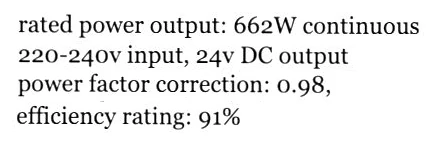
Specs match the note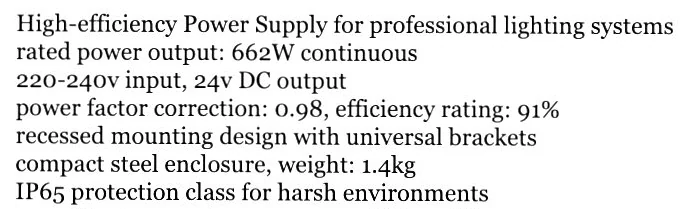
items[0].productSpecsJson
{
  "power": {
    "watts": 662, "efficiency": 91,
    "powerFactor": 0.98, "inputVoltage": "220-240v"
  },
  "ratings": { "protection": "ip65" },
  "physical": {
    "weight": 1.4, "material": "steel",
    "mountingType": "recessed"
  }
} 
items[0].productSpecsJson.power
{
  "watts": 662,
  "efficiency": 91,
  "powerFactor": 0.98,
  "inputVoltage": "220-240v"
}
Wrong bank details become payment errors
GPT-6.1 Sol (max reasoning)
Wrong check number Printed routing · account · check numbers
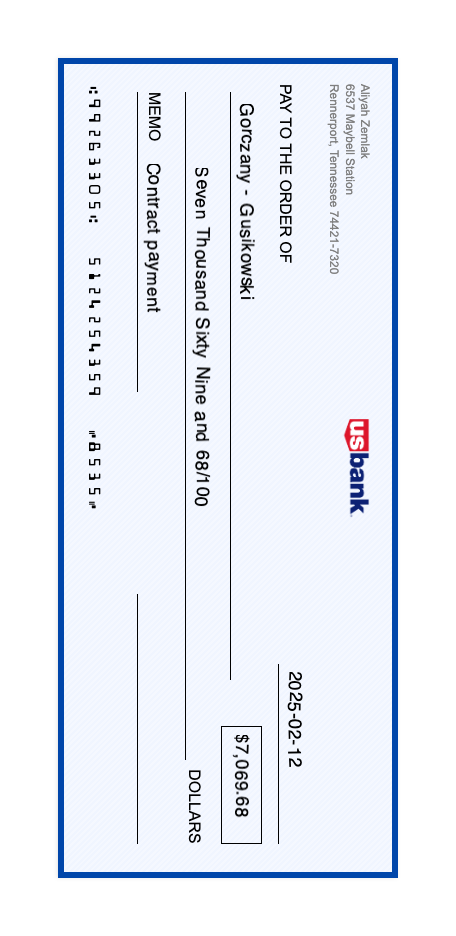
Returned fields
{ "checkNumber": 6335 } A wrong check number breaks reconciliation against the issued payment.
Claude Haiku 5.5 (high effort)
Wrong routing and account numbers Printed routing · account · check numbers
Returned fields
{
  "routingNumber": 449263305,
  "accountNumber": 51242541359
}
Wrong bank numbers can send a payment to the wrong destination.
- arXiv:2607.21617 Amazon study: AI document readers turn unusual words into familiar ones. GPT-5.4 mini did it to 1 in 4.
Do VLMs Read or Rewrite? On Transcription Faithfulness in Vision-Language Models
“they often tend to rewrite it into a more plausible form”
- ACL Anthology 2026.findings-acl.1237 Findings of ACL 2026 ACL 2026 study: every vision model tested reported numbers it could not see
Perceptual Hallucination in Vision–Language Models: Definition, Analysis and Verification
“perceptual hallucination occurs across all models”
98% of GPT-6.1 Sol's accuracy, 85% cheaper
Exact field values
546 documents ↑
GPT-6.1 Sol
GPT-6.1 Sol 96.1%
SIE Gemma 4 31B
SIE Gemma 4 31B 94.3%
GPT-6 Luna (high reasoning)
GPT-6 Luna (high reasoning) 92.3%
Claude Sonnet 5.5
Claude Sonnet 5.5 92.2%
Claude Haiku 5.5
Claude Haiku 5.5 88.2%
Mistral OCR 4.1
Mistral OCR 4.1 83.4%
Cost per 1,000 documents
USD ↓
GPT-6 Luna (high reasoning)
$1.12 GPT-6 Luna (high reasoning)
Claude Haiku 5.5
$1.19 Claude Haiku 5.5
SIE Gemma 4 31B
$2.12 SIE Gemma 4 31B
Mistral OCR 4.1
$5.00 Mistral OCR 4.1
GPT-6.1 Sol
GPT-6.1 Sol $14.63
Claude Sonnet 5.5
Claude Sonnet 5.5 $18.68
Evaluation
- Tested
- OmniAI OCR Benchmark: 546 business documents in 17 formats
- Scored
- Answer-key fields returned exactly; failed or cut-off replies score zero
- Prices
- Recorded tokens; Serverless and provider list prices
Send a page and your schema, get typed fields back
from pathlib import Pathimport base64import jsonfrom sie_sdk import SIEClientclient = SIEClient(api_key="API keysk-sie-…")schema = json.loads("""schema{ "type": "object", "properties": { "items": {"anyOf": [{"type": "array", "items": {"type": "object", "properties": {···"brand": ···, "quantity": ···, "reference": ···, "productSpecsJson": {···"watts": ···, "efficiency": ···}, {"type": "null"}]}, "header": {"type": "object", "properties": {···"date": ···} }, "required": ["items", "header"], "additionalProperties": false}""")instruction = "instruction···Copy values as they appear on the document.···"prompt = instructionimage = base64.b64encode(Path(fileJPGdelivery-note.jpgbrowse).read_bytes()).decode("ascii")# Messages: the prompt as the system message, the image as the user message. Copy includes them.result = client.chat_completions( "modelgoogle/gemma-4-31B-it:h100-96k-hires-out8k-no-spec", messages, max_completion_tokens=8192, extra_body={"temperature":0,"presence_penalty":0}, # Strict JSON-schema response_format. Copy includes it.)# Copy also reads and parses the JSON reply.import { readFile } from 'node:fs/promises';
import { SIEClient } from '@superlinked/sie-sdk';
const client = new SIEClient(undefined, { apiKey: 'sk-sie-…' });
const schema = {
"type": "object",
"properties": {
"items": {"anyOf": [{"type": "array", "items": {"type": "object", "properties": {···"brand": ···, "quantity": ···, "reference": ···, "productSpecsJson": {···"watts": ···, "efficiency": ···}, {"type": "null"}]},
"header": {"type": "object", "properties": {···"date": ···}
},
"required": ["items", "header"],
"additionalProperties": false
};
const instruction = "···Copy values as they appear on the document.···";
const prompt = instruction;
const image = await readFile("delivery-note.jpg");
const result = await client.chatCompletions({
model: 'google/gemma-4-31B-it:h100-96k-hires-out8k-no-spec',
// Messages: the prompt as the system message, the image as the user message. Copy includes them.
max_completion_tokens: 8192,
temperature: 0,
presence_penalty: 0,
// Strict JSON-schema response_format. Copy includes it.
});
// Copy also reads and parses the JSON reply.document_image=$(base64 < 'delivery-note.jpg' | tr -d '\n')
curl https://api.superlinked.com/v1/chat/completions \
-H "Authorization: Bearer sk-sie-…" \
-H "Content-Type: application/json" \
-d "{\"model\":\"google/gemma-4-31B-it:h100-96k-hires-out8k-no-spec\",\"messages\":[{\"role\":\"system\",\"content\":\"···Copy values as they appear on the document.···\"},{\"role\":\"user\",\"content\":[{\"type\":\"image_url\",\"image_url\":{\"url\":\"data:image/jpeg;base64,$document_image\"}}]}],\"max_completion_tokens\":8192,\"temperature\":0,\"presence_penalty\":0,\"response_format\":{\"type\":\"json_schema\",\"json_schema\":{\"name\":\"fields\",\"strict\":true,\"schema\":{\"type\":\"object\",\"properties\":{\"items\":{\"anyOf\":[{\"type\":\"array\",\"items\":{\"type\":\"object\",\"properties\":{\"sn\":{\"anyOf\":[{\"type\":\"number\"},{\"type\":\"null\"}]},\"type\":{\"anyOf\":[{\"type\":\"string\",\"enum\":[\"LED Luminaire\",\"Power Supply\",\"Control System\",\"Mounting Bracket\",\"LED Driver\",\"Cable Assembly\",\"Junction Box\",\"Sensor Module\"]},{\"type\":\"null\"}]},\"unit\":{\"anyOf\":[{\"type\":\"string\",\"enum\":[\"pcs\",\"set\",\"unit\"]},{\"type\":\"null\"}]},\"brand\":{\"anyOf\":[{\"type\":\"string\",\"enum\":[\"Philips\",\"Osram\",\"Schneider Electric\",\"Siemens\",\"ABB\",\"Lutron\",\"Legrand\",\"Mean Well\"]},{\"type\":\"null\"}]},\"quantity\":{\"anyOf\":[{\"type\":\"number\"},{\"type\":\"null\"}]},\"reference\":{\"anyOf\":[{\"type\":\"string\"},{\"type\":\"null\"}]},\"productSpecsJson\":{\"type\":\"object\",\"properties\":{\"power\":{\"type\":\"object\",\"properties\":{\"watts\":{\"anyOf\":[{\"type\":\"number\"},{\"type\":\"null\"}]},\"efficiency\":{\"anyOf\":[{\"description\":\"Efficiency in percentage, 0-100\",\"type\":\"number\"},{\"type\":\"null\"}]},\"powerFactor\":{\"anyOf\":[{\"type\":\"number\"},{\"type\":\"null\"}]},\"inputVoltage\":{\"anyOf\":[{\"type\":\"string\",\"enum\":[\"100-240v\",\"100-277v\",\"220-240v\"]},{\"type\":\"null\"}]}},\"required\":[\"watts\",\"efficiency\",\"powerFactor\",\"inputVoltage\"],\"additionalProperties\":false},\"ratings\":{\"type\":\"object\",\"properties\":{\"protection\":{\"anyOf\":[{\"type\":\"string\",\"enum\":[\"ip65\",\"ip66\",\"ip67\"]},{\"type\":\"null\"}]}},\"required\":[\"protection\"],\"additionalProperties\":false},\"physical\":{\"type\":\"object\",\"properties\":{\"weight\":{\"anyOf\":[{\"type\":\"number\"},{\"type\":\"null\"}]},\"material\":{\"anyOf\":[{\"type\":\"string\",\"enum\":[\"aluminum\",\"steel\",\"plastic\"]},{\"type\":\"null\"}]},\"mountingType\":{\"anyOf\":[{\"type\":\"string\",\"enum\":[\"surface\",\"recessed\",\"track\"]},{\"type\":\"null\"}]}},\"required\":[\"weight\",\"material\",\"mountingType\"],\"additionalProperties\":false}},\"required\":[\"power\",\"ratings\",\"physical\"],\"additionalProperties\":false}},\"required\":[\"sn\",\"type\",\"unit\",\"brand\",\"quantity\",\"reference\",\"productSpecsJson\"],\"additionalProperties\":false}},{\"type\":\"null\"}]},\"header\":{\"type\":\"object\",\"properties\":{\"to\":{\"type\":\"object\",\"properties\":{\"tel\":{\"anyOf\":[{\"type\":\"string\"},{\"type\":\"null\"}]},\"email\":{\"anyOf\":[{\"type\":\"string\"},{\"type\":\"null\"}]},\"location\":{\"anyOf\":[{\"type\":\"string\"},{\"type\":\"null\"}]},\"attention\":{\"anyOf\":[{\"type\":\"string\"},{\"type\":\"null\"}]},\"reference\":{\"anyOf\":[{\"type\":\"string\"},{\"type\":\"null\"}]},\"vatNumber\":{\"anyOf\":[{\"type\":\"string\"},{\"type\":\"null\"}]},\"companyName\":{\"anyOf\":[{\"type\":\"string\"},{\"type\":\"null\"}]}},\"required\":[\"tel\",\"email\",\"location\",\"attention\",\"reference\",\"vatNumber\",\"companyName\"],\"additionalProperties\":false},\"date\":{\"anyOf\":[{\"type\":\"string\"},{\"type\":\"null\"}]},\"from\":{\"type\":\"object\",\"properties\":{\"tel\":{\"anyOf\":[{\"type\":\"string\"},{\"type\":\"null\"}]},\"email\":{\"anyOf\":[{\"type\":\"string\"},{\"type\":\"null\"}]},\"location\":{\"anyOf\":[{\"type\":\"string\"},{\"type\":\"null\"}]},\"reference\":{\"anyOf\":[{\"type\":\"string\"},{\"type\":\"null\"}]},\"vatNumber\":{\"anyOf\":[{\"type\":\"string\"},{\"type\":\"null\"}]},\"companyName\":{\"anyOf\":[{\"type\":\"string\"},{\"type\":\"null\"}]}},\"required\":[\"tel\",\"email\",\"location\",\"reference\",\"vatNumber\",\"companyName\"],\"additionalProperties\":false},\"projectName\":{\"anyOf\":[{\"type\":\"string\"},{\"type\":\"null\"}]}},\"required\":[\"to\",\"date\",\"from\",\"projectName\"],\"additionalProperties\":false}},\"required\":[\"items\",\"header\"],\"additionalProperties\":false}}}}"Build the "Doc field extraction" capability into my app using the Superlinked Inference Engine (SIE).
Context
- SIE is an OpenAI-style inference API. Python SDK: `from sie_sdk import SIEClient`; TypeScript: `@superlinked/sie-sdk`.
- Base URL: https://api.superlinked.com (or my regional endpoint). Auth: Bearer key from env `SIE_API_KEY` (never hard-code it).
- Model: google/gemma-4-31B-it:h100-96k-hires-out8k-no-spec (OpenAI-compatible endpoint: /v1/chat/completions). Keep the model id configurable.
Task
- Input: an uploaded document plus the JSON schema for its fields.
- Behaviour: parse the document, then return fields matching the JSON schema
- Send one POST /v1/chat/completions request (SDK: chat_completions / chatCompletions) with a system message and a user message. The system message is "Extract data from the document image into the JSON schema. Copy values as they appear on the document. Use null for a field the document does not contain. Return only the JSON.\n\nJSON schema:\n{\n \"type\": \"object\",\n \"required\": [\n \"header\",\n \"items\"\n ],\n \"properties\": {\n \"items\": {\n \"type\": \"array\",\n \"items\": {\n \"type\": \"object\",\n \"required\": [\n \"sn\",\n \"type\",\n \"brand\",\n \"reference\",\n \"productSpecsJson\",\n \"unit\",\n \"quantity\"\n ],\n \"properties\": {\n \"sn\": {\n \"type\": \"number\"\n },\n \"type\": {\n \"enum\": [\n \"LED Luminaire\",\n \"Power Supply\",\n \"Control System\",\n \"Mounting Bracket\",\n \"LED Driver\",\n \"Cable Assembly\",\n \"Junction Box\",\n \"Sensor Module\"\n ],\n \"type\": \"string\"\n },\n \"unit\": {\n \"enum\": [\n \"pcs\",\n \"set\",\n \"unit\"\n ],\n \"type\": \"string\"\n },\n \"brand\": {\n \"enum\": [\n \"Philips\",\n \"Osram\",\n \"Schneider Electric\",\n \"Siemens\",\n \"ABB\",\n \"Lutron\",\n \"Legrand\",\n \"Mean Well\"\n ],\n \"type\": \"string\"\n },\n \"quantity\": {\n \"type\": \"number\"\n },\n \"reference\": {\n \"type\": \"string\"\n },\n \"productSpecsJson\": {\n \"type\": \"object\",\n \"required\": [\n \"power\",\n \"physical\",\n \"ratings\"\n ],\n \"properties\": {\n \"power\": {\n \"type\": \"object\",\n \"required\": [\n \"watts\",\n \"inputVoltage\"\n ],\n \"properties\": {\n \"watts\": {\n \"type\": \"number\"\n },\n \"efficiency\": {\n \"type\": \"number\",\n \"description\": \"Efficiency in percentage, 0-100\"\n },\n \"powerFactor\": {\n \"type\": \"number\"\n },\n \"inputVoltage\": {\n \"enum\": [\n \"100-240v\",\n \"100-277v\",\n \"220-240v\"\n ],\n \"type\": \"string\"\n }\n }\n },\n \"ratings\": {\n \"type\": \"object\",\n \"required\": [\n \"protection\"\n ],\n \"properties\": {\n \"protection\": {\n \"enum\": [\n \"ip65\",\n \"ip66\",\n \"ip67\"\n ],\n \"type\": \"string\"\n }\n }\n },\n \"physical\": {\n \"type\": \"object\",\n \"required\": [\n \"material\",\n \"mountingType\"\n ],\n \"properties\": {\n \"weight\": {\n \"type\": \"number\"\n },\n \"material\": {\n \"enum\": [\n \"aluminum\",\n \"steel\",\n \"plastic\"\n ],\n \"type\": \"string\"\n },\n \"mountingType\": {\n \"enum\": [\n \"surface\",\n \"recessed\",\n \"track\"\n ],\n \"type\": \"string\"\n }\n }\n }\n }\n }\n }\n }\n },\n \"header\": {\n \"type\": \"object\",\n \"required\": [\n \"from\",\n \"to\",\n \"date\",\n \"projectName\"\n ],\n \"properties\": {\n \"to\": {\n \"type\": \"object\",\n \"required\": [\n \"companyName\",\n \"reference\",\n \"location\",\n \"attention\",\n \"tel\",\n \"email\",\n \"vatNumber\"\n ],\n \"properties\": {\n \"tel\": {\n \"type\": \"string\"\n },\n \"email\": {\n \"type\": \"string\"\n },\n \"location\": {\n \"type\": \"string\"\n },\n \"attention\": {\n \"type\": \"string\"\n },\n \"reference\": {\n \"type\": \"string\"\n },\n \"vatNumber\": {\n \"type\": \"string\"\n },\n \"companyName\": {\n \"type\": \"string\"\n }\n }\n },\n \"date\": {\n \"type\": \"string\"\n },\n \"from\": {\n \"type\": \"object\",\n \"required\": [\n \"companyName\",\n \"reference\",\n \"location\",\n \"tel\",\n \"email\",\n \"vatNumber\"\n ],\n \"properties\": {\n \"tel\": {\n \"type\": \"string\"\n },\n \"email\": {\n \"type\": \"string\"\n },\n \"location\": {\n \"type\": \"string\"\n },\n \"reference\": {\n \"type\": \"string\"\n },\n \"vatNumber\": {\n \"type\": \"string\"\n },\n \"companyName\": {\n \"type\": \"string\"\n }\n }\n },\n \"projectName\": {\n \"type\": \"string\"\n }\n }\n }\n }\n}" verbatim, without appending the response schema. The user message holds only an image_url part. Base64-encode the original local image bytes as a canonical data:image/png, data:image/jpeg or data:image/webp URI (normalize jpg to image/jpeg). Use max_completion_tokens 8192, temperature 0 and response_format {type: "json_schema", json_schema: {name: "fields", strict: true, schema}} with the submitted schema unchanged. Parse choices[0].message.content as JSON and fail loudly when it is missing or invalid.
Deliverables
- A typed client wrapper, an application-level function for this task, error handling for timeouts/empty input, and unit tests with a stubbed client.
- Wire it into my existing stack (ask me which framework if unclear) and add a short usage example. Edit the code and run it live Sign up to run this example.
Get started no credit card required
Output
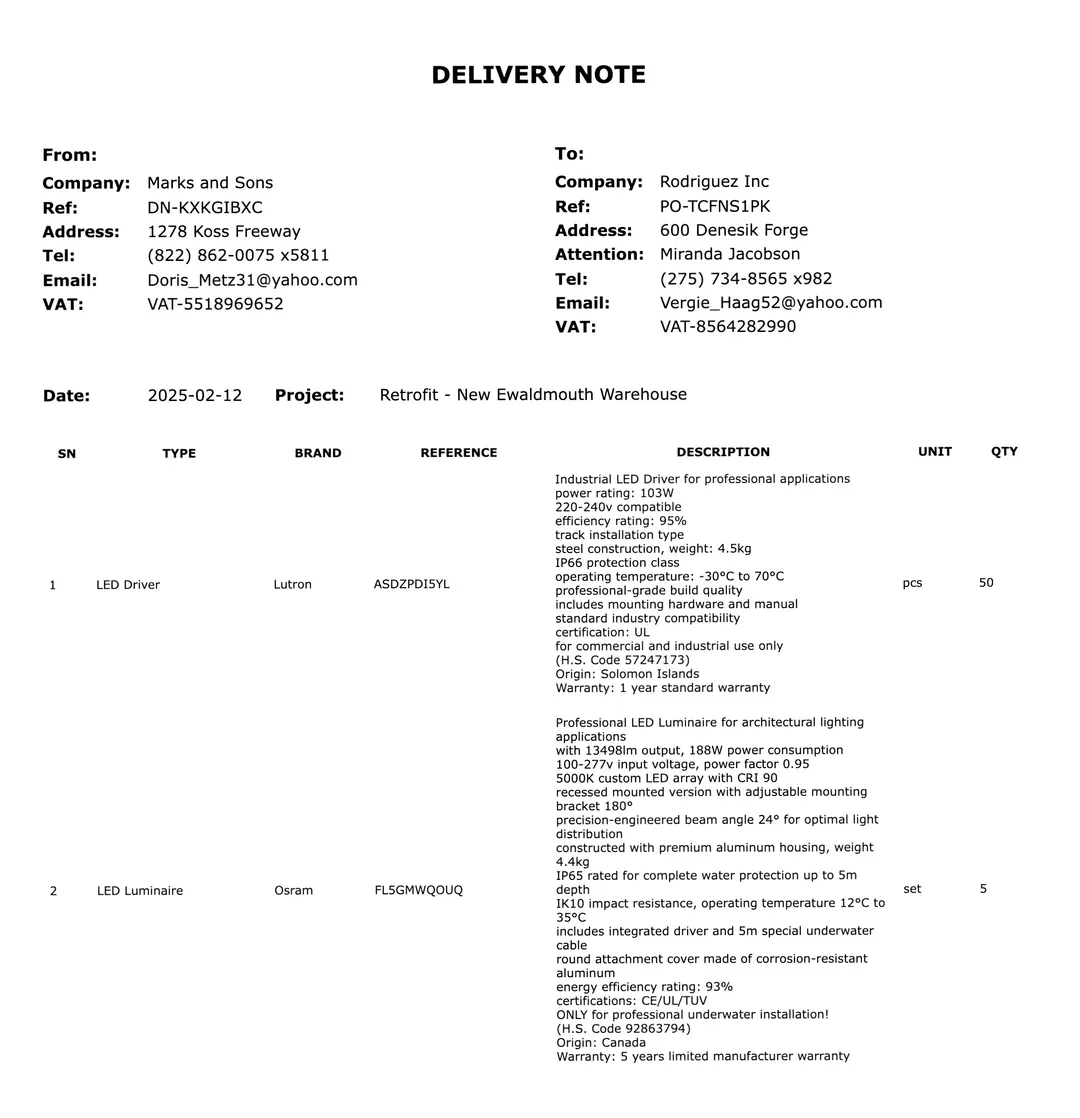
header.date 2025-02-12
| reference | brand | quantity | watts | efficiency |
|---|---|---|---|---|
| ASDZPDI5YL | Lutron | 50 | 103 | 95 |
| FL5GMWQOUQ | Osram | 5 | 188 | 93 |
Read your documents into your schema
SIE Serverless
We host the models; you call one API.
- No idle GPUs, pay for what you use
- Fits your stack: SDK, API, CLI, MCP
- Self-host the same open-source engine
- SOC 2 Type 2, US or EU data residency
- Create an account to try Serverless
SIE Cluster
Kubernetes in your own cloud, backed by our engineers.
- Terraform modules for your cloud
- Apache-2.0, same engine as Serverless
- GPU workers scale to zero between jobs
- Separate worker pools for each tenant
Agent prompt
Deploy SIE to our AWS account with the superlinked/sie/aws Terraform module. Docs: superlinked.com/docs/deployment.Deploy SIE to our Google Cloud project with the superlinked/sie/google Terraform module. Docs: superlinked.com/docs/deployment.Deploy SIE to our Azure subscription with the superlinked/sie/azure Terraform module. Docs: superlinked.com/docs/deployment.Deploy SIE to our Alibaba Cloud account with the superlinked/sie/alicloud Terraform module. Docs: superlinked.com/docs/deployment. SIE Local
The open-source server on your own machine.
- NVIDIA GPU, 80 GB
- One container, no cluster
- Process your data fully offline
- Same SDK and model IDs as Serverless
docker run --gpus all -p 8080:8080 ghcr.io/superlinked/sie-server:latest-cuda13-sglang-cu130