
Search images by words nobody tagged them with
Superlinked gives your agent one API to put text and pictures in the same vector space, so a request naming a colour, a material and an object finds it in a library that was never labelled for any of them.
“ an earthenware plate ”
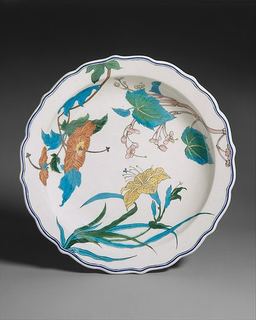
“ a blue earthenware plate ”
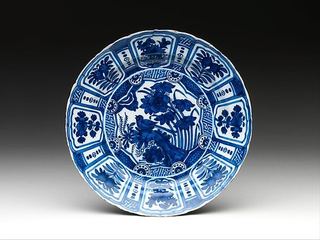
Naming the colour takes the right picture from 6 of 24 to 13
Every photograph here is a museum record. The record names the object and the material and never says what colour the thing is, so a request built from what the catalogue holds gets 6 of 24 right out of 50 pictures. Add the colour, which is written down nowhere, and the median rank of the right picture is 1.
| the request names | ranks first | median rank |
|---|---|---|
| the object | 2 of 24 | 5.5 |
| colour and object | 7 of 24 | 3 |
| material and object | 6 of 24 | 2 |
| colour, material and object | 13 of 24 | 1 |
“ a brown glass jug ”
- 1
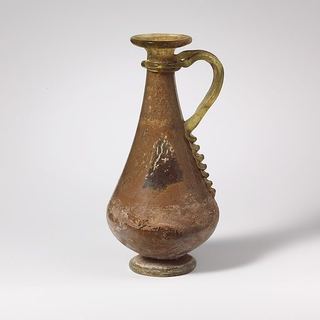 brown glass jug matches all three
 - 2
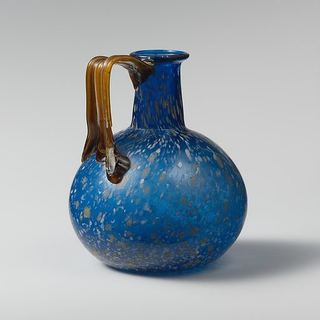 blue glass jug right material and object, wrong colour
 - 3
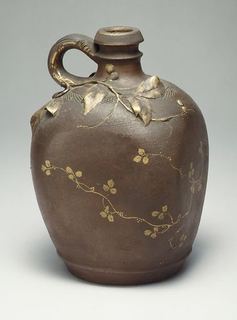 brown stoneware jug right colour and object, wrong material
The museum record for this photograph says glass jug and never brown. Naming the colour puts it first.
Glass jug“ a green porcelain bowl ”
- 1
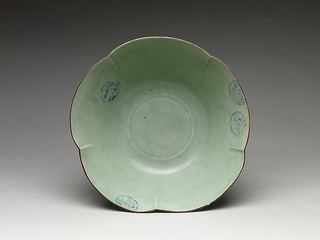 green porcelain bowl matches all three
 - 2
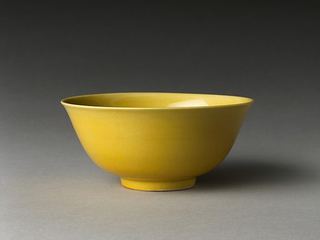 yellow porcelain bowl right material and object, wrong colour
 - 3
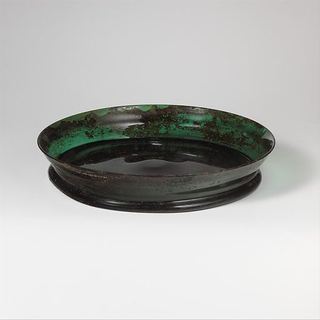 green glass plate matches one attribute
The museum record for this photograph says porcelain bowl and never green. Naming the colour puts it first.
Large Bowl (Hachi) with Flower Medallions“ a white earthenware bowl ”
- 1
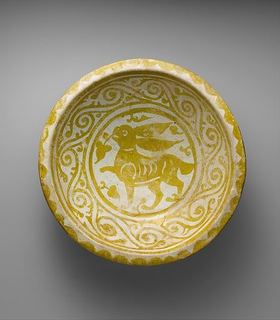 yellow earthenware bowl right material and object, wrong colour
 - 2
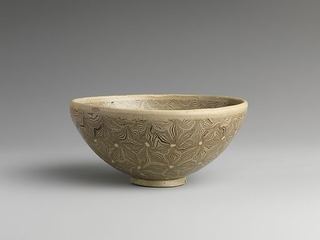 white earthenware bowl matches all three
 - 3 yellow porcelain bowl matches one attribute
A miss. First place went to a photograph with the wrong colour. The one matching all three came 2 of 50.
Tea Bowl with Marbleized Veneer50 photographs from the Metropolitan Museum of Art open access collection, 24 requests written four ways each, encoded by google/siglip-so400m-patch14-384 on 2026-09-21. This page shows 4: 3 here and one in the hero.
Rank a whole catalogue from one text request
import numpy as npfrom sie_sdk import SIEClientclient = SIEClient( api_key="sk-sie-…", base_url="https://api.superlinked.com",)query = "querya blue earthenware plate"images = [ imageDish with flowers and birdsbrowse, imageDishbrowse, imageDish with Beans, Squash, and Eggplantbrowse,]# Encode the text query + each catalog image in one batch.items = [{"text": query}] + [{"images": [f]} for f in images]vecs = client.encode("modelgoogle/siglip-so400m-patch14-384", items)mat = np.array([v["dense"] for v in vecs])mat = mat / np.linalg.norm(mat, axis=1, keepdims=True)scores = mat[1:] @ mat[0] # cross-modal cosine to the queryfor i in np.argsort(scores)[::-1]: print(f"{scores[i]:.3f} {images[i]}")import { readFile } from 'node:fs/promises';
import { SIEClient } from '@superlinked/sie-sdk';
const client = new SIEClient('https://api.superlinked.com', {
apiKey: 'sk-sie-…',
});
const query = "a blue earthenware plate";
const imagePaths = [
"Dish with flowers and birds",
"Dish",
"Dish with Beans, Squash, and Eggplant",
];
const images = await Promise.all(imagePaths.map((path) => readFile(path)));
// Encode the text query + each catalog image in one batch.
const items = [{ text: query }, ...images.map((image) => ({ images: [image] }))];
const vecs = await client.encode('google/siglip-so400m-patch14-384', items);
const [q, ...imgVecs] = vecs.map((v) => v.dense);
const cosine = (a: Float32Array, b: Float32Array) => {
const dot = a.reduce((s, x, i) => s + x * b[i], 0);
return dot / (Math.hypot(...a) * Math.hypot(...b));
};
const ranked = imagePaths
.map((file, i) => ({ file, score: cosine(q!, imgVecs[i]!) }))
.sort((a, b) => b.score - a.score);
console.log(ranked);image_0=$(base64 < 'Dish with flowers and birds' | tr -d '\n')
image_1=$(base64 < 'Dish' | tr -d '\n')
image_2=$(base64 < 'Dish with Beans, Squash, and Eggplant' | tr -d '\n')
curl https://api.superlinked.com/v1/encode/google%2Fsiglip-so400m-patch14-384 \
-H "Authorization: Bearer sk-sie-…" \
-H "Content-Type: application/json" \
-d "{\"items\":[{\"text\":\"a blue earthenware plate\"},{\"images\":[{\"data\":\"$image_0\",\"format\":\"png\"}]},{\"images\":[{\"data\":\"$image_1\",\"format\":\"png\"}]},{\"images\":[{\"data\":\"$image_2\",\"format\":\"png\"}]}],\"params\":{\"output_types\":[\"dense\"]}}"Build the "Image search" capability into my app using the Superlinked Inference Engine (SIE).
Context
- SIE is an OpenAI-style inference API. Python SDK: `from sie_sdk import SIEClient`; TypeScript: `@superlinked/sie-sdk`.
- Base URL: https://api.superlinked.com (or my regional endpoint). Auth: Bearer key from env `SIE_API_KEY` (never hard-code it).
- Model: google/siglip-so400m-patch14-384 (SIE primitive: /encode). Keep the model id configurable.
Task
- Input: a text query plus one or more candidate images.
- Behaviour: return the images ranked by similarity to the query
- Call the selected SIE primitive once per request and map the response into your domain type.
Deliverables
- A typed client wrapper, an application-level function for this task, error handling for timeouts/empty input, and unit tests with a stubbed client.
- Wire it into my existing stack (ask me which framework if unclear) and add a short usage example. 3
3- Ranks images by pixels, not filenames or tags
- Finds matches from a plain text query
Image retrieval quality and latency
Deploy your way
Managed Cloud
Full compute toolkit for your agents with zero ops.
- No idle GPUs, pay for what you use
- Fits your stack: SDK, API, CLI, MCP
- Zero lock-in, self-host the same stack
- SOC 2 Type 2, US or EU data residency
no credit card required
Self-host with K8s
Easy & scalable deployment in your own cloud.
- Terraform to your cloud in minutes
- Apache-2.0, same engine as Cloud
- Scales to zero, no bill between jobs
- Per-tenant pools, no noisy neighbors
Deploy SIE to our AWS account with the superlinked/sie/aws Terraform module. Docs: superlinked.com/docs/deploymentDeploy SIE to our GCP project with the superlinked/sie/google Terraform module. Docs: superlinked.com/docs/deploymentDeploy SIE to our Azure AKS cluster via helm install. Requirements: superlinked.com/docs/deployment Run locally
Run the same models on your own machine.
- Runs on NVIDIA GPU or Apple Silicon
- One command, no Docker or cluster
- All 100+ Cloud models, fully offline
- Same SDK and IDs, no code changes
pip install "sie-server[local]" && sie-server servepip install "sie-server[local]" && sie-server serve --device cuda