
Read the page once, then fill any schema from that text
Superlinked gives your agent one API to turn a page into Markdown, then fill typed fields from that same text.
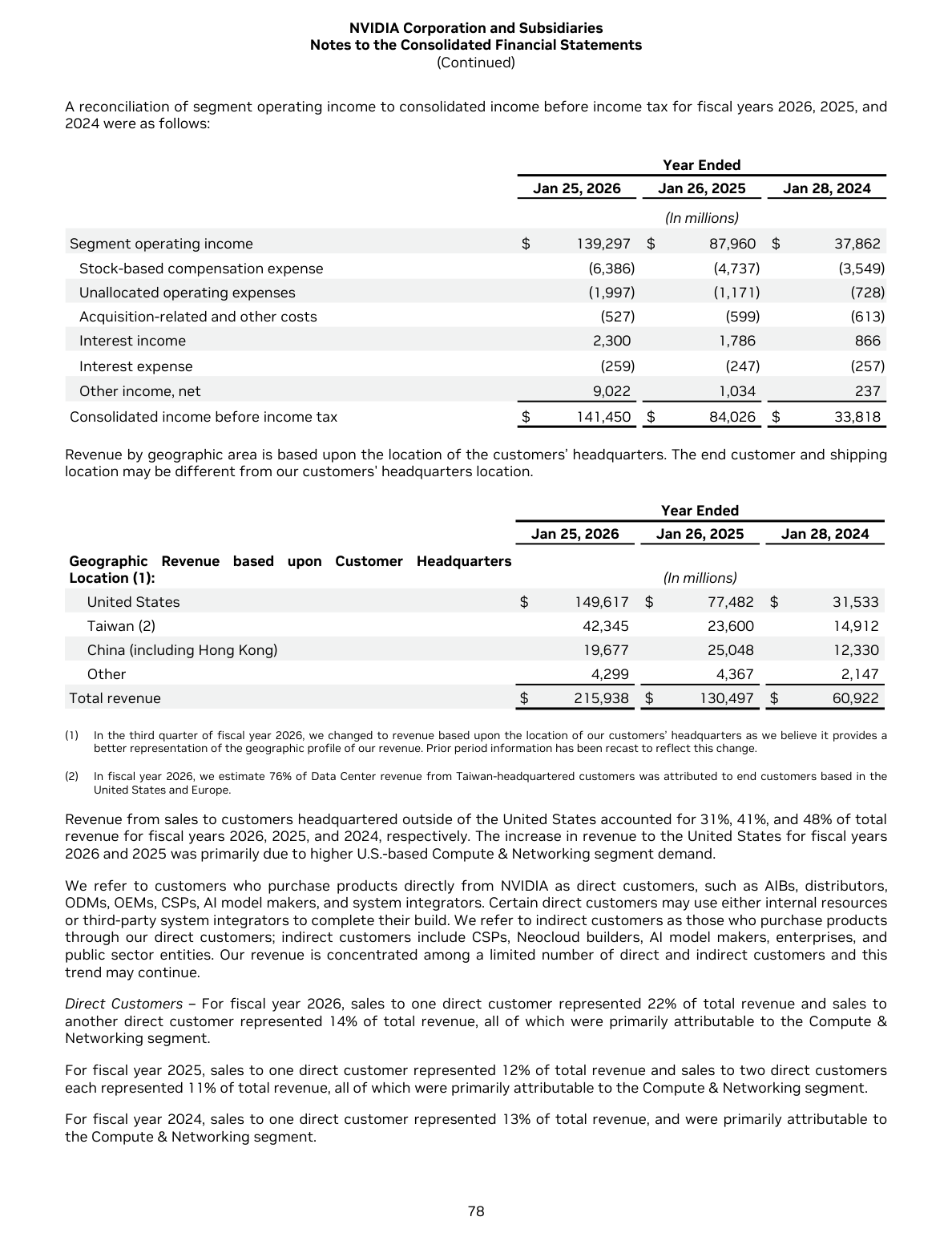
NVIDIA 2026 annual report, page 78
    <tr>
      <td>Stock-based compensation expense</td>
      <td>(6,386)</td>
      <td>(4,737)</td>
      <td>(3,549)</td>
</tr>- fy2026
- -6386
- fy2025
- -4737
- fy2024
- -3549
Nobody has to reopen the original to check a field
The barcode settles a date the printed label cannot
12/02/2024 is either 12 February or 2 December, depending on where the label was printed. Stage 1 also kept the GS1 element string under the barcode, where application identifier 15 gives the same date as 240212. Asked for an ISO date, stage 2 answered 2024-02-12.
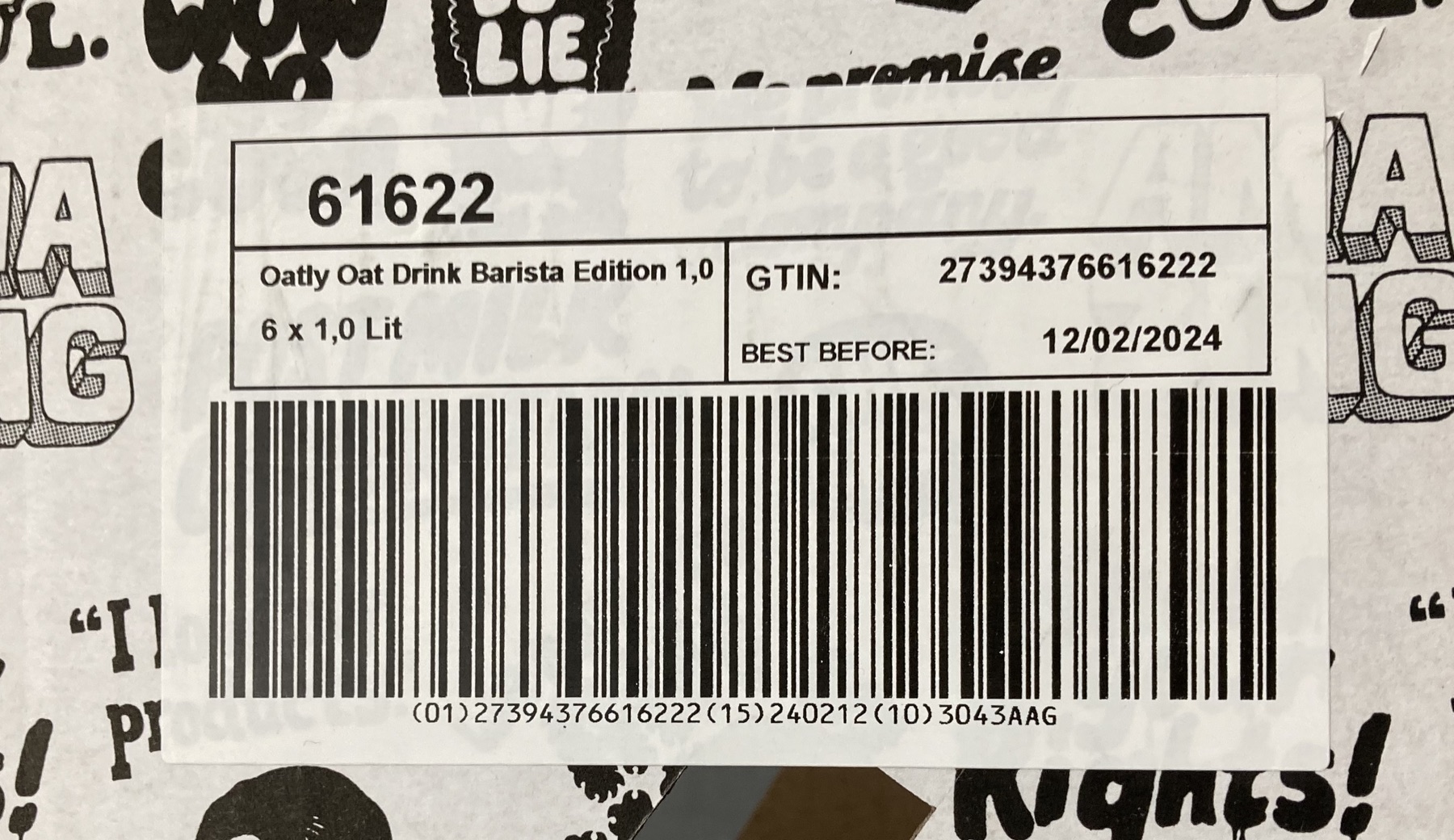
(01)27394376616222(15)240212(10)3043AAG| Field | On the page | Returned |
|---|---|---|
| gtin | 27394376616222 | 27394376616222 |
| printed_ | 12/02/2024 | 12/02/2024 |
| best_ | (15)240212 | 2024-02-12 |
| batch | 3043AAG | 3043AAG |
The page's own title, licence and repository note stay out of the record
This page is an invoice template, so the rendered image carries a heading, a licence line and a link to its repository around the invoice itself. Stage 1 read all of it. The schema asked for invoice fields, and the record holds invoice fields: the currency came back as USD from a printed dollar sign, and the total came off a row that prints the label and the amount together.
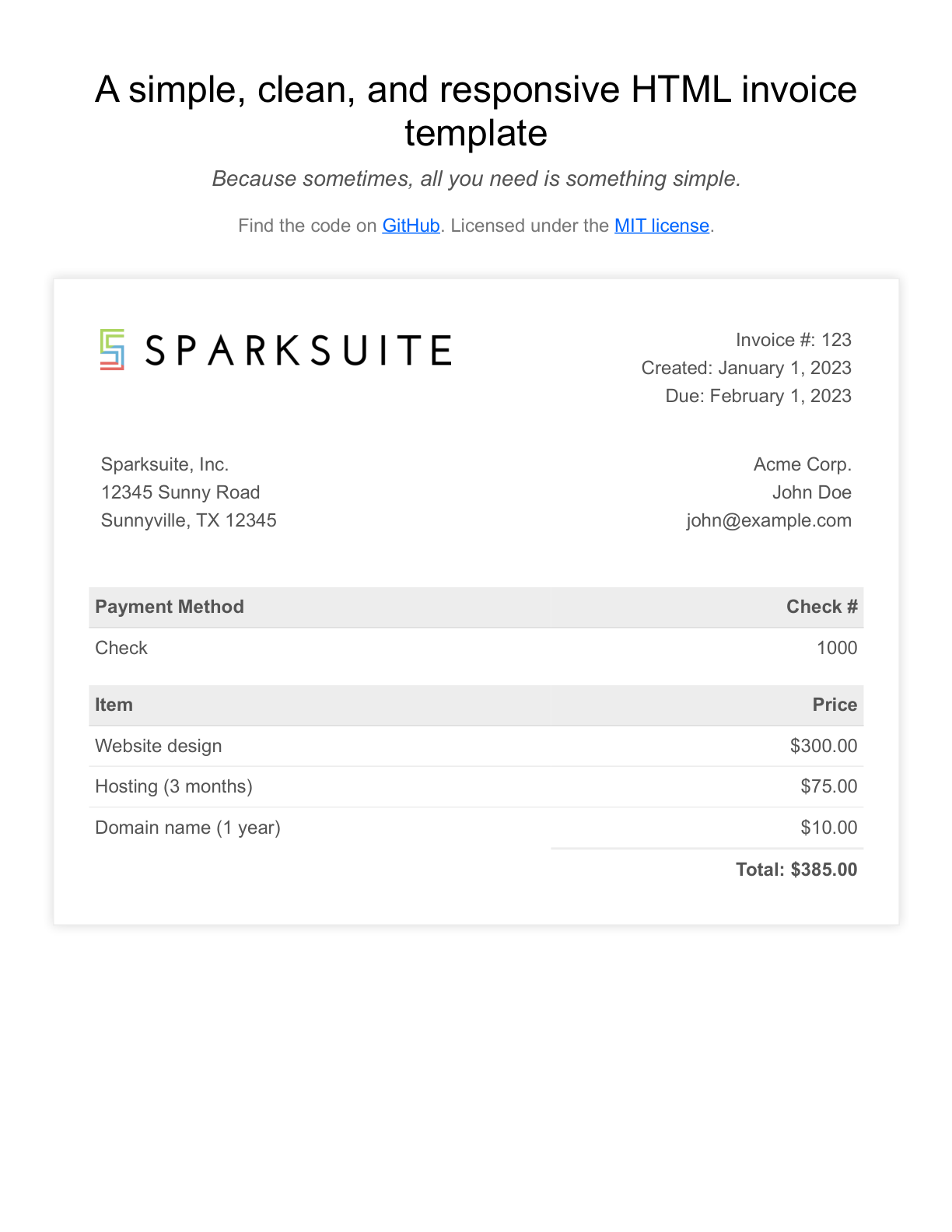
Invoice #: 123
Created: January 1, 2023
Due: February 1, 2023

Acme Corp.
John Doe
john@example.com| Field | On the page | Returned |
|---|---|---|
| invoice_ | Invoice #: 123 | 123 |
| contact_ | john@example.com | john@example.com |
| total | Total: $385.00 | $385.00 |
| currency | $ | USD |
Parenthesised rows come back negative, and the reconciliation still adds up
A financial table prints a negative as a number in brackets, and a field typed as an integer has to carry the sign instead. Stage 2 read (259) as -259 across every bracketed row, and the reconciled total on the last line came back positive, from the same recorded text.
    <tr>
      <td>Interest expense</td>
      <td>(259)</td>
      <td>(247)</td>
      <td>(257)</td>
    </tr>
    <tr>
      <td>Other income, net</td>
      <td>9,022</td>
      <td>1,034</td>
      <td>237</td>
    </tr>
    <tr>
      <td>Consolidated income before income tax</td>
      <td>$ 141,450</td>
      <td>$ 84,026</td>
      <td>$ 33,818</td>
</tr>| Field | On the page | Returned |
|---|---|---|
| unit | (In millions) | In millions |
| rows[ | (259) | -259 |
| rows[ | 9,022 | 9022 |
| rows[ | 141,450 | 141450 |
3 of the 7 recorded schema calls are shown here, over 3 of the 6 recorded documents. Between them they registered 45 fields, every one of which matches the printed page, and all 7 of the 7 replies in the run validated against their schema. SOURCES.md reports every recorded document and every registered field.
One call returns the whole page as Markdown
from pathlib import Pathfrom sie_sdk import SIEClientclient = SIEClient( api_key="API keysk-sie-…", base_url="https://api.superlinked.com",)image = {"data": Path(imagestore-receipt.pngbrowse).read_bytes(), "format": "png"}result = client.extract( "modellightonai/LightOnOCR-2-1B", {"images": [image]},)print(result["entities"][0]["text"])import { readFile } from 'node:fs/promises';
import { SIEClient } from '@superlinked/sie-sdk';
const client = new SIEClient('https://api.superlinked.com', {
apiKey: 'sk-sie-…',
});
const image = await readFile("store-receipt.png");
const result = await client.extract(
'lightonai/LightOnOCR-2-1B',
{ images: [image] },
{ labels: [] },
);
console.log(result.entities[0].text);images_bytes=$(base64 < 'store-receipt.png' | tr -d '\n')
curl https://api.superlinked.com/v1/extract/lightonai%2FLightOnOCR-2-1B \
-H "Authorization: Bearer sk-sie-…" \
-H "Content-Type: application/json" \
-d "{\"items\":[{\"images\":[{\"data\":\"$images_bytes\",\"format\":\"png\"}]}]}"Build the "OCR" capability into my app using the Superlinked Inference Engine (SIE).
Context
- SIE is an OpenAI-style inference API. Python SDK: `from sie_sdk import SIEClient`; TypeScript: `@superlinked/sie-sdk`.
- Base URL: https://api.superlinked.com (or my regional endpoint). Auth: Bearer key from env `SIE_API_KEY` (never hard-code it).
- Model: lightonai/LightOnOCR-2-1B (SIE primitive: /extract). Keep the model id configurable.
Task
- Input: an uploaded image containing text.
- Behaviour: return the text visible in the image
- Call the selected SIE primitive once per request and map the response into your domain type.
Deliverables
- A typed client wrapper, an application-level function for this task, error handling for timeouts/empty input, and unit tests with a stubbed client.
- Wire it into my existing stack (ask me which framework if unclear) and add a short usage example.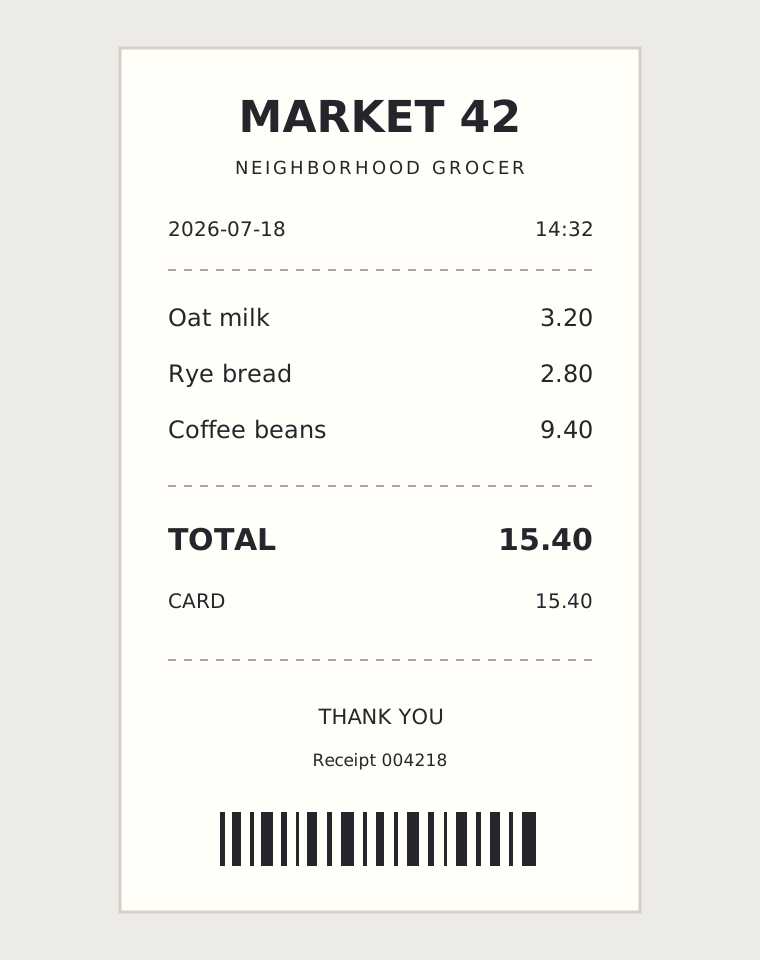
MARKET 42
Oat milk 3.20
Rye bread 2.80
Coffee beans 9.40
Total 15.40
- Reads text directly from images and photos
OCR quality and latency
One OCR pass feeds every schema you add
Two calls to https://api.superlinked.com, recorded on 2026-09-16.
Deploy your way
Managed Cloud
Full compute toolkit for your agents with zero ops.
- No idle GPUs, pay for what you use
- Fits your stack: SDK, API, CLI, MCP
- Zero lock-in, self-host the same stack
- SOC 2 Type 2, US or EU data residency
no credit card required
Self-host with K8s
Easy & scalable deployment in your own cloud.
- Terraform to your cloud in minutes
- Apache-2.0, same engine as Cloud
- Scales to zero, no bill between jobs
- Per-tenant pools, no noisy neighbors
Deploy SIE to our AWS account with the superlinked/sie/aws Terraform module. Docs: superlinked.com/docs/deploymentDeploy SIE to our GCP project with the superlinked/sie/google Terraform module. Docs: superlinked.com/docs/deploymentDeploy SIE to our Azure AKS cluster via helm install. Requirements: superlinked.com/docs/deployment Run locally
Run the same models on your own machine.
- Runs on NVIDIA GPU or Apple Silicon
- One command, no Docker or cluster
- All 100+ Cloud models, fully offline
- Same SDK and IDs, no code changes
pip install "sie-server[local]" && sie-server servepip install "sie-server[local]" && sie-server serve --device cuda