
Kubernetes in Azure
Deploy SIE to Azure Kubernetes Service (AKS) with GPU node pools, KEDA autoscaling, and Terraform automation.
Prerequisites
Section titled “Prerequisites”There are two install paths for AKS. Confirm the items under the path you plan to take before running any commands.
Path A. Terraform and Helm (module provisions the cluster)
Section titled “Path A. Terraform and Helm (module provisions the cluster)”-
Azure subscription with billing enabled. For CI, use a federated service principal via the GitHub Actions Azure OIDC flow; see the module README for the setup.
-
RBAC roles on the subscription sufficient to create VNet, AKS, identity, storage, and (optionally) ACR resources.
ContributorplusUser Access Administratorworks; the latter covers the role assignments the module creates for the model cache and image pulls. For the least-privilege set (Network Contributor, AKS Contributor, AKS RBAC Cluster Admin, AcrPush, Monitoring Contributor, Key Vault Contributor, RBAC Admin), see scoped role assignments. -
GPU quota in your target region (default:
westeurope), requested from the Quotas blade in the Azure portal. Spot pools draw fromTotal Regional Spot vCPUs; on-demand pools draw from the per-family quota (Standard NCASv3_T4 Family vCPUs for T4, Standard NVADSA10v5 Family vCPUs for A10, Standard NCadsH100v5 Family vCPUs for H100). Thedev-nc4ast4-spotexample uses spot.Standard_NC4as_T4_v3is 4 vCPU per node and the example scales 0-5 nodes, so anything at least 20 is sufficient:az vm list-usage --location westeurope --output table | grep -iE "NCASv3_T4|Spot"H100 quota approvals are the slowest; file the request before the first apply if you plan to use
gpu_class = "h100". -
Region with GPU VM availability. T4 (
NC4as_T4_v3) and A10 (NV6ads_A10_v5) are available in most major regions; A100 (NC24ads_A100_v4) and H100 (NC40ads_H100_v5) availability is narrower. Check before changing region. -
Local tooling: Terraform ≥ 1.14, Azure CLI (
az),kubectl,kubelogin, andhelm≥ 3.13. -
Authenticated:
az loginaz account set --subscription "<subscription-id>"
Path B. Helm into an existing AKS cluster
Section titled “Path B. Helm into an existing AKS cluster”- Cluster meets the generic Kubernetes Cluster Prerequisites (k8s version, GPU device plugin, ingress controller, network egress).
- GPU node pool with an N-series VM size (
Standard_NC4as_T4_v3,Standard_NV6ads_A10_v5,Standard_NC24ads_A100_v4, orStandard_NC40ads_H100_v5) and thenvidia.com/gpu=present:NoScheduletaint. Spot pools also carry the AKS-managedkubernetes.azure.com/scalesetpriority=spot:NoScheduletaint; the chart’s AKS overlay tolerates both. - NVIDIA Device Plugin DaemonSet installed. AKS preinstalls the NVIDIA driver on N-series node images but not the device plugin. Verify
kubectl describe nodeshows a schedulablenvidia.com/gpuresource; without the plugin, GPU nodes never advertise it and worker pods stayPending. The Terraform module installs it via Helm during cluster bootstrap. The exception is the preview AKS-managed GPU node pools: those install the device plugin for you but do not support the cluster autoscaler during preview, so scale-from-zero cannot work on them. This guide, and the Terraform module, target standard GPU pools. - Workload Identity enabled on the cluster (OIDC issuer + webhook), with a user-assigned managed identity that has a federated credential for the
sie:sie-serverServiceAccount and blob-read access to your model-cache container. Pass the identity’s client ID to the chart as theazure.workload.identity/client-idServiceAccount annotation at install time; the AKS values overlay adds theazure.workload.identity/use: "true"pod label the webhook keys off. - ACR decision. Let the chart pull public images from GHCR (default), or mirror to ACR and point
gateway.image.repository,workers.common.image.repository, andconfig.image.repositoryat it. kubectlauthenticated against the target cluster (az aks get-credentials --resource-group <rg> --name <cluster>, thenkubelogin convert-kubeconfig -l azureclifor AAD-enabled clusters).
Architecture
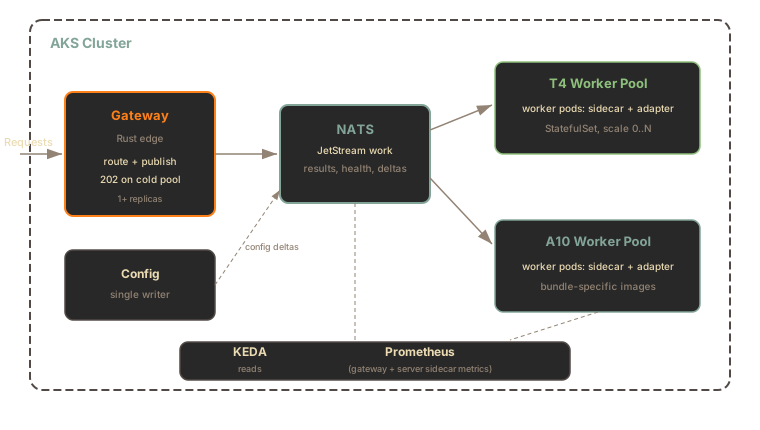
Section titled “Architecture”The architecture mirrors the GCP and AWS deployments, with gateway, config, worker pods, and KEDA autoscaling:
Components:
- AKS Cluster with AAD-RBAC, a Workload Identity OIDC issuer, and the built-in per-pool cluster autoscaler (no separate autoscaler chart)
- NVIDIA Device Plugin for GPU scheduling; the driver itself ships on AKS N-series node images
- Workload Identity for Blob Storage access, so no static credentials reach a pod
- NATS Core and JetStream for queued work, result inboxes, SIE server sidecar health, and config deltas
- GPU worker pods that run the SIE server sidecar beside the Python
sie-serveradapter; the sidecar pulls JetStream work and calls the adapter over IPC - KEDA and Prometheus for autoscaling based on gateway and queue metrics
- Grafana and DCGM Exporter for dashboards and GPU metrics
Terraform Setup
Section titled “Terraform Setup”The examples in superlinked/terraform-azure-sie consume the published superlinked/sie/azure Terraform registry module, pinned to a known-good version:
| Example | GPU | Approx. spot cost | Best for |
|---|---|---|---|
dev-nc4ast4-spot | T4 (NC4as_T4_v3) | ~$0.15/hr | Minimal-cost development |
dev-nv6adsa10-spot | A10 (NV6ads_A10_v5) | ~$0.35/hr | Larger embedding bundles (24 GiB VRAM) |
Costs are approximate West Europe spot list prices; check the Azure pricing calculator for your region.
Both examples run GPU nodes on Spot capacity: cheap, but evictable at any time and without an SLA. They are development setups; for production, configure a regular-priority (non-Spot) GPU pool through the module variables.
Prerequisites
Section titled “Prerequisites”See Path A. Terraform and Helm in the Prerequisites section at the top of this page.
Deploy
Section titled “Deploy”git clone https://github.com/superlinked/terraform-azure-sie.gitcd terraform-azure-sie/examples/dev-nc4ast4-spot
# Required: populates the CAF `Owner` tag on every resourceexport TF_VAR_owner="you@example.com"
# Initialize and apply (VNet, AKS control plane, system + GPU pools,# workload identity, model-cache storage account)terraform initterraform applyThe example main.tf pins the module version:
module "sie_aks" {  source  = "superlinked/sie/azure"  version = "0.6.18"
  location     = var.location  project_name = var.project_name  owner        = var.owner
  gpu_node_pools = [    {      name       = "t4spot"      gpu_class  = "t4"      node_count = 0 # scale-to-zero when idle      max_count  = 5      spot       = true    },  ]}
Two module behaviors to know about before the first apply:
storage_use_azuread = trueis required on yourazurermprovider block whencreate_model_cache = true(the default). The module disables shared-key auth on the model-cache storage account, so the provider needs AAD tokens to finish the apply. Every shipped example already sets this.grant_admin_to_creator = truegives the identity running Terraform theAKS RBAC Cluster Adminrole on the new cluster, sokubectlworks right after apply. Set it unless your identity already holds that role at subscription scope (the cluster is AAD-RBAC; subscriptionOwneralone does not grant Kubernetes data-plane access).
The module does not ship its own state backend or CI-identity bootstrap; those are subscription-wide concerns you own once and reuse across clusters. Each example includes a backend.hcl.example for an azurerm remote-state backend.
Each gpu_node_pools entry picks its GPU via gpu_class:
gpu_class | VM size | GPU | VRAM |
|---|---|---|---|
t4 | Standard_NC4as_T4_v3 | 1x T4 | 16 GB |
a10 | Standard_NV6ads_A10_v5 | 1x A10 | 24 GB |
a100 | Standard_NC24ads_A100_v4 | 1x A100 | 80 GB |
h100 | Standard_NC40ads_H100_v5 | 1x H100 | 80 GB |
Adding A100 or H100 once quota is granted is a values-only change: append an entry to gpu_node_pools. For multi-GPU worker pods, override gpu_node_pools[*].vm_size to a SKU with more GPUs and set the matching workers.pools.<name>.gpu.count on the Helm side. See the module variables reference.
To split one model across several GPUs on a node, see Multi-GPU serving.
Variables
Section titled “Variables”Key configuration options for the superlinked/sie/azure module:
| Variable | Default | Description |
|---|---|---|
location | westeurope | Azure region |
project_name | sie | Name prefix for all resources |
owner | (required) | UPN for the CAF Owner tag, e.g. alice@example.com |
gpu_node_pools | [] | GPU pool definitions (name, gpu_class, spot, node_count, max_count) |
grant_admin_to_creator | false | Grant the applying identity cluster-admin RBAC on the new cluster |
create_model_cache | true | Provision the blob container backing the model cache and payload store |
create_acr | false | Provision a Premium ACR for custom images (the chart pulls GHCR by default) |
enable_private_cluster | false | Private API server endpoint |
api_server_authorized_ip_ranges | [] | CIDRs allowed to reach a public API server |
deletion_protection | true | CanNotDelete lock on the cluster (set false for dev) |
The module also fills the four Cloud Adoption Framework taxonomy tags (Environment, Owner, CostCenter, Workload) from input variables, so subscriptions with a CAF tag-baseline policy accept the cluster without exceptions.
What Gets Created
Section titled “What Gets Created”| Resource | Purpose |
|---|---|
| AKS Cluster | Control plane with AAD-RBAC, OIDC issuer, and Workload Identity |
| GPU Node Pool | Auto-scaling Standard_NC4as_T4_v3 T4 spot nodes (0-5), NVIDIA driver preinstalled |
| System Node Pool | Standard_B4ms for system workloads, spread across zones |
| VNet + NAT Gateway | Three subnets (system, GPU, private endpoints) with predictable egress IPs |
| NVIDIA Device Plugin | GPU scheduling in Kubernetes (AKS does not install it) |
| Workload Identity | User-assigned identity + federated credential for the sie:sie-server ServiceAccount |
| Storage Account | Blob container holding the model cache (models/) and payload store (payloads/) |
| ACR | Optional (create_acr = true). The chart pulls public images from GHCR by default. |
| Private Endpoints | Optional (enable_private_endpoints = true): ACR and Storage on Private Link |
Helm Installation
Section titled “Helm Installation”Once the cluster is up, configure kubectl and install the sie-cluster chart with the AKS values overlay. The overlay installs more than the plain GCP and AWS commands do: KEDA, kube-prometheus-stack, log collection, and nginx ingress come on by default, the t4 and a10 machine profiles are pre-wired, and worker pods get the GPU and spot tolerations plus the azure.workload.identity/use pod label. The overlay URL is pinned to the v0.6.26 tag to match the chart version; bump both together when upgrading.
# Configure kubectl from the terraform output, then convert the kubeconfig# to Azure CLI token auth (the cluster authenticates kubectl through AAD)$(terraform output -raw kubectl_config_command)kubelogin convert-kubeconfig -l azurecli
# Install SIE. The -f flag pulls the AKS overlay from the chart's source repo# at the matching release tag; model_cache_helm_args wires in the blob cache.helm upgrade --install sie-cluster oci://ghcr.io/superlinked/charts/sie-cluster \  --version 0.6.26 \  -f https://raw.githubusercontent.com/superlinked/sie/v0.6.26/deploy/helm/sie-cluster/values-aks.yaml \  --namespace sie --create-namespace \  --set "serviceAccount.annotations.azure\.workload\.identity/client-id=$(terraform output -raw sie_workload_identity_client_id)" \  $(terraform output -raw model_cache_helm_args)
# Wait for rolloutkubectl -n sie get pods -w
For gated Hugging Face models, create the namespace and Secret before the install (Helm has not created the namespace yet at that point): kubectl create namespace sie, then kubectl create secret generic hf-token --from-file=token=/path/to/token-file -n sie, then add --set workers.common.hfCache.tokenSecret=hf-token. (--set-file hfToken.value=/path/to/token-file also works but stores the token in Helm release values; --set hfToken.value="$HF_TOKEN" additionally exposes it to ps and CI traces.) For the smoke test below (BAAI/bge-m3) it is optional; in that case omit the flag entirely.
The overlay ships the t4 pool enabled at minReplicas: 0, so the cluster starts with zero GPU nodes and KEDA provisions them on demand. To keep one worker always warm instead, add --set workers.pools.t4.bundles.default.minReplicas=1.
Smoke Test
Section titled “Smoke Test”# The AKS overlay sets fullnameOverride=sie, so the service is sie-gatewaykubectl -n sie port-forward svc/sie-gateway 8080:8080 &
# Install the Python SDK. Requires Python 3.12; see the SDK README for newer or older Python notes.pip install sie-sdk
python3 -c "from sie_sdk import SIEClient
client = SIEClient('http://localhost:8080')result = client.encode('BAAI/bge-m3', {'text': 'hello world'}, gpu='t4', wait_for_capacity=True, provision_timeout_s=600)print(result['dense'].shape) # (1024,)"The first request after scale-from-zero takes ~3-7 minutes (node provisioning + image pull + model loading). See Scale-from-Zero for the full flow.
Available GPU Types
Section titled “Available GPU Types”The AKS overlay defines two machine profiles out of the box:
| GPU Type | Header Value | VM Size |
|---|---|---|
| NVIDIA T4 | t4 | Standard_NC4as_T4_v3 |
| NVIDIA A10 | a10 | Standard_NV6ads_A10_v5 |
Azure’s GPU VM lineup has no L4 size; the A10 (24 GB VRAM) fills that slot. Only the t4 worker pool is enabled in the overlay, so gpu="t4" (SDK) or X-SIE-MACHINE-PROFILE: t4 (HTTP) routes out of the box; see GPU Selection. To route gpu="a10", add a workers.pools.a10 entry that pairs the a10 machine profile; without one, the gateway returns 503 GPU_NOT_CONFIGURED. For A100 or H100 pools, add a machineProfiles entry and a workers.pools entry in your values file, following the t4 blocks in values-aks.yaml, alongside the Terraform gpu_node_pools entry.
Cleanup
Section titled “Cleanup”helm uninstall sie-cluster -n sieterraform destroySpot GPU pools can be evicted with no warning; Azure Spot has no EC2-style 2-minute interruption notice, and evicted VMs are deleted. Always destroy dev clusters when not in use.
Model Cache and Payload Store on Blob Storage
Section titled “Model Cache and Payload Store on Blob Storage”Two object-store-backed features share one blob container, created by default (create_model_cache = true):
- Model cache: pre-staged weights under
models/, so workers cold-start from Blob Storage instead of re-downloading from Hugging Face on every pod spin-up. - Payload store: work-item payloads over the 1 MiB NATS in-band budget (images, long documents) under
payloads/. The gateway writes them, the worker reads them once, and a runtime TTL plus a blob lifecycle rule garbage-collects them after a day.
The model_cache_helm_args Terraform output composes the Helm flags for you. Written out as values:
workers: common: clusterCache: enabled: true url: abfs://sie-cache@<storage-account>.dfs.core.windows.net/modelsThe chart derives payloadStore.url from the cache URL, so one --set covers both. Workload Identity handles authentication: the module grants the workload identity Storage Blob Data Reader scoped to models/ and Storage Blob Data Contributor scoped to payloads/. No storage keys reach a pod; shared-access-key auth is disabled on the account entirely.
One network note: the storage account’s ACL defaults to Deny, allowing only the cluster’s subnets. To populate the cache from a laptop or CI runner (for example with az storage blob upload-batch into the container’s models/ prefix), add your egress IP to storage_allowed_ip_ranges.
Differences from GCP and AWS
Section titled “Differences from GCP and AWS”| Feature | GCP (GKE) | AWS (EKS) | Azure (AKS) |
|---|---|---|---|
| GPU scheduling | Native GKE support | NVIDIA Device Plugin required | NVIDIA Device Plugin required (module installs it; driver preinstalled) |
| IAM for pods | Workload Identity | IRSA | Workload Identity (managed identity + federated credential) |
| Model cache storage | GCS (gs://) | S3 (s3://) | Blob Storage (abfs://) |
| Node provisioning | GKE Autopilot / NAP | Karpenter or Cluster Autoscaler | Built-in per-pool cluster autoscaler |
| Spot instances | Spot VMs | Spot Instances (2-min notice) | Spot VMSS (no eviction notice, extra scalesetpriority taint) |
| Entry-level GPU | L4 | L4 (g6) | T4 / A10 (no L4 SKU) |
Security Considerations
Section titled “Security Considerations”The dev examples expose the AKS API server publicly (allow_public_api_server = true). For production:
- Restrict the API server with
api_server_authorized_ip_ranges, or setenable_private_cluster = true - Enable authentication via oauth2-proxy or static gateway tokens
- Use a private load balancer for internal-only access. The
azure-load-balancer-internalannotation applies to a Service, so set it on the gateway Service (underingress.annotationsit has no effect and the endpoint stays public):
gateway: service: type: LoadBalancer annotations: service.beta.kubernetes.io/azure-load-balancer-internal: "true"- Put ACR and Storage on Private Link with
enable_private_endpoints = true; their public endpoints are disabled entirely
Out of the box the module enforces AAD-RBAC (no local admin accounts in production mode), TLS 1.2 minimum on Storage and ACR, and NAT-gateway egress with predictable IPs.
Standalone Docker on Azure
Section titled “Standalone Docker on Azure”For simpler deployments, run standalone SIE on a GPU VM:
# On a Standard_NC4as_T4_v3 (NVIDIA T4) VM with the NVIDIA driver installedsudo apt-get install -y nvidia-container-toolkitsudo systemctl restart docker
docker run --gpus all -p 8080:8080 \  -v ~/.cache/huggingface:/app/.cache/huggingface \  ghcr.io/superlinked/sie-server:latest-cuda12-default
This is simpler than AKS and suitable for single-instance production workloads.
What’s Next
Section titled “What’s Next”- Upgrade Runbook - pre-upgrade checklist, rolling updates, and rollback
- Scale-from-Zero - understanding the 503 PROVISIONING flow and cold starts
- Monitoring - metrics, alerts, and dashboards
- Kubernetes in GCP - equivalent GKE deployment
- Kubernetes in AWS - equivalent EKS deployment