
Kubernetes in AWS
Deploy SIE to Amazon EKS with GPU node pools, KEDA autoscaling, and Terraform automation.
Prerequisites
Section titled “Prerequisites”There are two install paths for EKS. Confirm the items under the path you plan to take before running any commands.
Path A. Terraform and Helm (module provisions the cluster)
Section titled “Path A. Terraform and Helm (module provisions the cluster)”-
AWS account with billing enabled, and no SCPs that block EKS, IRSA, or the VPC/IAM resources Terraform creates.
-
IAM permissions sufficient to create VPC, EKS, IAM, ECR, and S3 resources.
AdministratorAccessworks for the example; for a least-privilege setup combineAmazonEKSClusterPolicy,AmazonEC2FullAccess,IAMFullAccess,AmazonS3FullAccess, andAmazonEC2ContainerRegistryFullAccess(or scoped equivalents). -
EC2 spot quota for the G/VT family in your target region (default:
eu-central-1). AWS quotas G/VT by total vCPU, separately for on-demand and spot. Thedev-g6-spotexample uses spot, so checkAll G and VT Spot Instance Requests(quota codeL-3819A6DF):aws service-quotas list-service-quotas --service-code ec2 --region eu-central-1 \--query 'Quotas[?QuotaCode==`L-3819A6DF`].{Name:QuotaName,Value:Value}' \--output tableg6.2xlargeis 8 vCPU per node; the example scales 0-5 nodes, so anything at least 40 is sufficient. -
Region with GPU instance availability.
g6.2xlarge(L4) is available in most major regions; A100 instance types (p4d,p5) have narrower availability. Check before changing region. -
Local tooling: Terraform ≥ 1.14, AWS CLI v2 (authenticated via
aws configureor SSO),kubectl, andhelm≥ 3.13.
Path B. Helm into an existing EKS cluster
Section titled “Path B. Helm into an existing EKS cluster”- Cluster meets the generic Kubernetes Cluster Prerequisites (k8s version, GPU device plugin, ingress controller, network egress).
- GPU node group with
g6.*(L4),p4d.*(A100 40GB), orp5.*(A100 80GB) instances, the right NVIDIA accelerator label, and thenvidia.com/gputaint. - NVIDIA Device Plugin DaemonSet installed. EKS does not ship it by default; the Terraform module installs it via Helm during cluster bootstrap.
- IRSA role created with an S3 read/write policy scoped to your model-cache bucket, and a trust policy that allows the
sie:sie-serverServiceAccount to assume it. Annotate the chart’s ServiceAccount witheks.amazonaws.com/role-arn=<role-arn>at install time. - ECR decision. Let the chart pull public images from GHCR (default), or mirror to ECR and set
create_ecr_repositories = falseif the repos are managed by another stack. kubectlauthenticated against the target cluster (aws eks update-kubeconfig --name <cluster> --region <region>).
Architecture
Section titled “Architecture”The architecture mirrors the GCP deployment, with gateway, config, worker pods, and KEDA autoscaling:
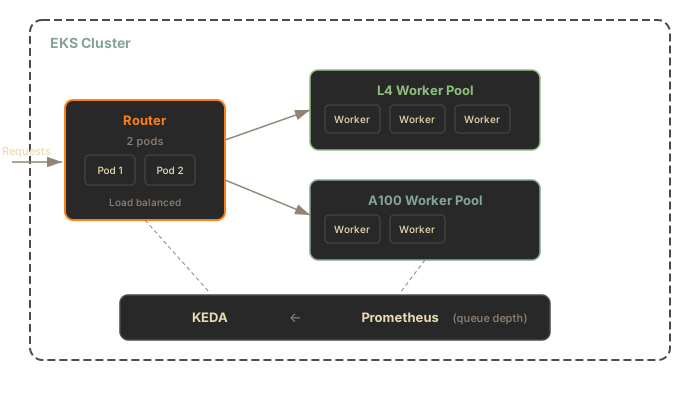
Components:
- EKS Cluster with managed node groups for GPU instances
- NVIDIA Device Plugin for GPU scheduling
- IRSA (IAM Roles for Service Accounts) for S3 access
- NATS Core and JetStream for queued work, result inboxes, SIE server sidecar health, and config deltas
- GPU worker pods that run the SIE server sidecar beside the Python
sie-serveradapter; the sidecar pulls JetStream work and calls the adapter over IPC - KEDA and Prometheus for autoscaling based on gateway and queue metrics
- Grafana and DCGM Exporter for dashboards and GPU metrics
Terraform Setup
Section titled “Terraform Setup”The examples/dev-g6-spot example in superlinked/terraform-aws-sie consumes the published superlinked/sie/aws Terraform registry module, the same module used in production deployments, pinned to a known-good version.
Prerequisites
Section titled “Prerequisites”See Path A. Terraform and Helm in the Prerequisites section at the top of this page.
Deploy
Section titled “Deploy”git clone https://github.com/superlinked/terraform-aws-sie.gitcd terraform-aws-sie/examples/dev-g6-spot
# Initialize and apply (creates an EKS cluster, ~15-20 min)terraform initterraform applyThe example main.tf pins the module version:
module "sie_eks" {  source  = "superlinked/sie/aws"  version = "0.6.6"
  aws_region        = var.aws_region  project_name      = var.project_name  gpu_instance_type = "g6.2xlarge"  gpu_capacity_type = "SPOT"  gpu_min_size      = 0  gpu_max_size      = 5}
For multi-GPU production setups, use the gpu_node_groups list variable instead of the single-GPU gpu_* variables. See the module variables reference.
To split one model across several GPUs on a node, see Multi-GPU serving.
If your AWS account already manages SIE ECR repos from another stack (e.g. a shared CI account or a previous deployment), set create_ecr_repositories = false on the module call to skip ECR resource creation. The module still emits the ecr_*_repository_url outputs from caller identity + repo names, so IRSA / Helm wiring is unchanged either way.
What Gets Created
Section titled “What Gets Created”The Terraform module provisions:
| Resource | Purpose |
|---|---|
| EKS Cluster | Kubernetes control plane |
| GPU Node Group | Auto-scaling g6.2xlarge L4 spot instances (0-5 nodes) |
| NVIDIA Device Plugin | GPU scheduling in Kubernetes |
| IRSA Role | Workload identity for SIE pods (no static AWS credentials) |
| ECR Repositories | Created for optional custom images. The chart pulls public images from GHCR by default. |
Helm Installation
Section titled “Helm Installation”Once the cluster is up, configure kubectl and install the sie-cluster chart. The chart packages KEDA, kube-prometheus-stack, DCGM Exporter, Loki, and Alloy as optional sub-charts; they default to install: false. The smoke test below works with the core services: gateway, config, NATS, and GPU worker pods running the SIE server sidecar beside the Python sie-server adapter. To enable KEDA autoscaling and observability, add --set keda.install=true --set autoscaling.enabled=true --set kube-prometheus-stack.install=true --set dcgm-exporter.install=true to the install command.
# Configure kubectl from the terraform output$(terraform output -raw kubectl_config_command)
# Install SIE (pulls the chart from GHCR, wires up IRSA from the terraform output)# `workers.pools.l4.enabled=true` is required; the chart's pools default to enabled: false.IRSA_ARN=$(terraform output -raw sie_irsa_role_arn)
helm upgrade --install sie oci://ghcr.io/superlinked/charts/sie-cluster \  --version 0.6.26 \  -n sie --create-namespace \  --set "serviceAccount.annotations.eks\.amazonaws\.com/role-arn=$IRSA_ARN" \  --set workers.pools.l4.enabled=true \  --set workers.pools.l4.bundles.default.minReplicas=1
# Wait for rolloutkubectl -n sie get pods -w
The command above needs no Hugging Face token; the smoke test below (BAAI/bge-m3) is ungated. For gated models, create the namespace and Secret first (the namespace does not exist until you create it or Helm does), then add the Secret reference to the install:
kubectl create namespace siekubectl create secret generic hf-token --from-file=token=/path/to/token-file -n sie
# then append to the helm command:#   --set workers.common.hfCache.tokenSecret=hf-token
Passing the raw token with --set hfToken.value=... also works but exposes it through Helm process arguments and release values.
workers.pools.l4.bundles.default.minReplicas=1 keeps one L4 worker pod always running, the simplest path to a working smoke test without KEDA. For scale-from-zero, pass --set keda.install=true --set autoscaling.enabled=true and set it back to 0.
Smoke Test
Section titled “Smoke Test”kubectl -n sie port-forward svc/sie-sie-cluster-gateway 8080:8080 &
# Install the Python SDK. Requires Python 3.12; see the SDK README for newer or older Python notes.pip install sie-sdk
python3 -c "from sie_sdk import SIEClient
client = SIEClient('http://localhost:8080')result = client.encode('BAAI/bge-m3', {'text': 'hello world'}, gpu='l4', wait_for_capacity=True, provision_timeout_s=600)print(result['dense'].shape) # (1024,)"The first request after scale-from-zero takes ~3-7 minutes (node provisioning + image pull + model loading). See Scale-from-Zero for the full flow.
Cleanup
Section titled “Cleanup”helm uninstall sie -n sieterraform destroyDifferences from GCP
Section titled “Differences from GCP”| Feature | GCP (GKE) | AWS (EKS) |
|---|---|---|
| GPU scheduling | Native GKE support | NVIDIA Device Plugin required |
| IAM for pods | Workload Identity | IRSA |
| Model cache storage | GCS (gs://) | S3 (s3://) |
| Node provisioning | GKE Autopilot / NAP | Karpenter or Cluster Autoscaler |
| Spot instances | Spot VMs | Spot Instances |
S3 for Model Cache
Section titled “S3 for Model Cache”Configure the cluster cache to use S3:
workers: common: clusterCache: enabled: true url: s3://my-bucket/modelsIRSA handles authentication automatically - no access keys needed in the pod.
Security Considerations
Section titled “Security Considerations”The default Terraform configuration exposes the API endpoint publicly. For production:
- Restrict ingress to your VPC CIDR or specific IP ranges
- Enable authentication via oauth2-proxy or static tokens
- Use a private load balancer for internal-only access. The
aws-load-balancer-internalannotation applies to a Service, so set it on the gateway Service (underingress.annotationsit has no effect and the endpoint stays public):
gateway: service: type: LoadBalancer annotations: service.beta.kubernetes.io/aws-load-balancer-internal: "true"Standalone Docker on AWS
Section titled “Standalone Docker on AWS”For simpler deployments, run standalone SIE on a GPU EC2 instance:
# On a g6.xlarge (NVIDIA L4) instancesudo apt-get install -y nvidia-container-toolkitsudo systemctl restart docker
docker run --gpus all -p 8080:8080 \  -v ~/.cache/huggingface:/app/.cache/huggingface \  ghcr.io/superlinked/sie-server:latest-cuda12-default
This is simpler than EKS and suitable for single-instance production workloads.
What’s Next
Section titled “What’s Next”- Upgrade Runbook - pre-upgrade checklist, rolling updates, and rollback
- Scale-from-Zero - understanding the 503 PROVISIONING flow and cold starts
- Monitoring - metrics, alerts, and dashboards
- Kubernetes in GCP - equivalent GKE deployment
- Kubernetes in Azure - equivalent AKS deployment