
Find SOTA embedding models by MTEB task
What this is
Section titled “What this is”SIE ships with 100+ specialized models (BGE, Qwen3, Stella, ColBERT, ColPali, GLiNER, Florence-2, and many more) and the broader HF embedding catalog has thousands more. Picking the right one for your task is hard: the MTEB leaderboard shows averaged scores that hide per-task strengths, and HF search is keyword-only.
This example is a small app that solves that. Describe what you are building in plain language (“multilingual long-document retrieval”, “zero-shot entity extraction from invoices”, “reranking for financial search”) and get back the SIE-ready model id you can paste straight into client.encode(), client.score(), or client.extract(). Under the hood it indexes ~14K model cards into ChromaDB through SIE, ranks by task-specific MTEB scores, and uses an LLM-generated description as the search target.
Two modes. Zero-setup mode runs a local text ranker against a bundled demo catalog: no SIE, no API keys, good for kicking the tires. Full mode uses your SIE endpoint for embeddings and OpenRouter for LLM-generated descriptions, the production path. Copy backend/.env.example to backend/.env and fill in only the keys for the mode you want. The sections below walk through both.
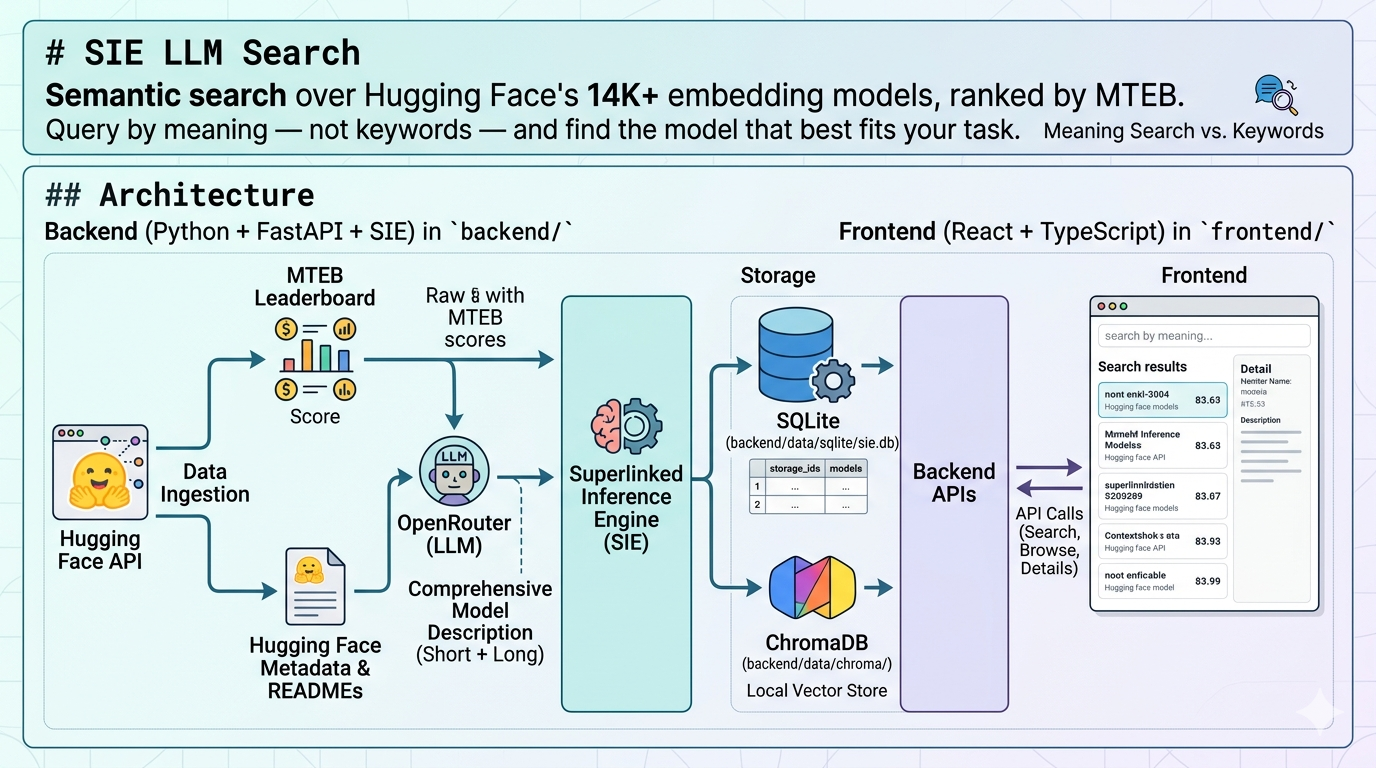
Architecture
Section titled “Architecture”- Backend: Python service in
backend/(FastAPI + SIE):- SQLite in
backend/data/sqlite/sie.dbwith tablesstorage_idsandmodels. - ChromaDB in
backend/data/chroma/as the local vector store. - Superlinked Inference Engine (SIE) produces embeddings for short and long descriptions.
- OpenRouter generates descriptions from HF metadata + README + MTEB scores.
- SQLite in
- Frontend: TypeScript + React app in
frontend/that calls the backend APIs for search, browse, and model details.
flowchart LR    UI[Frontend<br/>React + Vite]    API[FastAPI<br/>backend/app]    SQL[(SQLite<br/>models, storage_ids)]    Chroma[(ChromaDB<br/>short + long vectors)]    SIE[SIE<br/>embeddings]    OR[OpenRouter<br/>description LLM]    HF[HuggingFace<br/>metadata + README]    MTEB[MTEB cache<br/>benchmark scores]
    UI -->|/api/...| API    API --> SQL    API --> Chroma    Chroma --> SIE    API --> OR    API --> HF    API --> MTEB
Try it locally first
Section titled “Try it locally first”You can run the project without a SIE endpoint, OpenRouter key, or Hugging Face token. The repo includes a small bundled demo catalog plus a local text-ranking fallback.
cd backendpip install -r requirements.txtpython cli_seed_demo.pypython -m uvicorn app.main:app --reload --port 8000
cd ../frontendnpm installnpm run dev
Then open http://localhost:5173 and use storage id demo.
What works in local demo mode:
- browse the bundled model cards
- open model details and bundled READMEs
- run simple search and reranked search through the local fallback ranker
What still needs live services:
- downloading fresh Hugging Face model metadata
- generating descriptions through OpenRouter
- vector search and Chroma reindexing through a real SIE endpoint
Why SIE is useful here
Section titled “Why SIE is useful here”This project is not just a model browser. It shows how SIE helps turn a large model catalog into a searchable product experience.
With SIE, the same application can start in a lightweight local demo mode and then move to live semantic search with real embeddings when you connect a running SIE endpoint. That makes it easier to prototype, evaluate, and operationalize search workflows without rebuilding the app around a different serving stack.
In practice, this example shows three concrete benefits:
- a single API surface for semantic search workflows
- a clear path from local exploration to live inference-backed search
- less custom infrastructure to wire together when testing retrieval ideas on real model metadata
Project layout
Section titled “Project layout”sie-hugging-face-mteb-semantic-search/├── backend/│ ├── app/│ │ ├── api/routes/ # FastAPI routers: models, generate, search, chroma│ │ ├── db/ # SQLAlchemy models, session, migrations│ │ ├── services/ # chroma, fallback search, llm, openrouter, sie_chroma│ │ ├── prompts/ # description prompt templates (.md)│ │ ├── config.py # pydantic-settings, reads backend/.env│ │ └── main.py # FastAPI app factory│ ├── cli_download.py # download HF metadata + MTEB scores│ ├── cli_generate.py # generate short/long descriptions + index│ ├── cli_reindex.py # rebuild Chroma from existing descriptions│ ├── cli_seed_demo.py # seed bundled demo catalog for local use│ ├── cli_sie_status.py # inspect SIE server health + loaded models│ ├── demo_models.json # bundled demo data for public quickstart│ ├── data/ # sqlite/, chroma/, hf-cache/ (gitignored)│ └── requirements.txt├── frontend/│ ├── src/App.tsx # single-file React app, four tabs│ └── package.json├── assets/└── README.mdPrerequisites
Section titled “Prerequisites”- Python 3.12 and
pip. - Node.js 18+ and
npm. - An OpenRouter API key if you want to generate new descriptions.
- A running SIE endpoint if you want live vector indexing and embedding search.
SIE_API_KEYis optional and only needed for managed or auth-enabled clusters. - Optional: a Hugging Face token, useful for higher rate limits.
Installation
Section titled “Installation”Backend:
cd backendpip install -r requirements.txtFrontend:
cd frontendnpm installConfiguration
Section titled “Configuration”All backend settings come from environment variables or backend/.env. See backend/app/config.py for the full list; the important keys are:
| Variable | Default | Purpose |
|---|---|---|
HF_TOKEN | (empty) | Optional, raises HuggingFace rate limits |
OPENROUTER_API_KEY | (empty, required for generation) | Auth for OpenRouter description calls |
OPENROUTER_MODEL | google/gemini-3.1-pro-preview | Default LLM used by CLI + UI |
LLM_MAX_PARALLEL | 20 | Max in-flight OpenRouter calls |
SIE_API_ENDPOINT | (empty, required for embeddings) | URL of the SIE server |
SIE_API_KEY | (empty) | Optional bearer token for managed/auth-enabled SIE clusters |
SIE_EMBED_MODEL | NovaSearch/stella_en_400M_v5 | Embedding model registered on SIE |
SIE_EMBED_BATCH_SIZE | 32 | Texts per SIE encode call |
SQLITE_PATH | data/sqlite/sie.db | Local SQLite database path |
CHROMA_PATH | data/chroma | Local ChromaDB directory |
Minimal backend/.env for live services:
OPENROUTER_API_KEY=sk-or-...SIE_API_ENDPOINT=https://your-sie-host# Optional: only needed for managed/auth-enabled SIE clusters.SIE_API_KEY=HF_TOKEN=hf_... # optionalHow to use
Section titled “How to use”0. Seed the bundled demo catalog
Section titled “0. Seed the bundled demo catalog”If you want the no-credentials path, seed the bundled local catalog first:
cd backendpython cli_seed_demo.pyThen use storage id demo in the UI.
1. Run the backend
Section titled “1. Run the backend”cd backendpip install -r requirements.txtpython -m uvicorn app.main:app --reload --port 8000Verify: http://localhost:8000/health returns {"status":"ok"}.
2. Run the frontend
Section titled “2. Run the frontend”cd frontendnpm installnpm run devThen open http://localhost:5173. For the local demo flow, start with storage id demo.
3. Check the SIE server with cli_sie_status.py
Section titled “3. Check the SIE server with cli_sie_status.py”Inspects liveness, readiness, loaded embedding models, and worker pools.
cd backendpython cli_sie_status.py # full status reportpython cli_sie_status.py --health # /health onlypython cli_sie_status.py --models # list loaded modelspython cli_sie_status.py --pools # list worker pools4. Download model metadata with cli_download.py
Section titled “4. Download model metadata with cli_download.py”Selects the top MTEB-benchmarked models (ranked by number of benchmark tasks), fetches their Hugging Face metadata in parallel, and stores everything under a logical storage_id in SQLite.
cd backend
# Top 30 models, append to storage (default)python cli_download.py test01
# Top 100 models, 20-way parallel HF fetchpython cli_download.py test01 --limit 100 --parallel 20
# Wipe the storage first (same as the web UI "Download" button)python cli_download.py test01 --overwrite
# Show which models would be fetched without actually downloadingpython cli_download.py test01 --dry-run
Demo READMEs are bundled locally. Live Hugging Face READMEs are fetched on demand for downloaded models (see Operations notes below).
5. Generate descriptions and index with cli_generate.py
Section titled “5. Generate descriptions and index with cli_generate.py”Runs the same pipeline as the web UI Generate Descriptions buttons:
- Prepare 6K prompt (HF metadata + live README + MTEB summary).
- Generate 6K detailed description via OpenRouter.
- Generate 2K long description from the 6K output.
- Generate 200-char short description from the 6K output.
- Save short + long to SQLite.
- Upsert both embeddings into ChromaDB via SIE.
cd backend
# All models in the storage, default parallelism (LLM_MAX_PARALLEL)python cli_generate.py test01
# Single model onlypython cli_generate.py test01 BAAI/bge-large-en-v1.5
# Skip models that already have short + long descriptionspython cli_generate.py test01 --skip-existing --parallel 50
# Override the default OPENROUTER_MODELpython cli_generate.py test01 --model google/gemini-2.5-flash
# Rebuild Chroma from existing SQLite descriptions, skip LLM callspython cli_generate.py test01 --reindex-only
# Prepare prompts but don't call the LLM or savepython cli_generate.py test01 --dry-run
6. Rebuild the vector index only with cli_reindex.py
Section titled “6. Rebuild the vector index only with cli_reindex.py”Drops and rebuilds the models_{storage_id} Chroma collection from the current SQLite descriptions. Useful if the vector DB is out of sync, or after switching SIE_EMBED_MODEL.
cd backendpython cli_reindex.py test01python cli_reindex.py test01 --batch-size 16Frontend
Section titled “Frontend”Single-page React app (frontend/src/App.tsx) with four tabs, in this order:
- Search with Reranking: the recommended entry point. Runs a short-description kNN, then reranks the candidates by long-description similarity. Calls
POST /api/search/semantic-rerank. - Simple search: single-stage semantic search on short descriptions. Calls
POST /api/search/semantic. - Download LLM Cards: triggers
POST /api/models/downloadto (re)populate a storage with the top MTEB-benchmarked HF models. - Browse LLM Cards: filters stored models by
storage_idand optionalhf_idsubstring; each row opens a full detail view with MTEB scores, the live HF README, and a Generate descriptions modal.
The Search with Reranking tab is the default when the app loads.
A full walk-through of the UI fields and modals lives in frontend/frontend.md.
Data model
Section titled “Data model”Table storage_ids
Section titled “Table storage_ids”| Column | Type | Notes |
|---|---|---|
id | int PK | |
storage_id | string | Unique, indexed (e.g. test01) |
description | string? | Free-text |
created_at | datetime | Server default |
Table models
Section titled “Table models”| Column | Type | Notes |
|---|---|---|
id | int PK | |
storage_id | int FK | Cascades to storage_ids.id |
hf_id | string | HuggingFace model id, indexed |
created_at | datetime | When this row was stored locally |
created_at_hf | datetime? | HF model creation time |
last_modified | datetime? | HF last modified |
author, sha | string? | |
private, disabled | bool? | |
downloads, downloads_all_time, downloads_30d, likes, trending_score | numeric? | HF metrics |
tags | JSON | HF tag array |
pipeline_tag, library_name, mask_token | string? | |
config, card_data | JSON | Small structured HF metadata |
mteb_scores | JSON | Compact [{task_name, main_score}, ...], averaged per task |
short_description | varchar(200) | At most 200 characters |
long_description | varchar(2048) | At most 2048 characters |
Not stored locally: readme, siblings, safetensors, spaces, and the raw nested MTEB per-subset/per-split JSON. These would blow SQLite past several GB across the full catalog.
Chroma collection models_{storage_id}
Section titled “Chroma collection models_{storage_id}”Holds two entries per model:
- id
"{hf_id}::short"withkind="short": embedding ofshort_description. - id
"{hf_id}::long"withkind="long": embedding oflong_description.
Both are produced by the same SIEEmbeddingFunction. The kind metadata lets each search endpoint filter to the right set.
Search APIs
Section titled “Search APIs”Semantic search lets users describe a task in plain language and find the embedding models whose descriptions are closest in meaning. Two endpoints are available, a single-stage short-description search and a two-stage rerank search.
Both share the same request shape:
{ "storage_id": "test01", "query": "evaluate medical pictures", "n_results": 20}POST /api/search/semantic: single stage
Section titled “POST /api/search/semantic: single stage”Embeds the query, kNN-searches the kind="short" entries, returns up to n_results models sorted by cosine distance.
Response:
{ "storage_id": "test01", "query": "evaluate medical pictures", "results": [ { "hf_id": "BAAI/bge-large-en-v1.5", "distance": 0.123, "short_description": "..." } ]}POST /api/search/semantic-rerank: two stage
Section titled “POST /api/search/semantic-rerank: two stage”- Stage 1, short kNN:
collection.query(query_texts=[query], n_results=N, where={"kind": "short"})returns candidate models with their short-distance scores. - Stage 2, long rerank:
collection.query(query_texts=[query], n_results=len(candidates), where={"$and": [{"kind": "long"}, {"hf_id": {"$in": candidates}}]})makes Chroma recompute cosine distance against only those candidates’ long vectors. - Results are merged by
hf_id, sorted byrerank_distanceascending; any candidate without a long embedding falls back toshort_distanceand is appended at the end.
Response:
{ "storage_id": "test01", "query": "evaluate medical pictures", "results": [ { "hf_id": "BAAI/bge-large-en-v1.5", "rerank_distance": 0.087, "short_distance": 0.123, "short_description": "..." } ]}rerank_distance is null for any fallback item.
Index population
Section titled “Index population”- Auto:
POST /api/generate/savecallsupsert_embedding(storage_id, hf_id, short, long)after every save, keeping both Chroma entries in sync. Clearing a description deletes thatkind’s entry. - Bulk (re)build:
python cli_reindex.py <storage_id>.
Operations notes
Section titled “Operations notes”Why README is not stored locally
Section titled “Why README is not stored locally”At 14,000 models, storing HF READMEs in SQLite blows the database past several GB. Instead, only small fields live in SQLite (metadata, tags, compact MTEB scores, the two generated descriptions). The full README is fetched live from HuggingFace via GET /api/models/readme/{hf_id} whenever the user opens a detail view, and for description generation (ModelCard.load(hf_id).text truncated to 4000 chars). A small in-memory LRU avoids hammering HF.
Migrating from older schemas
Section titled “Migrating from older schemas”Earlier versions also stored readme, siblings, safetensors, spaces, and the raw nested mteb_results. If you are migrating an existing DB:
cd backendpython cli_download.py <storage_id> --overwritesqlite3 data/sqlite/sie.db "VACUUM;"SQLite does not shrink on its own after row deletes. The VACUUM; step is what actually reclaims disk.
Description generation pipeline
Section titled “Description generation pipeline”The CLI and UI both follow the same six-step pipeline:
- Render the 6K detailed prompt from model JSON, live README (4K chars max), and MTEB summary.
- Call OpenRouter, returns 6K detailed description (not persisted).
- Call OpenRouter with the 6K text, returns 2K long description.
- Call OpenRouter with the 6K text, returns 200-char short description.
- Save short + long into the
modelstable. - Upsert short + long embeddings into ChromaDB via SIE.
Prompt templates live in backend/app/prompts/*.md and can be edited without touching Python code.
By Zolt Balai.