
Small Open Models for Manufacturing

Manufacturers use AI in a lot of places on and around the plant floor: predicting failures from sensor data, inspecting parts on the line with cameras, planning production against demand, watching suppliers for risk, and helping engineers with design work. Less talked about is the paperwork that sits between all of those, the certificates, purchase orders, work orders, manuals and quality reports that people still read by hand.
A plant runs on that paperwork as much as on machines, and a lot of people spend their day reading it. A receiving inspector checks every delivery against its purchase order and the supplier’s mill certificates before the material reaches the shop floor, and a buyer chases the PO lines that came up short. Technicians close work orders in the CMMS (the maintenance system, e.g. Maximo or SAP PM) after a repair, usually in a hurry, and a reliability engineer later tries to count failures from what they typed. And when a machine stops, someone hunts through the equipment manual for the one diagram that answers the question.
In this post I’ll start with that paperwork and why it’s slow, look briefly at what manufacturers are already doing with open models, and then walk through how I break one of these jobs into steps, so that code looks things up in the ERP and the CMMS and does the arithmetic, and a model only reads the scans and the notes. After that come three examples from the SIE cookbook: checking a delivery against its PO, filling in a work order from a technician’s notes, and answering a question from an equipment manual. The code for all three is in the cookbook, if you’d rather read that first.
The Paperwork That Runs a Plant
Most of what reaches those people is either a scan or a few lines of free text. What comes from outside arrives as scans: the supplier’s system prints the delivery note and someone scans it at goods-in, and the mill certificate (the document with the heat number, grade, strengths and impact result) comes as a scanned PDF or a faxed copy, because no barcode on the delivery gives you its yield and tensile numbers. In plenty of shops the inspector still writes the thickness readings on a paper form that gets scanned too, and the equipment manual is often a scan where the answer is a tag on a piping diagram. None of it has a text layer, so today a person retypes the heat number, the grade and the strengths, looks up the limits and decides by eye.
What the plant writes itself is free text. The work order form in the CMMS has a dozen dropdowns and most of them stay blank, so the reliability engineer recodes the history by hand before they can count anything, the storeroom never books the parts that were used, and a recommended follow-up never becomes a new order.
Small misses add up in both. Most deliveries are fine, which is exactly what makes the bad one easy to miss, and a plate with a low yield strength or a thin corner that gets released ends up welded into a structure, where finding it costs far more than finding it at goods-in. A PO line booked as fully received when half of it is still at the mill means nobody chases the rest until the shop runs out.
What Manufacturers Already Do With Open Models
The examples manufacturers have published so far are mostly large models used as copilots and agents, and they have one thing in common: each company built on an open model. Siemens is extending its agentic chip and PCB design workflows with NVIDIA’s Nemotron 3 Ultra. Rockwell Automation uses Nemotron-Nano-9B-v2 for generative AI at the edge, including air-gapped deployments. Foxconn built its own large language model on Llama 3.1 for manufacturing and supply chain work, and Lockheed Martin put Llama into LMText Navigator, a tool that processes data on premises.
Rockwell’s air-gapped plants and Lockheed’s on-premises tool show that manufacturers want models they can run on their own hardware. None of these examples is about reading a certificate on the receiving dock or a work order in the CMMS, and those are the ones this post is about. For those I’d reach for small task models, because in all of that paperwork the slow part is the reading: turning a scan into text, finding the yield strength on a certificate layout you’ve never seen, picking a failure code from what a technician typed, and finding the page of a manual that has the answer.
How I Break a Plant Paperwork Job Into Steps
I take one job (e.g. checking a delivery), write down its steps, and then ask two questions. The first is whether it runs the same way every time. If it does, it’s a fixed workflow. If the steps change completely with what the person in front of it is seeing, it’s an agent. And if only some parts change, it’s a mix: the workflow runs and hands those parts to an agent, with code checking the agent’s work. I wrote up how I decide between the three in the workflow-vs-agent post, so I won’t repeat it here.
The second question is who does each step. In a plant most of the steps are already structured. The PO lines are in the ERP, the inspection plan and the grade limits are in the quality system, the picklists and the parts catalog are in the CMMS, and the work order tells you which manual revision a unit uses. Those are lookups, and none of them needs a model. Deciding whether a reading passes is arithmetic against a limit you already keep, so that’s Python too. That leaves four jobs for a model: turning a scan into text, finding a field on an unfamiliar form, picking a code from a picklist, and finding the page of a manual that answers a question. Each goes to a small model trained for that one task. The one exception is reading a drawing to answer a free question, which needs a bigger 27B model (the manual example below). The decision at the end (release the lot, quarantine it and raise an NCR, save the work order, decide what to do with the machine) stays with a person, with the reason in front of them.
That way a model reads the certificate or the notes, but a person still decides what happens to the lot or the work order. I also prefer checks that compare the model’s answer with something the model didn’t write (the PO, the inspection plan, the parts catalog, the page itself), because those are the checks that catch a misread.
Two more questions come up in every plant, and I’ll keep them short. Export control usually decides where the models run: under ITAR, a hosted model API that reads your technical data in plain text counts as a third party, so controlled drawings stay on your own GPUs. Small models make that cheap: SIE lists LightOnOCR and the two GLiNER models in the recipes below as tested on a single L4 GPU. The 27B model that reads manuals is the exception, and SIE lists it on an H100 80GB. And most plant reading jobs work with the models as they ship, because a rule against your limits or your catalog makes the decision. Failure codes are the one place I’d expect fine-tuning to pay off, with the reliability engineer’s recoded history as the labeled data. The across-industries post goes through both in more detail.
Checking a Delivery Against the PO
As an example, consider a fabricator that buys steel plate. It orders the plate on purchase orders, and the mill’s deliveries don’t always line up with them: half a PO line this week, the rest next month, now and then a couple of plates more than anyone asked for. When a delivery arrives at goods-in, an inspector ticks each delivered line off against its PO line, compares the heat number on each plate with the one on the certificate, measures thickness at each corner with an ultrasonic gauge, writes the readings on the inspection form and signs it.
Every truck goes through the same steps, so this is a plain workflow. manufacturing/check_delivery_against_po takes the PO lines from the ERP, and the inspection plan and grade limits from rules.yaml, a file that stands in for your quality system. Both are lookups. The scans have no text layer, so lightonai/LightOnOCR-3-4B turns each page into text; I picked it because it keeps each form box’s label next to its value, which every later step relies on. fastino/gliner2-large-v1 then points at the heat number, the strengths and the readings on a layout it has never seen, and Python checks that each value really sits on the same line as its label in the OCR text, so a yield strength is only accepted from the line that says yield strength. Everything after that is Python: matching each delivered line to a PO line, making sure every reading on the inspection plan is there exactly once, and comparing the numbers with the grade’s limits. There’s no large model in it, and nothing in it writes a sentence.
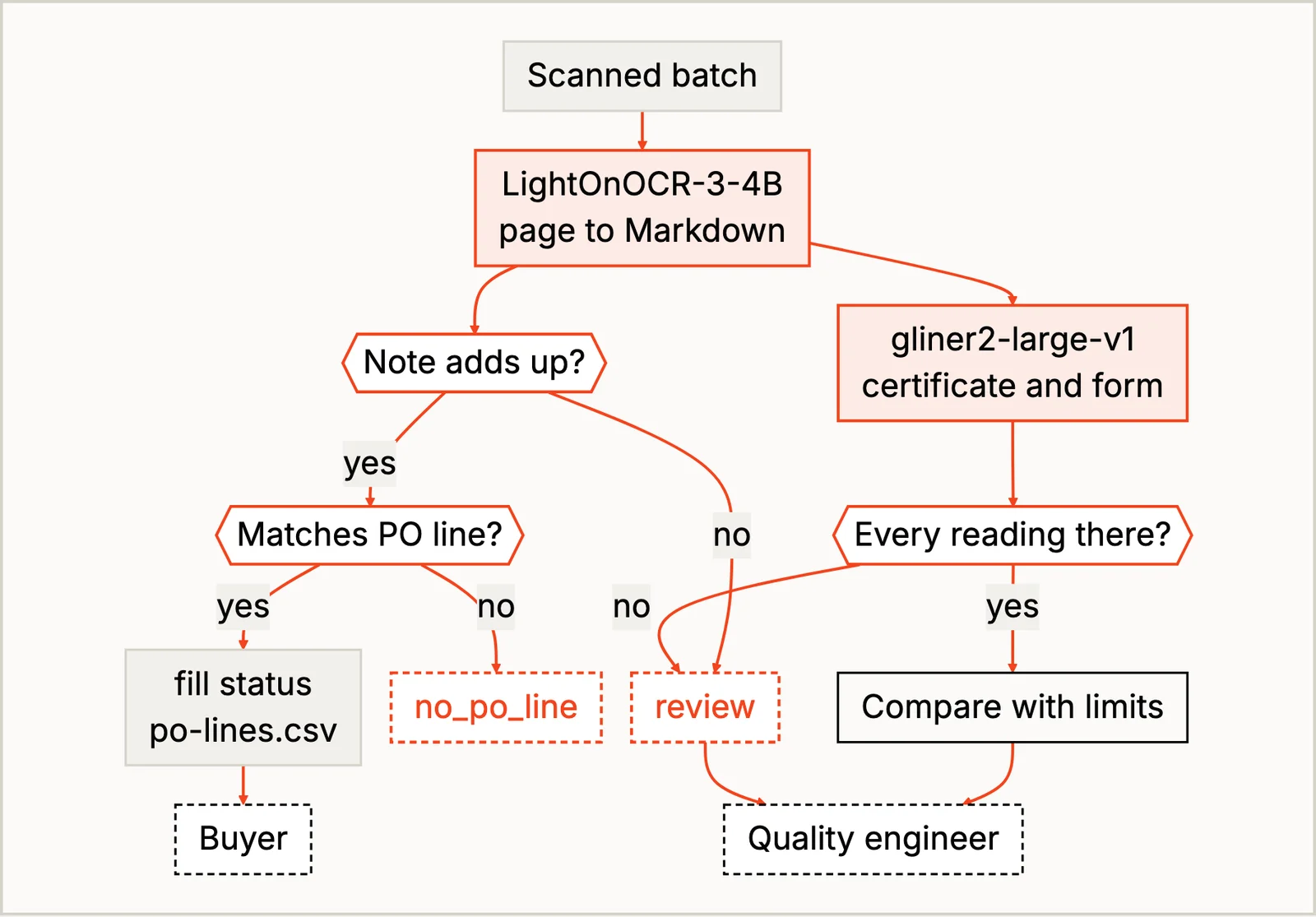
The buyer gets a fill status for each PO line, and the quality engineer gets each lot with the reasons it failed or needs a look. The part I’d copy first is the guard band (a margin around each limit as wide as the gauge’s uncertainty). A reading of 11.51 mm against a lower limit of 11.50 passes by less than the gauge’s 0.02 mm uncertainty, so the gauge can’t tell it from a reading just outside, and the recipe sends it to a person even though the number passes. Checking against the plan instead of the form matters too. A form with five rows where the plan has six gets “Thickness T3 not read”, even though every row it has passes. And one form says “OK” right next to a 14.38 mm reading that fails; it’s the most confident document in the pile, which is why the recipe ignores that column.
Matching heat numbers only prove that the paperwork agrees with itself, though, so the inspector still checks the stamp on the steel.
Filling In a Work Order From the Notes
For a second example, take a work order closed in a hurry. It’s 02:10, the line is down, and a technician closes it by typing “P-101 seal leaking again, product on floor. Replaced seal, flushed seal chamber.” The failure code, the seal that came out of the storeroom and the hours are all in those words, and “recommend a vibration reading next week” is a follow-up nobody will see again unless it becomes an order. Today those details mostly stay in the notes, because nobody fills in dropdowns at 2 a.m.
This one is a workflow too. In manufacturing/fill_work_order_from_notes, the CMMS already has the asset, the dates, the picklists and the parts catalog, so only the notes need reading. A picklist is a “pick one” question, so the codes go to fastino/GLiNER2.5-Decide, which scores every option. A code is filled only at 0.50 or more and 0.15 ahead of the runner-up, and each picklist has a “not stated” option so the model has an honest way to say the notes don’t say. Parts and hours go to gliner2-large-v1, because it points at the words it read, and that’s what a person needs to confirm a form. Python checks part numbers against the parts catalog and hours against how long the order was open, and a plain regex finds asset tags in the notes and compares them with the asset on the order. I kept a chat model out of this one, because it would happily invent part numbers that look right.
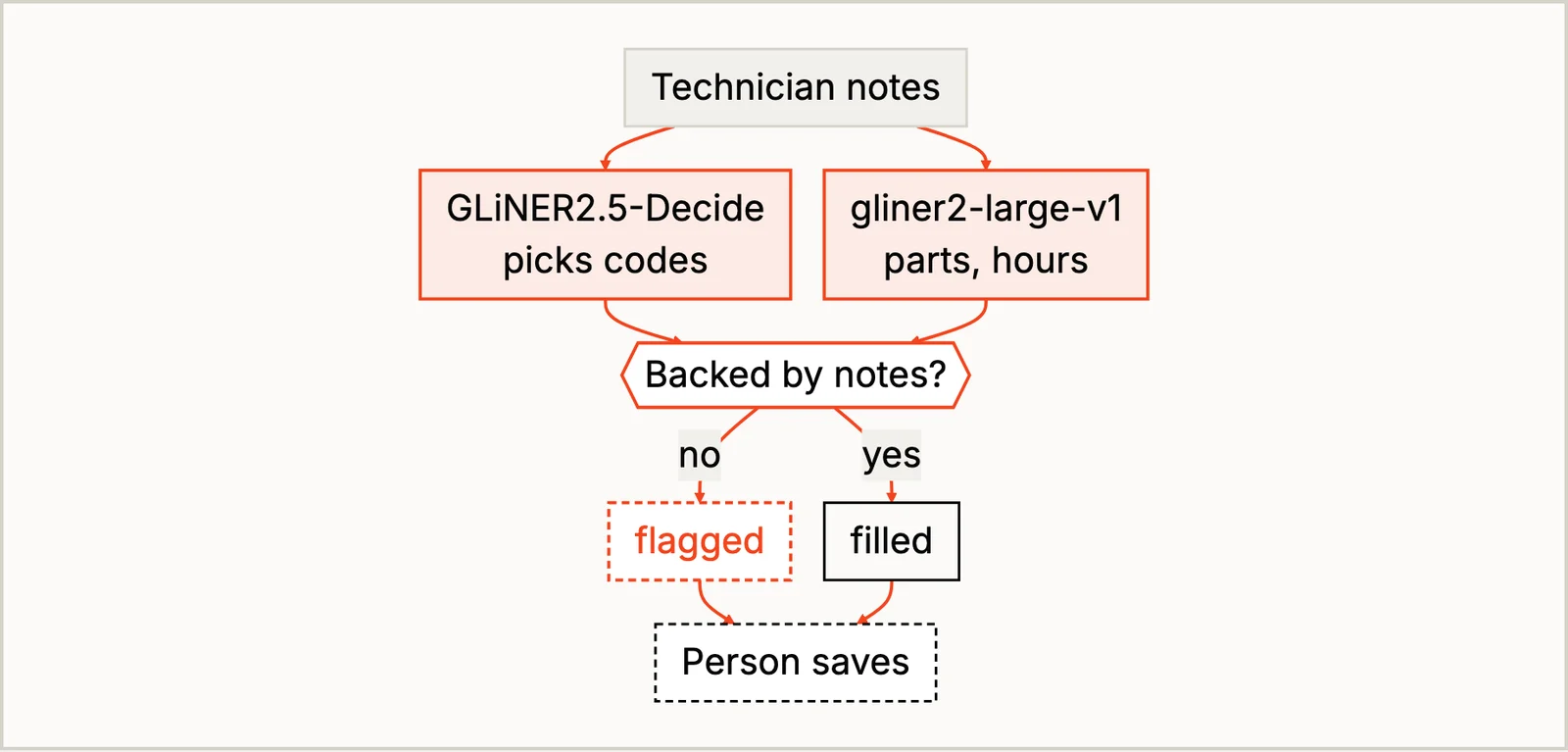
The result is a draft, and a person reads every one before it’s saved. A note that said “seal dry, no leak found” still got leak at 0.567, which clears both limits, and another got a contamination cause at 0.800 with nothing in the note about why the part failed. Score limits catch a model that’s unsure; they can’t catch one that’s sure and wrong. Reliability engineers hunt for bad actors (the few assets that keep failing), and I have to admit the first bad actor on this project was mine: on the first run, that asset-tag regex matched part numbers too.
Answering From the Equipment Manual
The third example is a question for the equipment manual. A technician at a stopped chiller asks which valve drains the coolant. The answer is the V3 tag on a piping diagram somewhere in a scanned manual. Today they flip through it, and if the site runs two units on different manual revisions, they’d better be flipping through the right one.
This one is still a workflow, but it’s the one with a bigger model in it. In manufacturing/answer_from_equipment_manual, the work order gives the unit’s manual revision, which is a lookup, and TomoroAI/tomoro-colqwen3-embed-4b ranks the page images of that revision, diagrams included. If no page scores high enough, no model reads anything and the answer is “no reliable match”. One step is more than a small model can do here: reading the labels off a drawing and working out which one answers a free question. That goes to a bigger 27B vision language model, Qwen/Qwen3.8-27B-FP8, which reads the top page (two at most) and answers with a quote. Python then checks that the quote is printed on the page the model was shown and that every number and tag in the answer is in the quote.
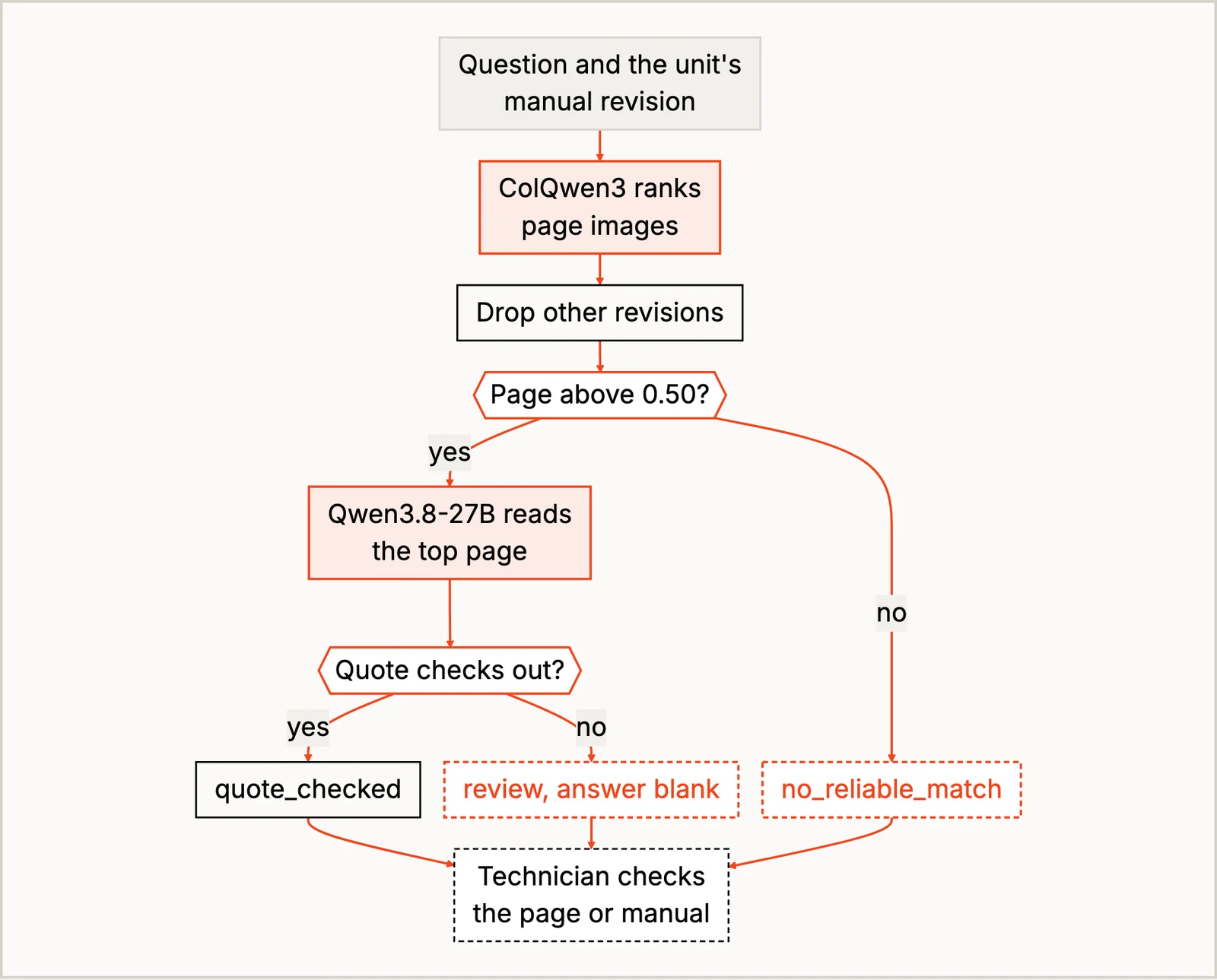
In the cookbook example the contents page outranked the piping diagram by a hair, so the 27B model said that page doesn’t answer and the recipe read the next one. A table of contents is, after all, a page that mentions everything and answers nothing. A checked quote only tells you the words are in the manual, not that they’re the whole answer. A quote like “open V3” leaves out everything around it, like the cool-down warning on page 1, and that’s why the technician reads the cited page, not just the answer, before touching the machine.
The technician’s follow-up questions are where this stops being a workflow. What they ask next depends on what they see when they get to the valve, and a back-and-forth where each step depends on the last answer is where an agent would fit. No manufacturing recipe does that yet. The cookbook’s agentic recipes show how an agent uses small models as its tools in other domains, and the workflow-vs-agent post covers when that’s worth it.
Run It Yourself
If you’d like to try one of these, the quickest way is on SIE Serverless, so you don’t need a GPU to start. You need uv and an SIE API key:
git clone https://github.com/superlinked/cookbook && cd cookbookcp .env.example .env # set SIE_API_KEYcd manufacturing/check_delivery_against_pouv run recipe.pyThe other two recipes run the same way from their folders, and I ran all three on SIE Serverless. The data is synthetic, so once you’ve seen them work, I’d try a week of your own paperwork (anything that isn’t export-controlled) with your own limits and picklists in rules.yaml, and read what lands in the review queue. When you want the models on your own GPUs, set SIE_BASE_URL in .env; SELF_HOSTING.md has the setup.
Conclusion
The same way of thinking works for the rest of a plant’s paperwork. Pick one job, write down its steps, decide whether it’s a workflow, an agent or a mix, and then give the ERP and CMMS lookups and the arithmetic to code, each scan, form or note that needs reading to a small model trained for it (or a bigger one for a free question about a drawing), and the release, quarantine or save decision to a person. The READMEs name a few more jobs where that fits: a chemical delivery against its certificate of analysis, a calibration certificate against the instrument record, a safety near-miss report that needs coding, and a torque spec in a scanned service manual. The fourth plant recipe, checking assembly photos for missing bolts, splits its job the same way, with a detection model and Python.
If your goods-in still retypes certificates, I’d love to hear which field trips you up most. Until next time.