
Small Open Models for Retail

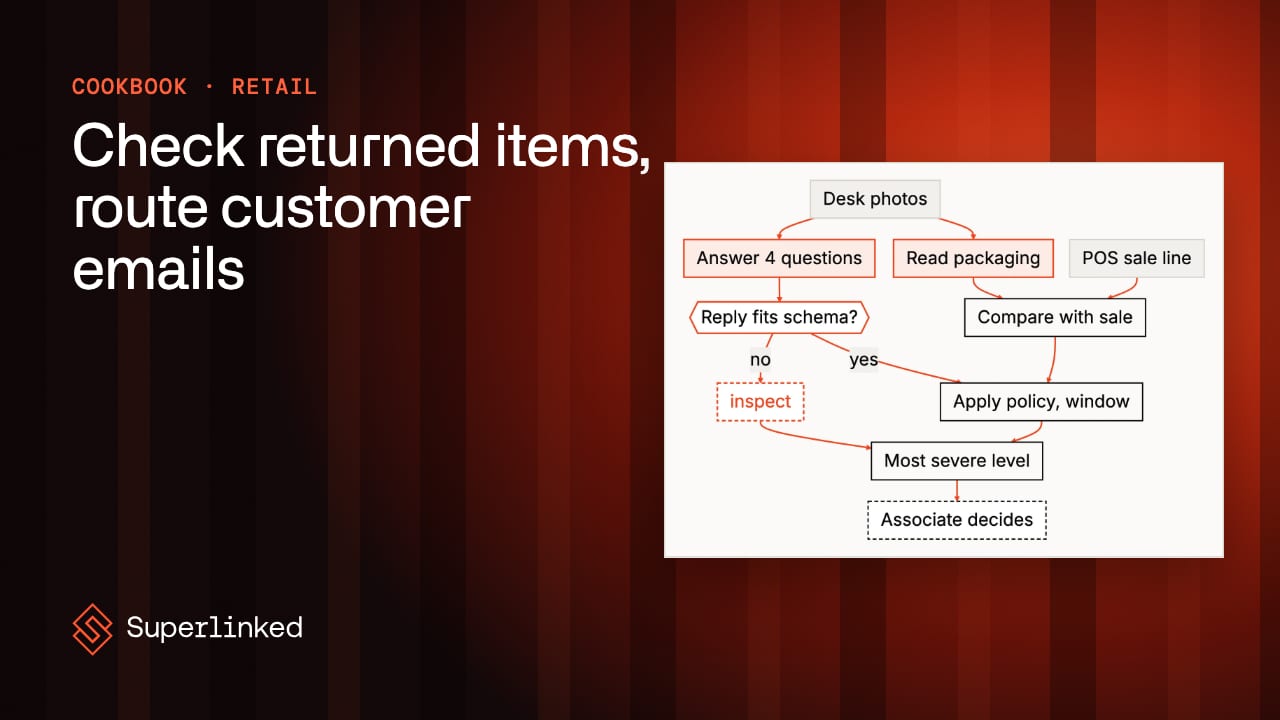
Retail covers a lot of ground: stores and an online shop, the catalog behind them, and the supply chain that keeps the shelves full. Merchandisers and buyers decide what to stock and at what price, planners forecast demand, store teams receive deliveries, check shelves and run the returns desk, the online team keeps search and product pages working, and customer care answers everything that goes wrong. AI shows up across all of it, mostly in search, recommendations and forecasting so far. A lot of the rest runs on small, repetitive decisions made by busy people, each one taking a minute, and a busy store makes a lot of them.
In this post I’ll start with why those small decisions go wrong, then look at what retailers are already doing with small open models. Then I’ll go through how I think about a retail job: break it into steps, decide whether it runs as a fixed workflow or an agent, and work out which steps code can do and which need a small model trained for one task. After that come two examples from the SIE cookbook, a return checked against its sale and the shared care inbox, and a short section on running them yourself.
Why These Small Decisions Go Wrong
The work comes in waves, and the holiday rush brings all of it at once, with the returns line and the inbox filling up while every store and every shopper is busy. The mistakes are small, and they add up. A return taken back against the wrong receipt is money out of the till, and at the end of a long line nobody reads model numbers. The one email about an injury that sits in the general queue for a day is a much bigger problem than a slow refund, and in a subject list it looks exactly like the fifty emails around it.
What Retailers Are Doing With Small Open Models
Most of that work is reading and labeling: reading a receipt or a box, judging an item’s condition from a photo, sorting a message to the right team. The public write-ups from retailers are mostly about search, catalog and forecasting rather than the returns desk, but the pattern carries over: a small open model for one job at very large volume, trained on the company’s own data.
- Target fine-tuned e5-small-v2, a small open embedding model, for product search, choosing it because it “gives strong retrieval quality at much lower latency”. The paper (September 2026) says the system “serves millions of guests daily”.
- Walmart trained a PaliGemma2 bi-encoder on 3.5M graded pairs from its catalog for visual search on its online store, and the preprint (September 2026) says it’s serving a slice of live traffic.
- Decathlon picked Amazon’s open Chronos-2 time-series model for demand forecasting, and re-tunes it on the latest data every six months (August 2026).
- Mirakl, which sells marketplace and catalog software to retailers, said in March 2025 it fine-tunes models including Meta’s Llama and Mistral’s 7B, and Anyscale’s case study says it routes “up to 90% of catalog traffic to LLaMA 3.1 8B” with fine-tuned LoRA adapters.
Target chose a small model because search has a latency budget and a small model fits in it, and Mirakl sending most of its catalog traffic to an 8B model is the same choice made for cost. Every one of them trained or re-tuned on its own data, while the recipes below run models as shipped with Python checking what they read. That’s often enough for a first version, and I’ve written up where it stops being enough separately.
How I Break a Retail Job Into Steps
I start with the job as a person does it today and write the steps down in order. A lot of them turn out to be things your systems already know or rules you can write. The sale line comes from the POS (point-of-sale system), the return window for each category lives in policy (and a busy associate applies it however they remember it), and the store list and the order-number format are data you already have. Less obviously, so is the list of phrases that must send an email to product safety (burn, sparking, choking, recall) or to legal (attorney, lawsuit, sue you). A phrase list is a rule, so it runs in Python.
That leaves a few things no system can do: reading the model number off a box, scoring which care team an email belongs to, finding the order number in a sentence. That’s where I use a small model trained for that one task, and each one returns something Python can check against what the store already has. Judging an item’s condition from a photo is harder, so there I started with a bigger 27B vision model answering four fixed questions, and a 4B one is worth trying (more on that below). Writing something new, like the reply to an unhappy customer, is where I’d pay for a large generative model, and a care agent reads the draft before it goes out. Decisions about money or safety stay with a person: the associate decides every return, a manager decides the ones sent up, and a named person watches the safety queue.
Then I decide how the steps run. Both examples below run as fixed workflows, where Python picks every step and calls a small model where a step needs one. You can write the steps down before the first customer walks up, every return should take the same steps, and nobody needs a model deciding what to do next. When an agent or a mix of the two does make sense is a question I’ve answered in when to use a workflow and when to use an agent, and the cookbook’s agent recipes show it on KYC checks, counterparty news, contract review and repair invoices.
Emails and sale lines are also personal information, so where the models run is worth settling before you pick them; the retail page covers that.
Checking a Returned Item Against Its Sale
As an example, consider a store’s returns desk. An associate there spends the day taking things back: a mouse that didn’t pair, a toaster that was the wrong color, a phone a customer changed their mind about. The customer hands over the receipt, the associate scans it, and the POS pulls up the sale (SKU, UPC, product name, model number, price, policy category). The associate looks at the item, decides whether the store takes it back, and issues the refund or calls a manager. The trouble is that scanning the receipt proves a sale happened, not that the box on the counter is the thing that was sold. A cheaper mouse comes back in its own box against the receipt for a better one, opened electronics come back with a part missing, and a toaster box says TR1250WD against a sale for TR1300WD: same brand, nearly the same box, one model number apart.
The returns recipe runs this as a workflow. The obvious shortcut is to send the photos and the receipt to one vision model and ask “should we accept this return?”, but you can’t see why it said yes, text printed on the box can sway its answer, and nobody can audit the refund decision. So the models only look at the item. GLM-OCR reads the packaging, and Python compares the UPC and model number with the sale line. If OCR reads a valid UPC off the box, that decides it; if there’s only a model number, it has to match exactly, and one that’s close but different counts as the wrong product. Qwen3.8-27B-FP8, the bigger vision model, answers four fixed questions about condition, with allowed answers and a strict JSON schema, and it never sees the sale line, so it can’t lean toward the product the receipt names. Then rules.yaml applies the return window and what each answer means at your desk, and the associate decides. Each return comes out at one of three levels: accept (no check objected), inspect (the associate should look closer) or refer (a manager decides), and when checks disagree, the stricter one wins. Even accept isn’t a refund approval.
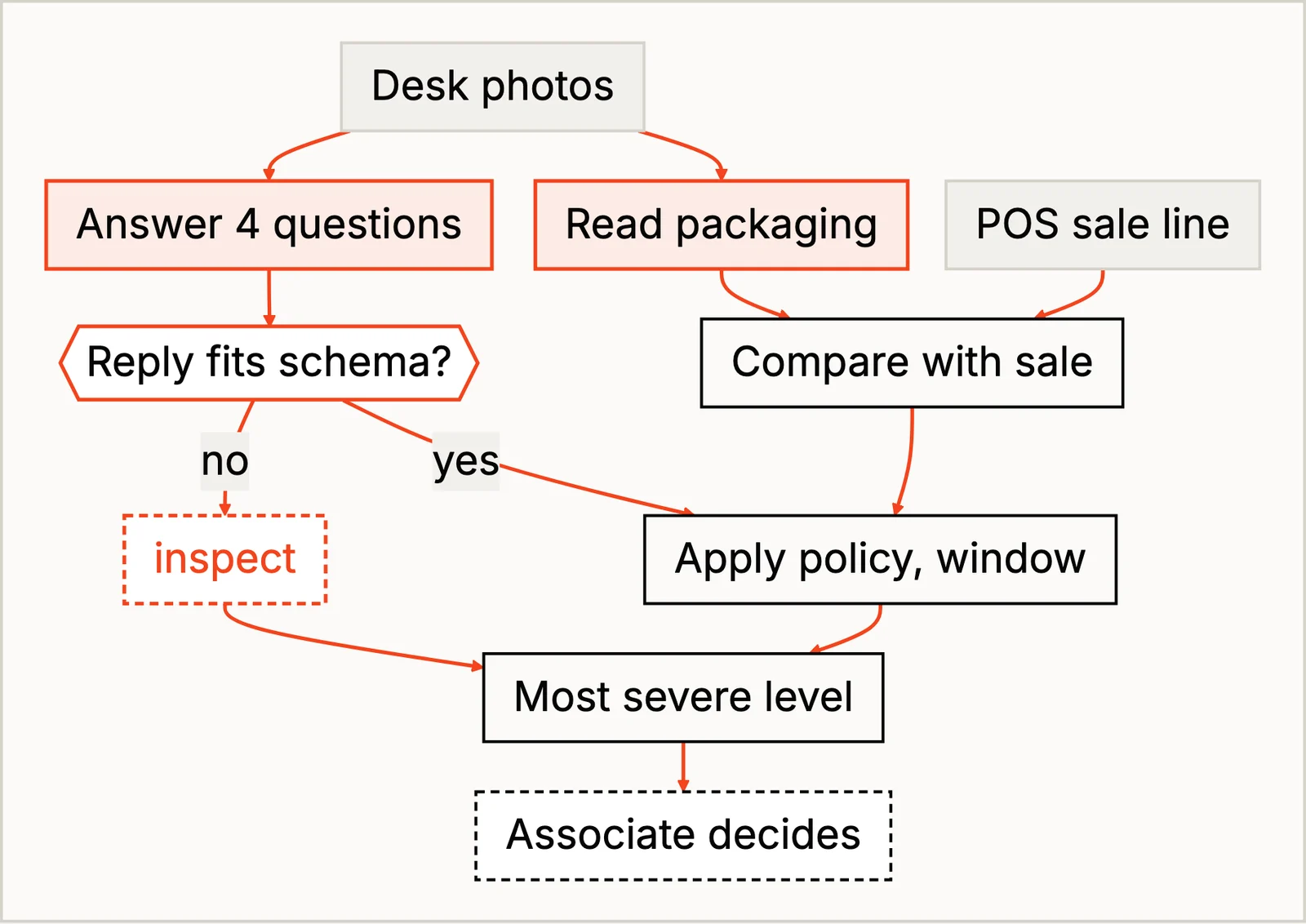
The test set is seven returns: real Creative Commons photos of real products, against sales written to match them, each built to test one way a return can go. They show how the checks behave, not how accurate the recipe would be at your desk. The toaster is the case the model number check exists for. GLM-OCR misread TR1250WD as TR12501WD, and the misread was still close enough to the sale’s TR1300WD to count as a different model of the same line, so it came out refer for a manager. The misread did no harm, since the real TR1250WD would have been a mismatch too. The condition model was the weaker part: it called a crumpled shipping carton minor damage, which changes nothing under rules.yaml, and that return got to inspect only because nothing printed on the carton said what was inside.
Pro-tip: when the questions are fixed and the answers come from a short list, try a small model first. The condition model is one line in rules.yaml, so I swapped in Qwen/Qwen3.5-4B. On the crumpled carton the two disagreed (the 4B said opened with major damage, the 27B closed and minor), and seven returns can’t tell you which is right more often. Run both on a few weeks of your own desk photos before you pick one. And if your desk already has a barcode scanner, use it for the UPC and keep OCR for model numbers and names.
Routing the Shared Care Inbox
For a second example, consider the shared customer care inbox. A care agent opens each email, picks one of seven care teams and copies the order number and store into the ticket. Most emails are routine (where is my order, refunds, assembly, loyalty points), and an email in the wrong queue waits until somebody notices. Now and then one is about a heater that sparked and burned a child, and it belongs with product safety the same day.
The inbox recipe is also a workflow, and it checks for the emails that can’t wait first, with a plain phrase list in Python, and writes escalations.csv before the first model is called, so no model can talk a burn out of the safety queue. Picking a team for everything else is a much smaller job. Paying a generative model to pick one of seven labels and then parsing its prose seemed wasteful, so fastino/GLiNER2.5-Decide returns a score per team from each team’s one-line description. A top score under 0.50, or a lead over the second team under 0.20, sends the email to the general queue with the model’s guess shown. fastino/gliner2-large-v1 finds the order number and store, and Python checks that the order number fits the LK plus 6 digits format and the store is on the store list. The care lead confirms every route.
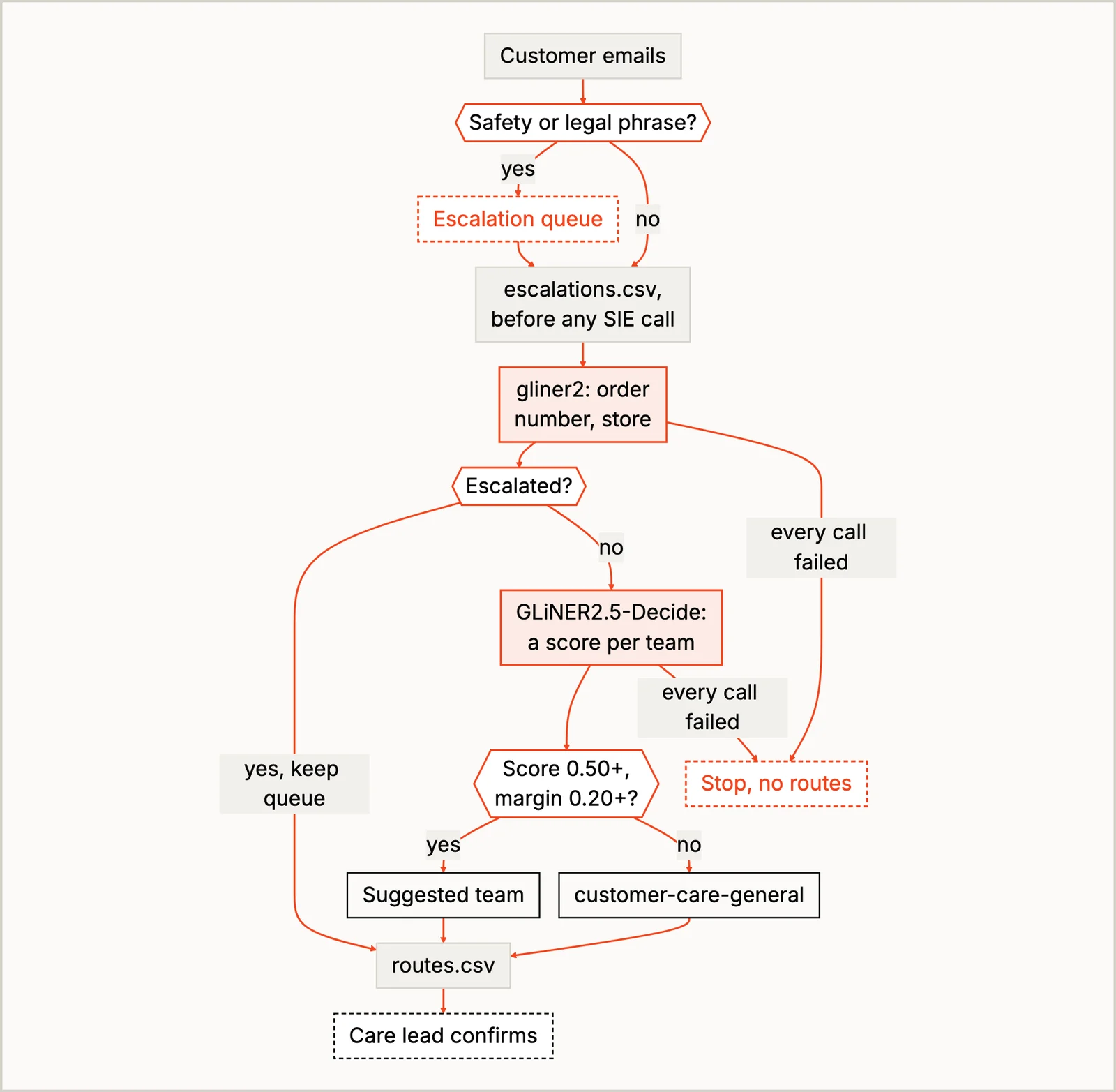
The recipe’s twelve synthetic emails each test one way routing can go wrong, and three of them are worth a closer look. A child cut by a shattered glass table uses words the phrase list doesn’t have, and that one is a miss: it landed in the general queue, and only because the decision model wasn’t sure either (its best guess was product help, at 0.39). I didn’t add “cut” to the list, because for a home and garden retailer “the mower won’t cut” is a Tuesday; the recipe’s README suggests asking the decision model a second yes-or-no question instead: does this email describe an injury? A product question that mentioned picking up at a store matched the in-store pickup team’s description and scored 0.59 for that team, 0.21 ahead of the next one, so it just cleared the 0.20 margin and went there, so rewrite team descriptions until their cues don’t overlap. And an email about two problems, a billing mistake and a late delivery, went to the delivery team with a clear lead, and its line in routes.csv only mentions delivery. That’s why the care lead confirms every route and reads the general queue too, since that’s where an injury the phrase list misses ends up, and why a named person still watches the safety queue.
Pro-tip: treat 0.50 and 0.20 as numbers set on twelve synthetic emails. They decide when to trust the model’s score, and they can’t tell you whether it’s right, so check them on your own mail before you rely on them.
Run It Yourself
If you want to see how the recipes decide on a real run, the easiest place to start is SIE Serverless with the sample data. You need uv and an SIE API key:
git clone https://github.com/superlinked/cookbookcd cookbookcp .env.example .env # then set SIE_API_KEYcd retail/check_returned_item_against_saleuv run recipe.pyThe run writes guidance.md in runs/<timestamp>/, one card per return. For the inbox, cd ../route_customer_emails, run uv run recipe.py again and open escalations.csv first. I ran both recipes this way. When you’re ready to try your own photos and emails on your own GPUs, point SIE_BASE_URL in .env at your SIE server; the code stays the same, and SELF_HOSTING.md has the setup.
Conclusion
Most retail jobs come apart the same way these two did. Write down the steps a person takes, give code everything the POS, the policy and a phrase list already know, give a small model only what no system can do (reading the model number off a box, picking the team for an email), check what it returns against what the store has, and decide whether the whole thing runs as a workflow or needs an agent. The decisions about money and safety stay with the people who make them today. The cookbook READMEs name a few more retail jobs that work like this: checking a delivery against the purchase order at the back door, a damaged-in-transit claim, a trade-in device, routing supplier emails to buyers, and a shelf check from one photo, where models read the shelf tags and Python compares the prices with the catalog.
If you try the returns recipe on your own desk photos, I’d love to hear how often the condition model calls a crushed box “minor”. I suspect it’s more than once.