
Small Open Models for E-commerce

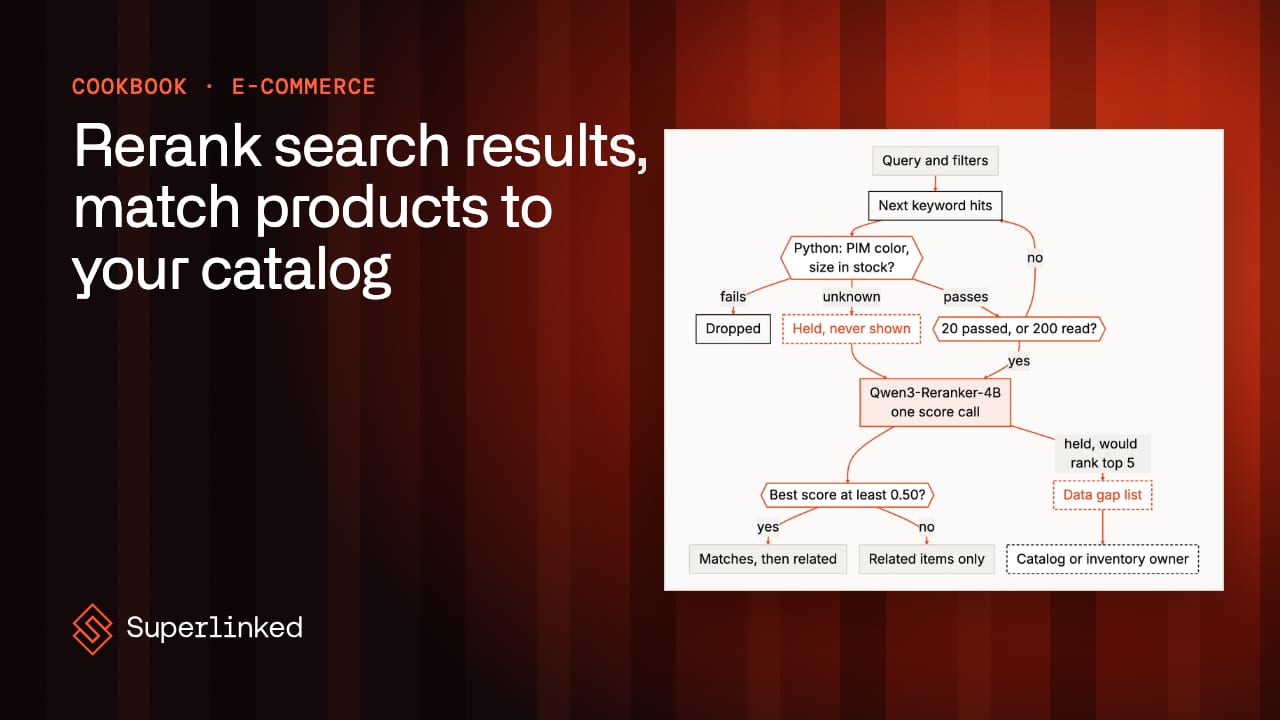
An online store has a lot of people making a lot of small decisions. Merchandisers decide what shows up first, search engineers chase the queries that get no clicks, catalog teams keep product data clean as suppliers send new feeds, and somewhere else people are screening orders for fraud, answering customer emails, handling returns and forecasting how much of each product to stock. AI shows up in nearly all of it: search relevance, recommendations, product tagging and categorization, duplicate and supplier matching, fraud scoring, demand planning, pricing and customer service.
Here I’ll stay with the two that sit closest to the shopper, the search box and the catalog behind it. Both depend on thousands of small decisions a day that a handful of people can’t make by hand. Most of those decisions are facts your systems already hold, and a few are questions like “does this listing fit the search?” that a small model built for that one kind of question answers well.
In this post I’ll start with who keeps search and the catalog working and why it’s hard, then look at what online stores like Instacart, Etsy, Shopify and eBay already do with open models. After that I’ll walk through how I break an e-commerce job into steps and decide which ones go to code and which go to a small model, and then show two worked examples from the SIE cookbook: reranking search results inside the shopper’s filters, and matching a new supplier’s feed to your catalog. Both recipes run on SIE Serverless, so you can try them the same afternoon.
The Search Box and the Catalog Behind It
A small team keeps both working. The merchandiser decides what the first row of results shows and makes sure every new product carries its type, color and material, so the filters can find it. The search relevance engineer works out why some searches get no clicks. And a catalog data steward owns the PIM (the product information management system, where the store keeps every product’s size, color and barcode) and decides, for each new supplier feed, which products the store already sells, which are variants of one and which are new.
The trouble is how many of those decisions there are, and how fast some of them have to be made. Search answers every request in a few hundred milliseconds, long before any person could look, and at the holiday peak every shopper is searching at once. Each mistake is small on its own: a shopper who doesn’t see what they want in the first row usually leaves, and a product with no color in the PIM never matches a color filter, so nobody notices until a merchandiser goes looking for why it never sells. It doesn’t help that shoppers and suppliers don’t write the way your catalog does. A shopper types “i want a warm jacket with a hood and that is waterproof and black or dark coloured like navy”, and the listing that fits has “waterproof” and “hooded” somewhere in its bullet points, written the seller’s way.
Today most of this gets fixed after the fact. The relevance engineer and the merchandiser open the analytics dashboard each week, pull last week’s queries with no clicks or no results, reproduce them in a storefront preview and patch what they can. The steward has the supplier’s feed open in a spreadsheet next to the PIM, reading two titles and opening two photos side by side for every product without a barcode. Most pairs are obvious, which is exactly why the steward stops looking closely somewhere around the two-hundredth.
What Online Stores Already Do With Open Models
The public examples are mostly about search (the e-commerce page has more of them), and in each one the company trained an open model further on its own data:
- Instacart fine-tuned an open-source Llama-3-8B with LoRA for real-time query understanding. They wrote in November 2025 that it serves millions of cold-start queries weekly and cut user complaints about poor results for tail queries by 50%.
- Etsy has an LLM label query and listing pairs, and fine-tuned a smaller Qwen 3 VL 4B on those labels. It labels “millions of query-listing pairs daily at a very low cost” for offline relevance evaluation (January 2026).
- Shopify fine-tuned Qwen3-32B into a tool-calling agent that builds Flow automations from natural language. It replaced a frontier model and now runs “on infrastructure we own” at 68% lower cost (April 2026).
- eBay adapts Meta’s Llama models to e-commerce by continuing to pretrain them on eBay and general data.
What they have in common is that each model has one job inside a bigger system, and the store’s own data decides how well it does it. All four trained a model on their own data. The recipes in this post don’t, and I’ll come back to when that’s enough.
How I Break an E-commerce Job Into Steps
When I look at a job like reranking search or matching a feed, I break it into steps, decide whether it should run as a fixed workflow, an agent loop or a mix of the two, and then work out which steps code can do and which need a small model. I wrote up how I decide between a workflow and an agent in when to use a workflow and when to use an agent, so I won’t repeat it here.
For the two examples in this post the answer is a workflow, and it isn’t close. Search has to answer every request in milliseconds, which leaves no room for a model to think about its next step, and matching a feed is the same steps for every product, thousands of times over. Agents do have a place at an online shop, just not in these two examples. The cookbook’s log investigation recipe shows one: Python sorts a day of the shop’s logs into patterns, and only the few odd ones go to an agent.
Deciding which steps need a model is where e-commerce is kind to you. Most of them are facts your systems already hold: the filters the shopper picked, stock per size and color, a shared GTIN (the barcode number) or model number, a pack count both records state. Those are lookups and rules in Python. That leaves a few questions no system has the answer to. Does “warm jacket with a hood that is waterproof” describe this listing? Do these two photos show the same product? A reranker or an embedding model answers those with a score you can set a rule on, and I keep one rule above all the others: a model’s guess never overrules a fact the rules can check in the PIM or the stock system. (The hammer further down shows where that stops: a fact only one record states is one the rules can’t always check.)
Two practical questions come before picking a model. The first is where it runs. What shoppers search for and buy is personal information, so I’d rather run the models where that data already lives (the across-industries post lists what that takes). The second is whether to train your own model, the way Instacart, Etsy, Shopify and eBay did. The two recipes below don’t; they use the models as they ship, with rules around them. That works when the rules handle the facts (size, color, stock) and the model only puts things in order or says how alike two products are. Deciding when that stops being enough is its own question, and I covered it in off the shelf or fine-tuned.
Reranking Search Without Bending the Filters
As an example, take one search. A shopper types “women s black tennis shoes size 8” into your search box and ticks black and size 8 in the filters on the left. They expect the first row to be black size 8 tennis shoes they can actually buy. The search service pulls candidates (often from a keyword engine like BM25), applies the filters against the catalog and the stock system, and orders what’s left.
Both obvious ways to get a better order go wrong. Letting a model rank everything invites it to trade a filter for relevance, and a bent filter (a size 8 search showing a size 8.5, or a sold-out shoe) costs trust faster than a bad order does. Plain keyword ranking keeps the filters and gets the order wrong instead: “cropped black shirt” fills the page with black T-shirts that aren’t cropped.
So ecommerce/rerank_search_within_filters keeps the filters in Python and lets a model do only the ordering. In pseudocode, the search step looks like this:
def search(query, filters): eligible, held = [], [] for hit in keyword_engine.walk(query, page=20, cap=200): # your engine check = filters.check(hit, pim, stock) # Python: color, size, in stock if check == "pass": eligible.append(hit) elif check == "unknown": held.append(hit) # no PIM color, not in the feed if len(eligible) == 20: break scores = reranker.score(query, eligible + held) # small model, one call data_gaps.add(h for h in held if would_rank_top5(h, scores)) # for the catalog owner return sorted(eligible, key=scores.get, reverse=True) # only eligible are shown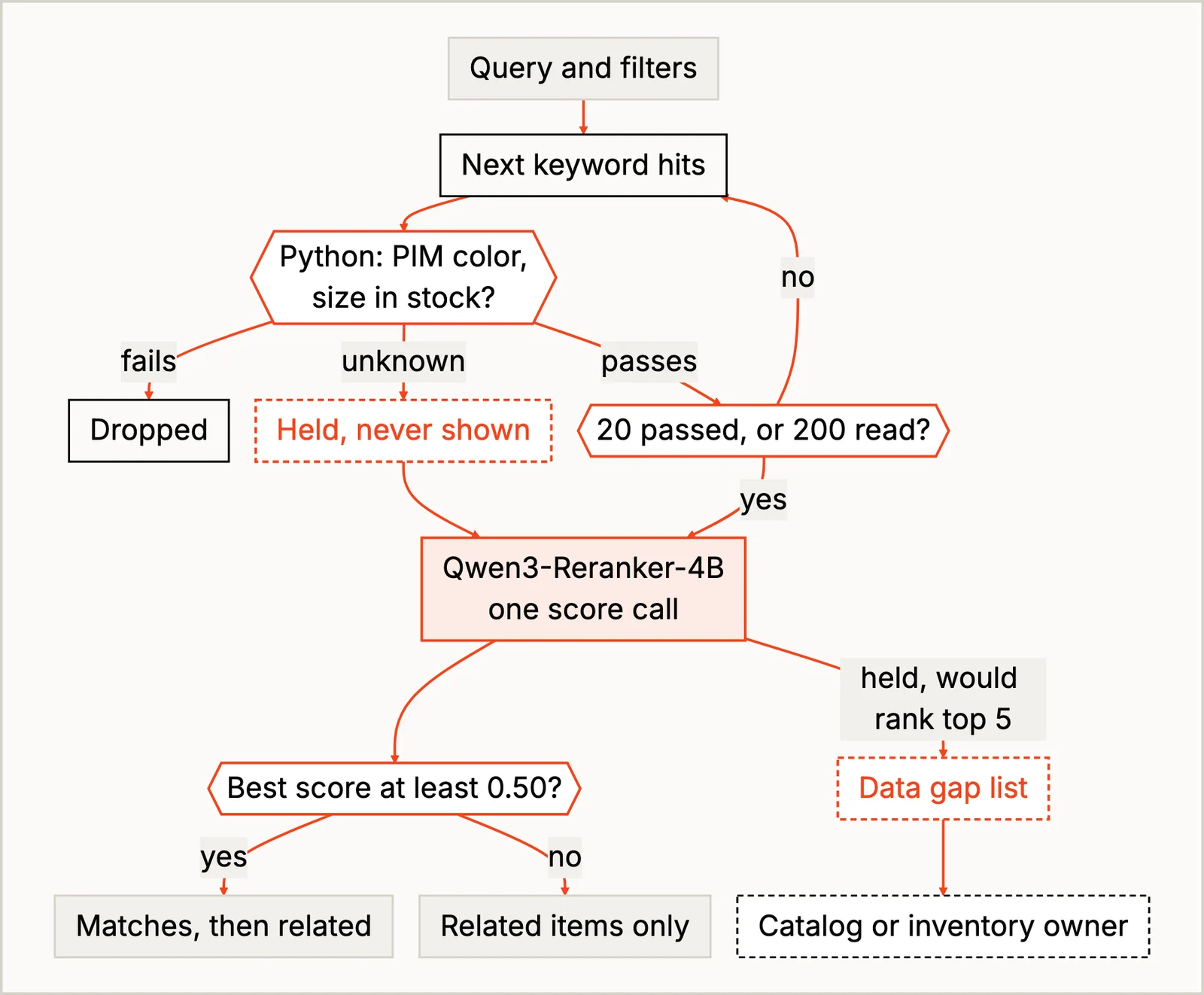
Python reads the keyword engine’s results a page of 20 at a time, checking the filters on each product as it goes, and stops once it has 20 that pass or has read 200. It filters while it reads because if you filter after cutting to the top 20, the matching product at hit 21 is gone before anyone checks it. Then Qwen/Qwen3-Reranker-4B scores the products in one call per search. A product Python can’t check (no color in the PIM, missing from the stock feed) is never shown and never guessed. The reranker scores it anyway, only so the recipe can tell whether it would have ranked in the first five, and if so it goes on a data gap list for the catalog or inventory owner to fix. I picked a reranker over a chat model because its inputs and outputs fit the job exactly: a query and a list of texts in, a score per text out.
The product text and seven of the eight test queries are real (Amazon’s ESCI dataset); the stock feed and filters are made up. On the live run, 8 of the README’s 10 test cases came out as expected. It counts the tennis-shoe query below as three cases, since it checks two shoes the filters should drop as well as the order of what’s left, and the two misses are that query’s order and a typo’d search for toddler shoes. My favorite is “all white boots for girls”, where the first keyword hit is a pair of white boot-cut trousers. They have “white”, “boot” and “girl” in the title, which, to be fair to BM25, is all it was asked for. That’s the order problem the reranker is there to fix. The same query also shows the data gap list at work: two Dr. Martens boots with no color in the PIM can’t be shown, and they go on the list for the catalog owner.
It slipped on the tennis shoes. The filters held, and the sneakers sold out in black size 8 were dropped, but the one black size 8 tennis shoe still in stock, a New Balance sneaker, scored 0.13, under 0.50 (the reranker’s yes/no midpoint), so the shopper saw it as a related item instead of a match. The README’s guess is that the size words in the query count against the size-8 shoes, and since the filters already handle size, you can strip words like “size 8” before reranking. That 0.50 belongs to this model, by the way. Swap the reranker and you have to check it again.
Pro-tip: a size filter without its sizing system isn’t the filter the shopper meant. When I searched “black tennis shoes” with --size 8 and no sizing system, a toddler’s size 8 sneaker came first, scoring just over the 0.50 cutoff. Add --size-system women and it’s gone.
Matching a New Supplier’s Feed to Your Catalog
For a second example, go back to the catalog data steward. Supplier feeds are full of products with no barcode, or with a model number typed three different ways. The ones with a shared barcode take seconds. The rest mean noticing that the same cashews are salted instead of unsalted, or that the same charger has a UK plug. (Matching is one half of onboarding a feed; the cookbook also has a recipe that sorts the products into your category tree.)
Every shortcut breaks somewhere. Fuzzy title matching merges “6 Feet” with “10 Feet”, photos alone merge a black leather flat with a black suede one, and a large model call for every pair is slow over thousands of pairs (and you’d still have to check its answer against the identifiers you have). So ecommerce/match_products_to_catalog starts with the cheapest step and only moves on when that step can’t decide: a lookup, two small models, a bigger 27B model and a person.
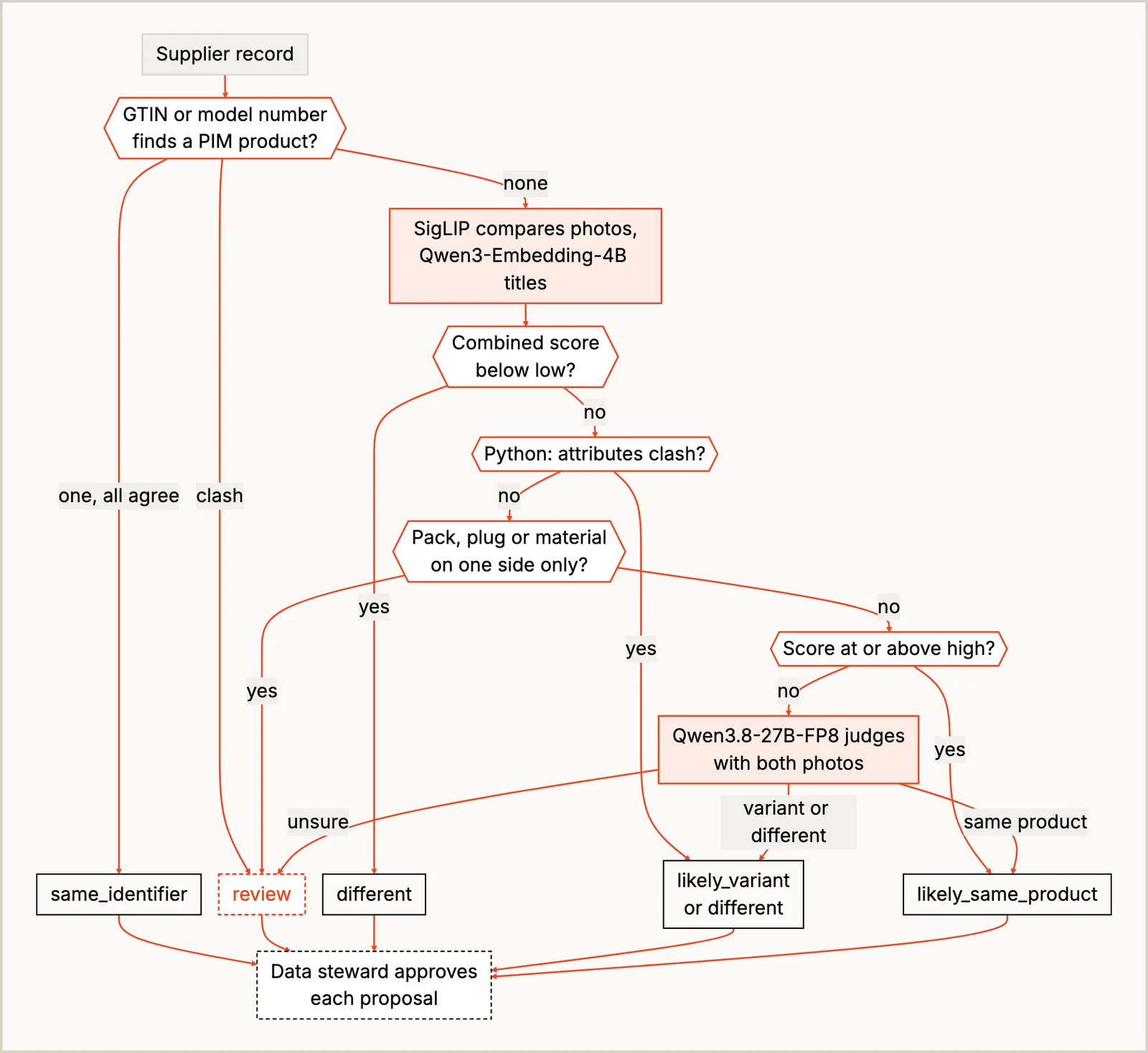
A shared barcode or model number is a lookup, so a rule settles it, and different model numbers on both sides make a pair different whatever the photos say. For everything else, two small embedding models compare photos and titles, and each has a blind spot you can predict. SigLIP is good at “same kind of object, same color”, which is why the 6-foot and 10-foot black cables score as nearly identical: it can’t see length. Qwen/Qwen3-Embedding-4B reads “Roasted & Salted” and “Roasted & Unsalted” as nearly the same, because one word apart reads very alike. So Python’s attribute rules go next. They catch a size, color, pack count, plug or material that the two records both state and that differs, and they send a pack count, plug or material that only one side states to the steward. A size or color only one side states goes on to the next step, which can see a color in the photo. Only the pairs still undecided reach Qwen/Qwen3.8-27B-FP8, a bigger 27B vision-language model, with both photos. Which pairs get that far depends on two cutoffs on the combined photo-and-title score: below the low one a pair is different, above the high one it’s likely the same, and only pairs in between go to the 27B model. Both cutoffs were set on these two embedding models, so if you swap either one, set them again. Nothing merges on its own; the steward approves every match the recipe proposes.
On the first run the 27B model linked two different shoes. A black suede ballet flat and the black leather one have the same title, the same color and the same size, and it looked at both photos and called them the same product, helpfully noting that “only the material finish differs slightly.” So I moved material out of the model’s hands and into the rules: when the PIM says leather and the supplier says nothing, the pair goes to the steward before the 27B model sees it. That rule has a cost. Shoes that really are the same as their PIM product now wait for the steward too, because their supplier titles don’t name a material, so if your suppliers fill in a material field the rule costs you nothing, and if they don’t, the steward gets more work.
It also matched a supplier’s claw hammer with no weight in its title to both the 20 oz and the 16 oz hammer in the PIM. A weight only the PIM states isn’t one of the one-sided attributes the rules stop, so the pair reached the 27B model, and here the model’s guess went past a fact the PIM holds. A hammer can’t be both, and a rule that flags one supplier product matched to two PIM products sent it to the steward. That rule caught the hammer only because the model made two matches that can’t both be true, though. If it had matched the hammer to the 16 oz one alone, nothing in the recipe would have noticed, and the steward would have had to.
What’s left for the steward, instead of reading every pair side by side, is checking what’s in neither record (the material of a shoe whose supplier didn’t name one, the weight of a hammer, a photo that shows something other than its title) and then running the import. When a match is approved, the supplier’s record is linked to the product you already have, and your existing catalog entry is the one you keep.
Run It Yourself
The easiest way to try either recipe is on SIE Serverless, where you don’t have to set up a GPU. You need uv and an SIE API key:
git clone https://github.com/superlinked/cookbook && cd cookbookcp .env.example .env # set SIE_API_KEYcd ecommerce/rerank_search_within_filtersuv run recipe.py # the 8 sample queriesuv run recipe.py "black tennis shoes" --color black --size 8 --size-system women # one searchThe catalog matcher runs the same way from ecommerce/match_products_to_catalog. I ran both on SIE Serverless. When you want them on your own GPUs, SELF_HOSTING.md has the setup. I’d start by swapping the sample queries for a few of your own no-click searches (on SIE Serverless, only ones with nothing that identifies a shopper, or ones your data rules allow) and reading the before-and-after pages the recipe writes.
Conclusion
An online store makes thousands of small decisions a day, and once you break any one of those jobs into steps, most of the steps turn out to be facts your systems already hold. Give those to code, find the one or two questions no system can answer (does this listing fit the query, are these two products the same) and give each to a model that does only that, a small one where it’s enough and a bigger one only for the pairs the small ones can’t settle. The READMEs name other jobs with the same shape, where some conditions are hard facts and the rest is “which of these fits best”: a parts search filtered by vehicle fitment, a help-center search limited to the shopper’s country, merging duplicate pages in your own catalog and matching competitor products for price monitoring.
I’m always curious how stores are splitting this work between code and models. If you run the reranker against your own no-click queries, I’d love to hear which ones it fixed.