
What Is SIE? An Inference Engine for Task-Specific Models
Your team has found a task-specific model that does one job really well, maybe a GLiNER model that finds personal details in support tickets or a 4B reranker that beats the search API you pay for today, it runs in a notebook, the numbers look good, and now it has to go to production. The model is ready. The infrastructure isn’t.
This post is about the gap between those two, and about what SIE (the Superlinked Inference Engine) does to close it. I’ll start with how teams serve a model like this today and why their GPUs still sit mostly idle, even with good inference servers. Then I’ll say plainly what SIE is, show where each way of running it fits, and walk a request through it. After that come the four jobs SIE takes off your plate and the models you can run on it. The other posts in this series go deeper on each part, with our measurements.
Serving a Model Today Is a DevOps Project
Getting the model served usually starts with a ticket. You ask the DevOps team one thing: “Can you serve this PII model for us?” They come back with questions. Is it in the company’s model catalog, and do you have permission to run it? Which GPU does it need, and how many? Should it stay on all the time, or only during office hours? Then they pick an instance type, write a deployment and put a load balancer in front of it, by hand.
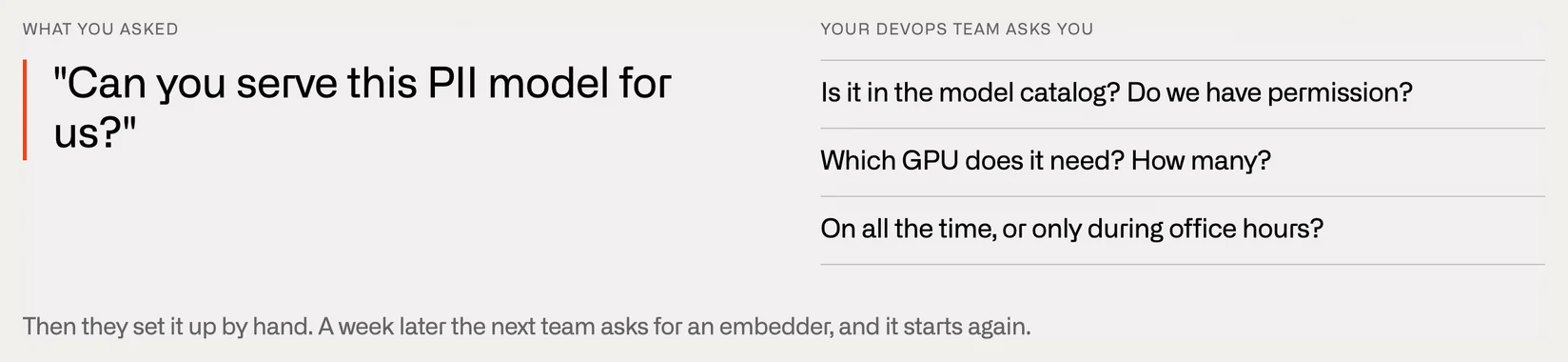
A week later another team wants an embedder, and it all happens again. Each model takes time, each one is set up by hand, and each one adds to what the team has to look after.
Why the GPUs Still Sit Mostly Idle
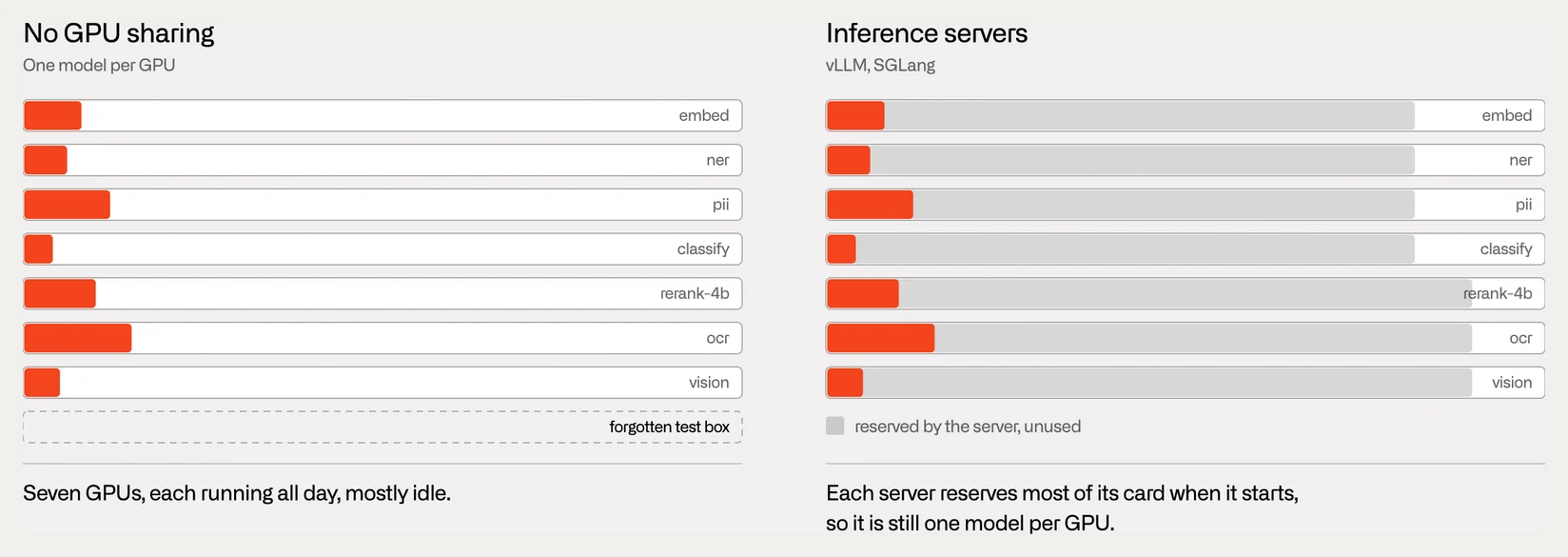
Seven models in, you have seven deployments on seven GPUs that sit mostly idle. Plus the H100 someone started for a test in March and forgot about, which is still billing by the hour. (Nobody remembers who started it. The invoice does.)
Good inference servers don’t fix this on their own. vLLM and SGLang are excellent at serving one model, and they’re built to own the card: vLLM takes 90% of the GPU’s memory by default, and SGLang sets aside about 82% of an L4 when it starts. A second server on the same card runs out of memory before it serves a request (our two-SGLang-models recipe shows it happening). So even with the best servers, it’s still one model per GPU.
Teams End Up Building a Serving Platform
The ticket is only the start. Paying for idle GPUs gets old, so the team adds autoscaling to scale each deployment up and down. Then traffic comes in bursts, requests time out while a new machine starts, and a worker dies halfway through a batch, so eventually they add a queue in front. Model by model, they’re building a serving platform, and running it is ongoing operational overhead for the DevOps and MLOps teams, on every model they add.

You don’t need to build any of this. SIE already does it.
SIE Is the Engine Between Your API Call and the GPUs
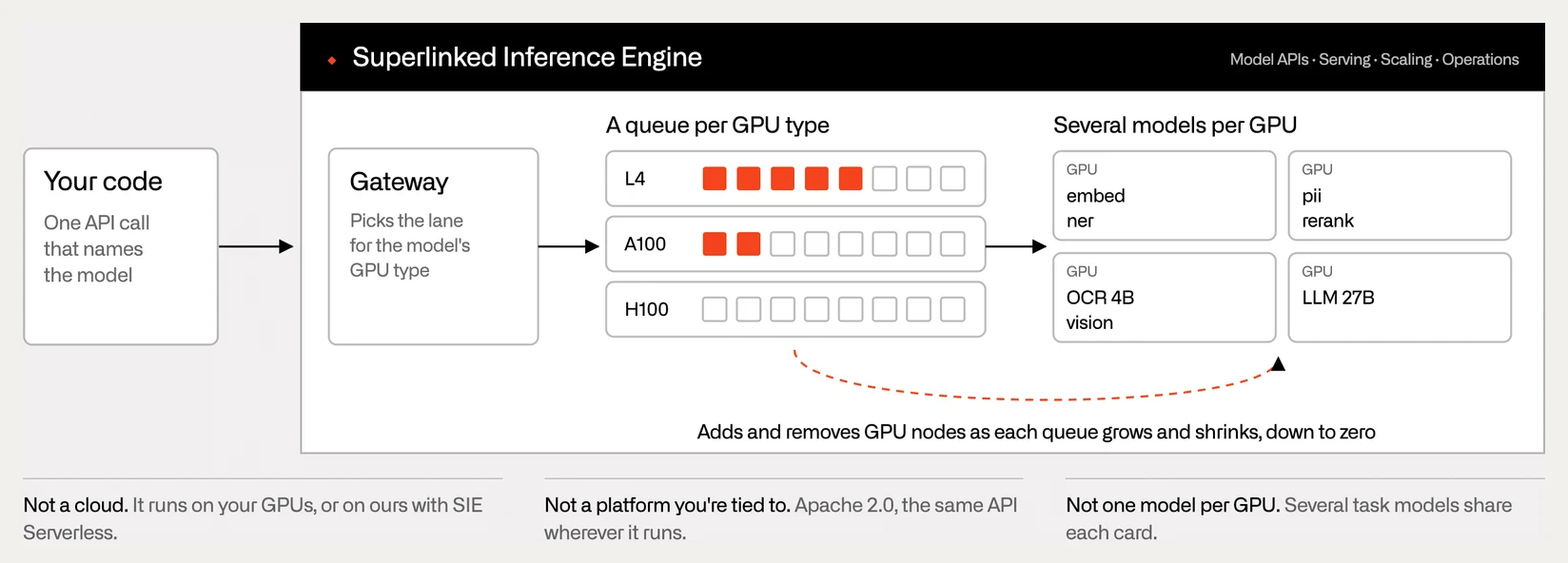
SIE is an inference engine: the software that sits between your API call and the GPUs. Your code calls one API and names a model. Inside SIE, a gateway puts the request on the queue for the GPU type that model needs, GPU nodes pull from those queues with several models on each GPU, and SIE adds or removes nodes as each queue grows and shrinks, down to zero.
What it isn’t:
- A cloud. SIE doesn’t rent you GPUs. It runs on the GPUs you already have, or on ours if you use SIE Serverless.
- A platform you’re tied to. It’s Apache 2.0, and the API and model names are the same wherever it runs.
- One model per GPU. Several task-specific models share each card.
Where Each Way of Running SIE Fits
The same engine runs four ways, and which one fits depends on two things: how many GPUs one model needs, and how far along your models are, from public open-weight models to task-specific ones, LoRA fine-tunes and models you fully fine-tuned or trained with RL. The API and the model names are the same in all four.
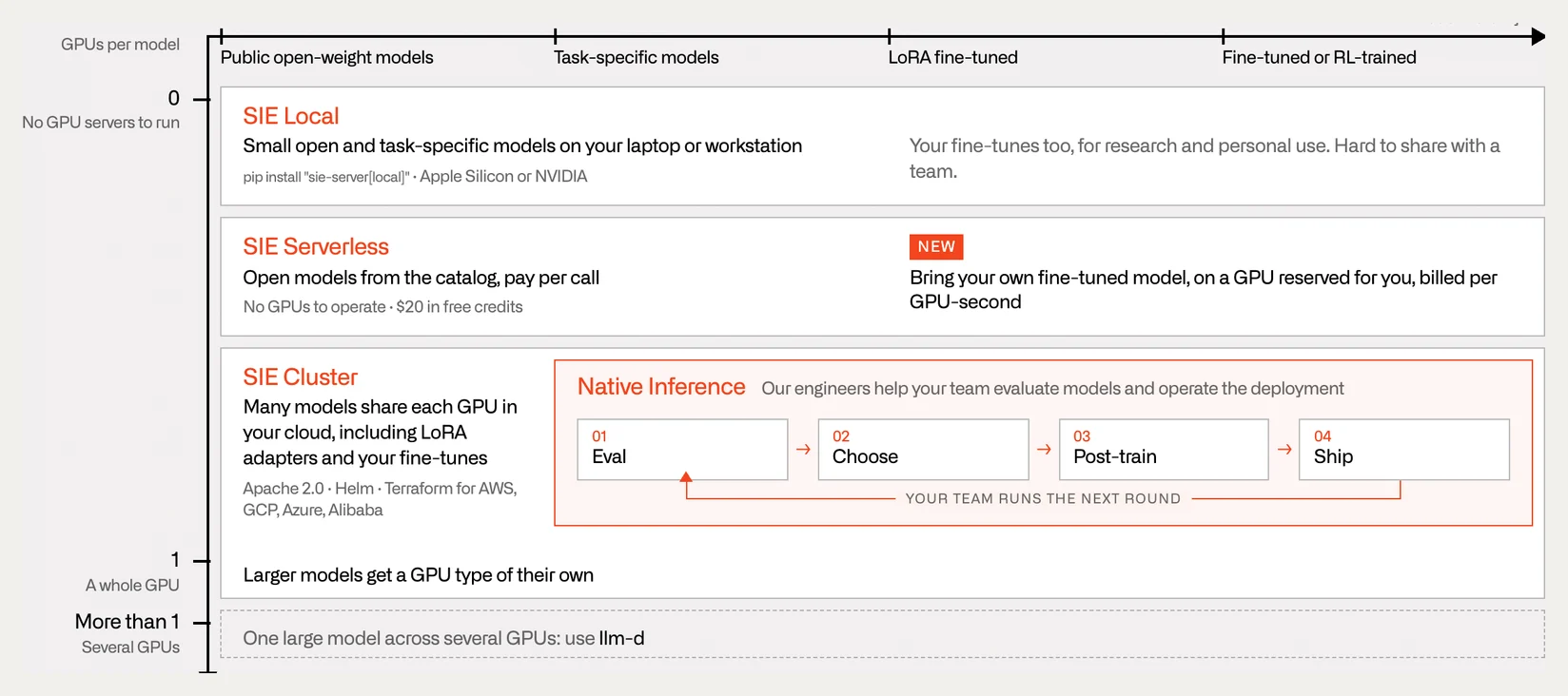
SIE Local is where most people start. Small open and task-specific models run well on a laptop or workstation (pip install "sie-server[local]", on Apple Silicon or NVIDIA). Your fine-tunes run there too, which is fine for research and personal use, but a model on your workstation is hard to share with a team.
SIE Serverless runs open models from our catalog with no GPUs to operate, and you pay per call (new accounts start with $20 in free credits). New: you can also bring your own fine-tuned model and run it on a GPU reserved for you, billed per GPU-second.
SIE Cluster runs in your own cloud, with an Apache 2.0 Helm chart and Terraform modules for AWS, Google Cloud, Azure and Alibaba Cloud. Many models share each GPU, including LoRA adapters on a shared base model and your own fine-tunes, and larger models get a GPU type of their own.
Native Inference is SIE Cluster with our engineers helping your team evaluate models and operate the deployment. It runs as a loop: you write evals from your product’s real questions, let them pick the open models that pass, post-train one alongside our engineers where none passes, and ship it on your SIE Cluster, owned by your team. Then your team runs the next round.
If one large model needs several GPUs to itself, use llm-d. That’s what it’s built for, and SIE sticks to what it’s best at: the many models that each need less than a GPU. Choosing Between SIE Serverless, SIE Cluster and SIE Local goes deeper on picking one.
How a Request Moves Through SIE
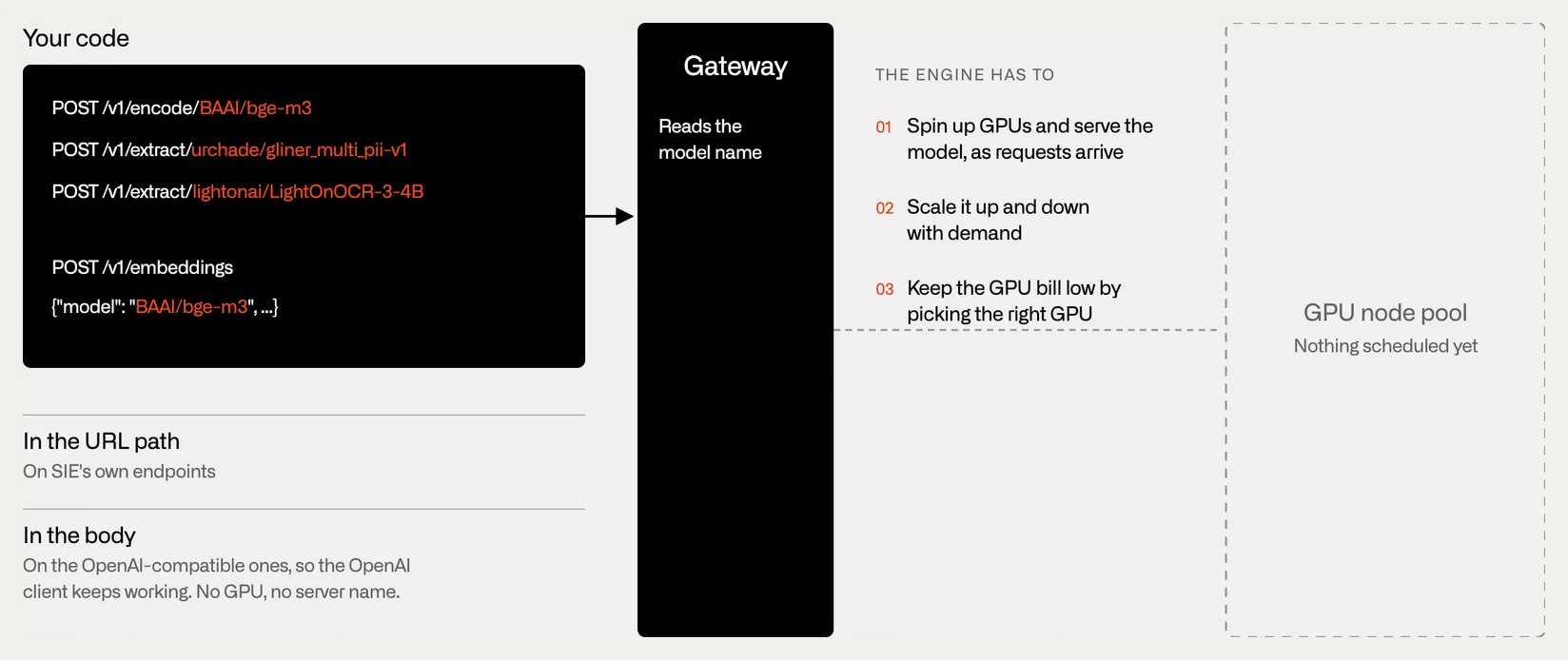
An inference engine simplifies model serving. Your code names the model and nothing else. The name goes in the URL path on SIE’s own endpoints (POST /v1/encode/BAAI/bge-m3, POST /v1/extract/urchade/gliner_multi_pii-v1) or in the body on the OpenAI-compatible ones (POST /v1/embeddings with "model": "BAAI/bge-m3"), so the OpenAI client keeps working. You never say which GPU or which server. That leaves the engine three jobs: spin up GPUs and serve the model as requests arrive, scale them up and down with demand, and keep the GPU bill low by picking the right GPU for each model. The next three steps are how SIE does them.
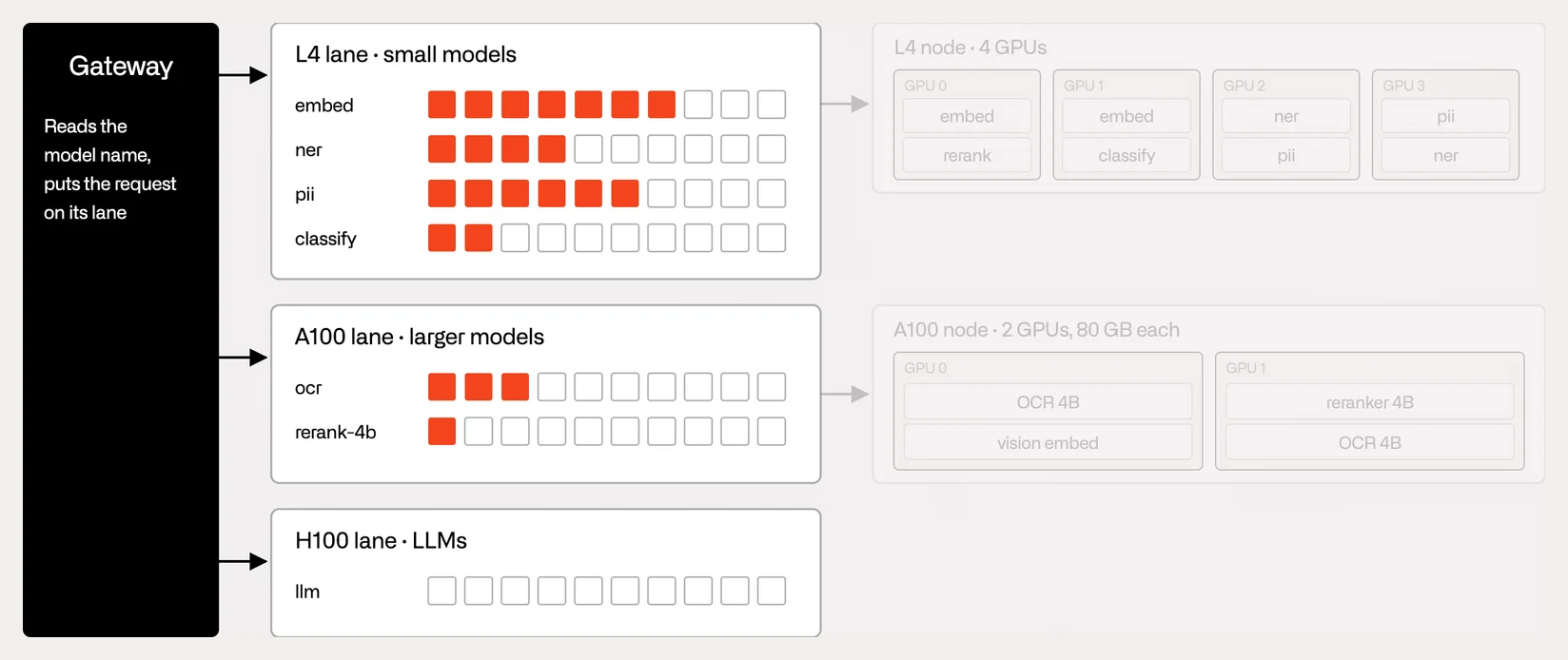
The gateway queues each request for its GPU type. A lane is a group of identical workers: the same GPU type running the same software. The gateway reads the model name and puts the request on that model’s lane. Each lane has one queue, and every request in it carries its model’s name, which is why the picture shows a row per model. Small models go to the L4 lane, larger ones to the A100 lane, and LLMs to the H100 lane. A request stays on the queue until a worker confirms it’s done, so a worker that dies halfway through a batch doesn’t lose anything.
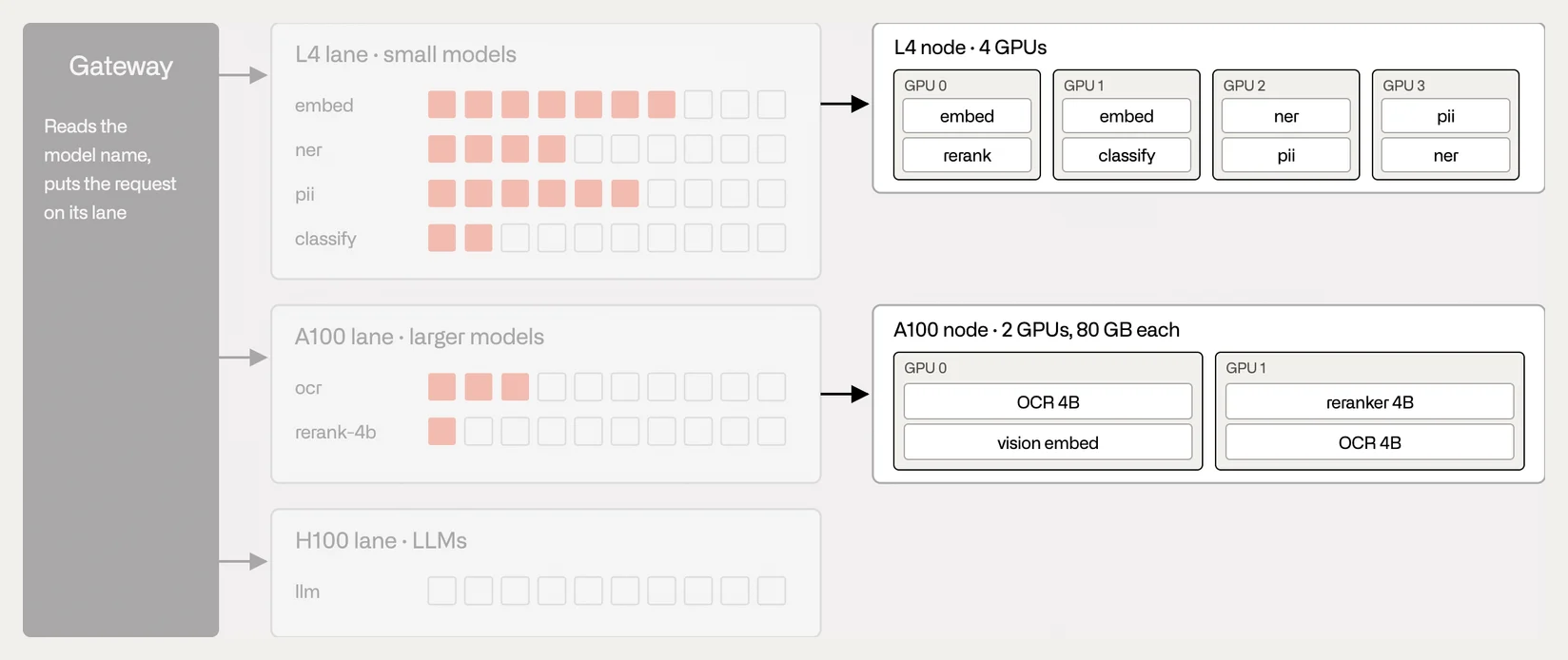
Each GPU holds several task models. Every node in a lane pulls from that lane’s queue. Inside the node, requests are grouped by model, batched, and sent to a GPU that has the model loaded. One GPU holds several models at once, so an embedder, a NER model and a PII model can share one L4.
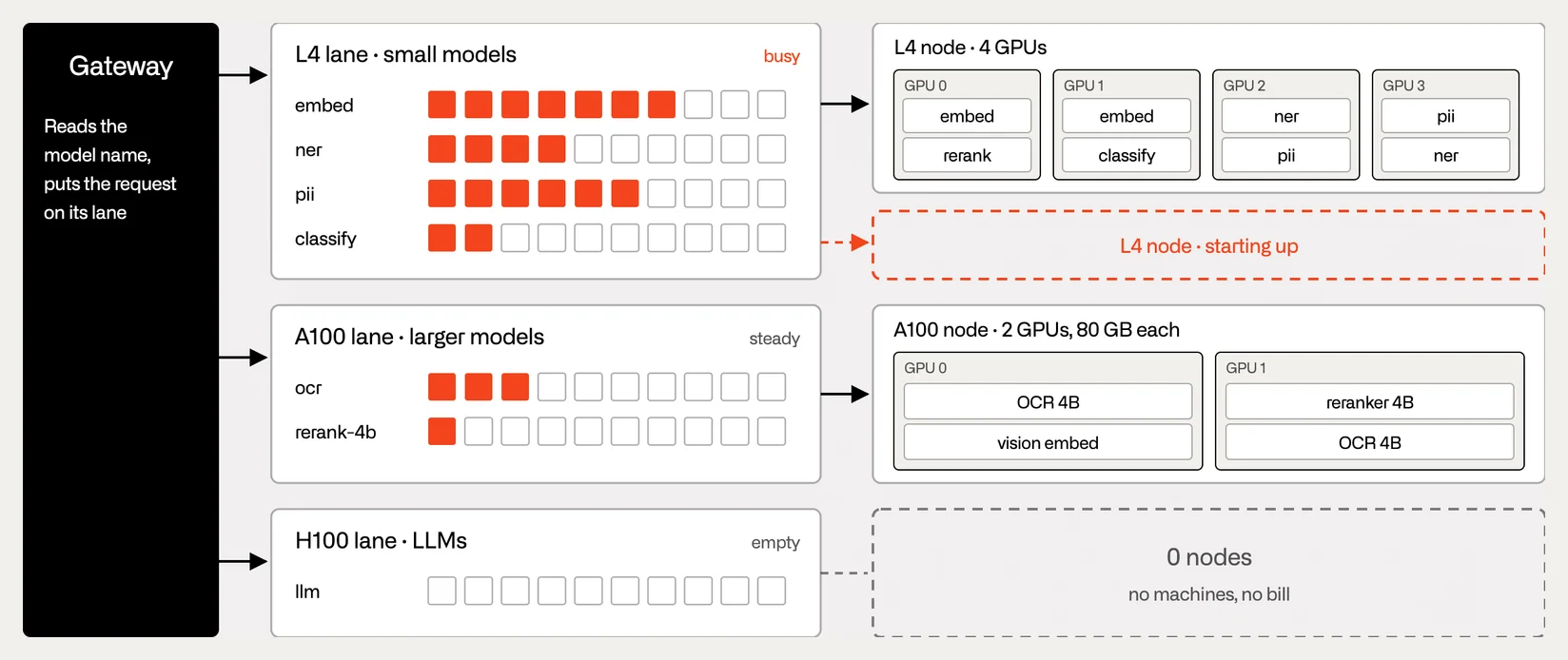
Each GPU type scales on its own queue, down to zero. When the L4 lane backs up, SIE adds an L4 node. When the H100 lane is empty, it has no nodes, and no bill.
The Four DevOps Questions SIE Answers for You
Go back to the ticket. Each question the DevOps team asked becomes something SIE does on its own.
”How long should it stay on?” SIE scales on the queue, down to zero
Each lane scales on how much work is waiting in its queue, and a lane with nothing to do goes to zero machines, so nobody has to remember to turn anything off. The trade is a cold start: the first request to an empty lane waits while a node starts, which took 5 to 9 minutes on our own Kubernetes cluster.
”Does each model need its own GPU?” SIE packs models onto shared GPUs
Task-specific models are small, and a whole GPU per model wastes most of what you pay for. SIE works out each model’s memory from its checkpoint before loading it, so two SGLang models that can’t share an L4 at their defaults start side by side on the first try. It loads a model on its first request, unloads the least recently used one when GPU memory passes 95%, and never unloads a model you pin.
In our runs, five agent models on two A10 GPUs instead of five answered the typical turn in 239 ms against 226 ms at light load, for 40% of the GPU bill. At medium load the slowest 5% of turns took about twice as long, because a heavy reranker held up the small models sharing its card.
Pro-tip: give your heaviest model a GPU of its own.
”What settings should it run with?” SIE runs each model with its own
A model only matches its published score when it’s served the way it was trained: the right query instruction, pooling, precision and sequence length. In SIE each model has a config file, pinned to an exact model revision, that carries those settings, so they travel with the model instead of with whoever writes the client. Requests are batched by token count (16,384 tokens for most models), which keeps one long document from running the GPU out of memory and still fills a batch with short queries. The benchmark numbers we publish are measured through the public API with each model pinned to its revision, and our eval methodology shows how to repeat one yourself.
”Which GPU does it need?” SIE sends each model to the right GPU type
An embedder runs fine on an L4. An OCR model or a 4B reranker wants more memory, and a 27B LLM wants an H100. In SIE each model belongs to a bundle, a container image whose dependencies work together, and each lane runs one bundle on one GPU type. The gateway only sends a model to a lane whose workers can serve it. Choosing the GPU for each model is the part SIE v0.11.1 started to plan for you: its placement planner takes each model’s measured throughput and latency on each GPU, the GPU prices and your hourly demand, and works out which lane each model goes in and how many workers to keep warm.
Choose From Our Catalog or Bring Your Own Models
SIE is built for task-specific models: embedders, rerankers, entity and PII extractors, classifiers, OCR, speech-to-text, translation and small generation models. You have three ways to get one onto it.
From the catalog. The catalog has 229 model configs today, each with its settings already worked out.
Any model SIE has an adapter for. An adapter is the code that runs a family of models, and SIE wraps SGLang in generic adapters, so a model on an architecture SGLang supports, or on any of SIE’s other adapters, needs a config file and no code. You write the config (SIE doesn’t guess the adapter from the model’s files), and on a running cluster you add it with one call to the Config API, without rebuilding any images. A new architecture needs a new adapter. Adding Models walks through the config.
Your fine-tuned models. A full fine-tune of a supported architecture is a config file pointing at your weights. LoRA adapters are declared in a model’s profile and picked per request, on the models whose adapters support them (LoRA Adapters lists how). The cookbook has a recipe that fine-tunes a decision model end to end. On SIE Serverless you can bring your own fine-tuned model and run it on a GPU reserved for you, billed by the GPU-second.
Conclusion
You don’t have to build an inference engine. Your code names a model, and SIE does the work that used to need a ticket per model: it picks the GPU type, puts the model on a GPU next to others, runs it with its own settings, and scales its lane with the queue, down to zero when nobody calls it. Start on your laptop with SIE Local, run it in your own cloud with SIE Cluster (or with our engineers, through Native Inference), or let us run it for you on SIE Serverless.
The trade-offs are real (a cold start when a lane wakes up, slower tails when a heavy model shares a card), and the next posts in this series measure each one.
If your team is somewhere between the first ticket and the homemade queue, I’d love to hear how it’s going.