
Small Open Models for SRE

Site reliability engineers keep production up, and AI already shows up in a lot of their tools: anomaly detection on metrics, alert grouping to cut noise, capacity forecasting, log search, suggested root causes and incident summaries. Some of it is built into the monitoring stack, some of it teams build themselves, and most of it is aimed at the same thing, getting the person on call to the answer faster.
This post is about on call, the part of the job that wears people down. On call, the work arrives in pieces, and most of the pieces are reading: an alert to read, a runbook to find, a team to page, logs to pull for a vendor’s support case, and a postmortem to write two days later, on top of everything else.
In this post I’ll go through why that reading is hard, what the big observability companies have already done with open models, and how I split an on-call job between code, small models, a bigger model and the person on call. Then I’ll go through four recipes from the SIE cookbook in the order an incident meets them, from the alert storm to the postmortem, and end with where I’d start on your own alerts.
Why On-Call Reading Is Hard
The alerts come all at once, in words nobody agreed on, and often from monitoring you didn’t set up. Say you’re on call for a NOC (network operations center): maybe your company bought three others and kept all three monitoring stacks, or a dozen product teams each write their own alert rules. Either way, one broken dependency fires about 30 alerts from five services, each in its own team’s words, from stacks that can’t even agree whether the label is service, job or app, so grouping by label splits one outage into five. Most alerts have no runbook link, and the ones that do point to a wiki page that moved two reorganizations ago. An alert that no routing rule matches sits in a shared queue until someone works out who owns it, often at 3 a.m.
Every wrong answer costs time, and the first ten minutes decide how long a big incident lasts. The wrong runbook sends everyone down the wrong path, and the wrong team spends ten minutes proving the page isn’t theirs. Afterwards a postmortem can blame the deploy that happened to land mid-outage.
The logs add a second problem, because they carry things that must not travel and they travel anyway. Log lines were written for your own team, so they hold customer emails, client IPs, session cookies and, now and then, a bearer token in a debug header. Then they get attached to a vendor’s support case, pasted into a public bug report, or fed to a model that reads them to investigate.
How SRE Teams Already Use Open Models
The bigger observability shops got here first, and the SRE page has the details:
- Sentry groups issues with a tuned embedding model, trained from
lightonai/modernbert-embed-largeon labeled stack-trace pairs, and it’s on by default for all Sentry customers. - Meta ranks likely root causes with a fine-tuned Llama 2 7B, trained on past investigations whose root cause they knew, and in a backtest on past investigations the right cause was in its top five suggestions 42% of the time.
- Datadog built Scout 1.0, the model behind its investigation agent, by post-training GLM-5.3 Flash, “so that investigations are cheap enough to run an order of magnitude more often and earlier in an incident’s lifecycle.”
Each of them picked an open model for one job. Sentry’s embedding model and Meta’s 7B are small; GLM-5.3 Flash, under Datadog’s agent, is a large one.
How I Split an On-Call Job Between Code, Models and People
A lot of on-call work is already written down somewhere (the alert labels, the service catalog, the deploy log, the Slack timestamps), and nobody should ask a model for it. What’s slow is reading everything in between, and most of that is matching things said in different words. Which of these 30 alerts are the same problem in different words? Which runbook fits an alert that says “Charge returns Invalid token”, when the runbook is titled “Payment: Charge requests failing” and no keyword search will connect them? Which team owns a service name the catalog has never seen? Embedding models, rerankers and decision models are built for those questions, and they’re small enough to call on every alert in a storm. Finding personal data in logs is the same kind of job for a PII model, and writing the postmortem narrative is the one that needs a bigger generative model.
I start by taking one on-call job (e.g. matching a storm’s alerts to runbooks), writing down its steps, and deciding whether it runs as a fixed workflow, an agent or a mix. On call, most jobs repeat, so most of them are workflows. When a workflow meets something it wasn’t built for, it can hand that case to an agent, and the cookbook’s log watcher does exactly that: Python groups a day of logs into patterns and hands the few odd ones to Claude, with code checking every quote in its note. I wrote up how I decide between the three in the workflow-vs-agent post, so here I’ll stick to the steps.
For each step I ask four questions in order, and the first one that settles it wins:
- Do your systems already know it? The alert’s labels, the service catalog and its aliases, the host inventory, runbook links that point at a real wiki page, the deploy log. Python asks these first, because their answers are right and fast.
- Does a model have to read it? Grouping alerts that say the same thing (an embedding model), ranking runbooks for a group (a reranker), picking the owning team (a decision model), finding personal data in free text (a PII model). Each returns a score, a probability or a span, so Python can set a minimum and send anything under it to a person.
- Does it need something new written? The triage note and the postmortem narrative are text a person reads, so they go to a bigger generative model (a 27B in these recipes), with a strict JSON schema and Python checking what comes back.
- Is it a decision? Reassigning the page, working the runbook steps, attaching logs to the vendor case and signing off the postmortem stay with whoever is on call.
Pro-tip: whenever the answer is a pick from a list you already keep (a team, a runbook, a label), prefer a model that returns a score over one that writes text, because you can put a minimum on a score.
On call adds three things to that. In a storm, 30 alerts might be five problems, so I want the model calls to grow with the problems, not the alerts: embed the storm once, rerank once per group, and write one note per group. The model reading your logs is itself somewhere the data goes, even when its job is redacting them, so either SIE Serverless is a processor your company has approved for that data or you run the same models in your own cloud. And I’d train on your own history (the way Sentry and Meta did) only once the off-the-shelf scores fall short on your alerts. The across-industries post covers the data and training questions for every industry.
Following One Incident Through the Cookbook
The four SRE recipes follow the order of an incident, from the alert storm to the postmortem, though each one brings its own made-up incident. Each one is a workflow with no agent, runs its models as shipped, and uses synthetic data (the shops, the people, the alerts and the secrets are all made up). For each I’ll say what the job is, which steps went where, and the one miss worth remembering.
During the Storm: Match Alerts to Runbooks
As a first example, take the recipe’s test incident. Thirty-two alerts are firing from four monitoring stacks, and only the payments team’s two alerts carry a runbook link. Today the person on call reads them one by one and searches the wiki.
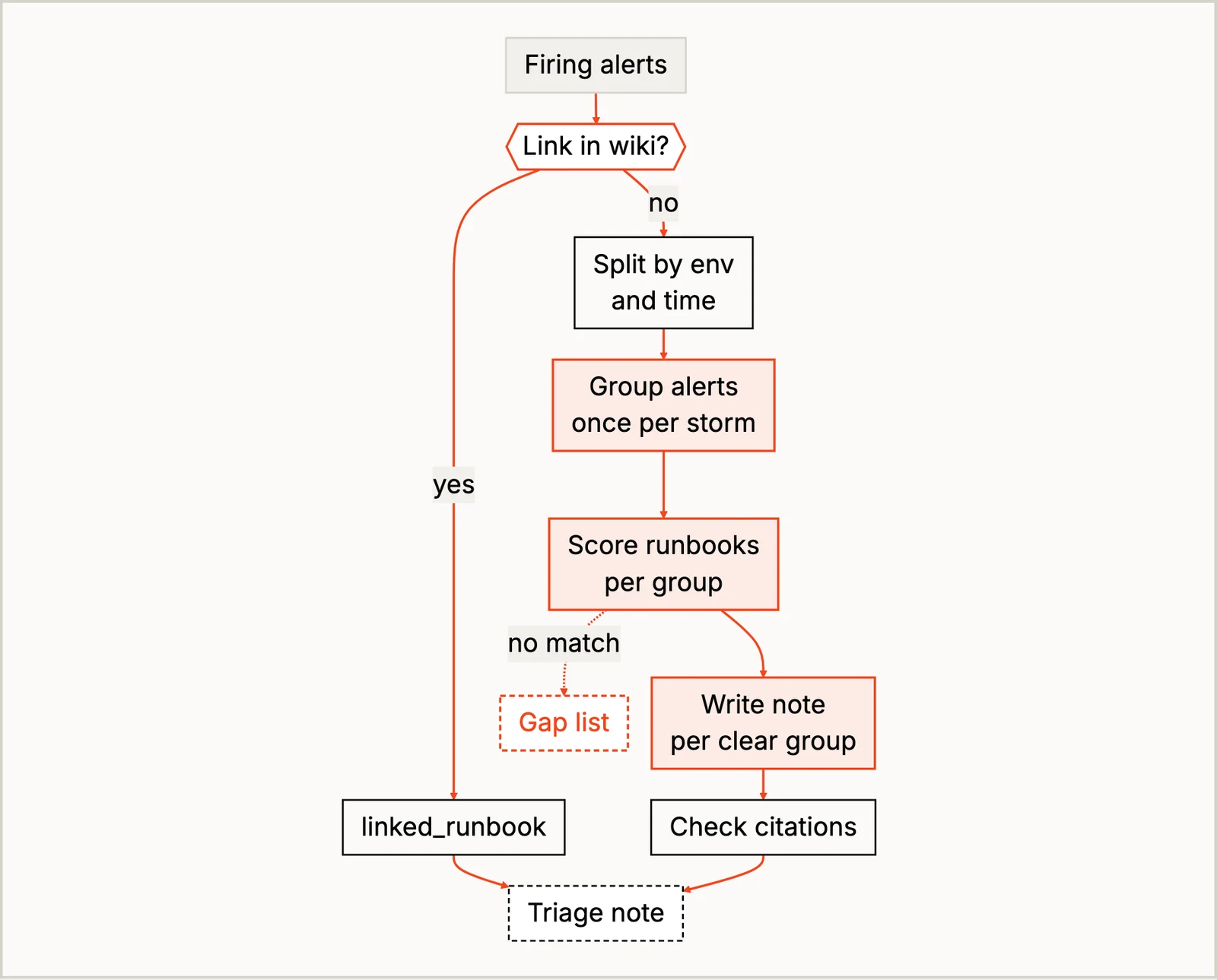
sre/match_alerts_to_runbooks uses the runbook links that exist as they are. Python splits the rest by environment and time first, because an embedding model can’t tell production from staging when the words match. Qwen3-Embedding-4B then groups alerts that say the same thing in different words, and Qwen3-Reranker-4B scores all 10 runbooks against each group. Only then does Qwen3.8-27B write a five-line note for each group that has a match, and Python checks that every alert it cites is in the group and that the only runbook it cites is the one it was given.
The test storm has five separate faults in it, and the recipe kept them apart instead of splitting them by label. The Kafka group got no runbook and no improvised advice, because its best match was the frontend proxy runbook, so it went on a list of runbooks nobody has written yet. The miss I’d remember is a note that said checkout was affected, when nothing in its group mentions checkout. Every citation in it was real, so the checks passed it, and only the person reading it could catch it. Before trusting this on your own alerts, I’d also tune the grouping threshold on a few of your past incidents, because the right value depends on the embedding model and your alerts.
When No Routing Rule Matches: Route Alerts to Their Owners
For a second example, take the alerts no routing rule matched. They land in a shared queue, and a central SRE has to work out who owns each one. sre/route_alerts_to_owners looks up every label that can name an owner (service, app, job, instance, namespace) in the service catalog and the host inventory first. A lot of these alerts turn out to have an owner after all. The label says app where the route expects service, the name has different capitals, or the host is in the inventory. Each of those is a missing alias in the routing rules that someone could add.
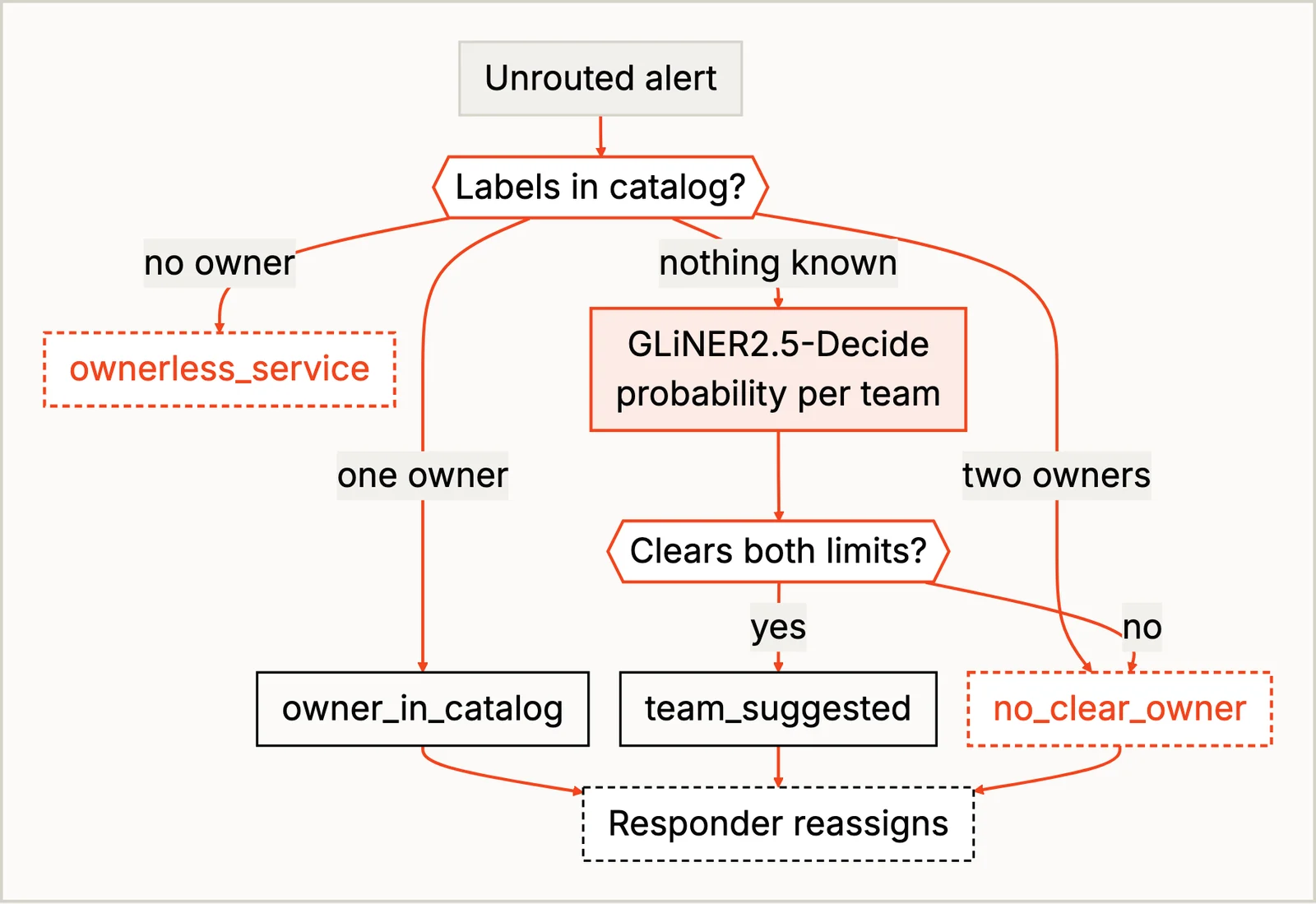
The rest go to GLiNER2.5-Decide, a small encoder that answers “which team owns the system this alert is about?” with the catalog’s teams as options and a probability for each. I chose it over a chat model because Python can require a minimum score of 0.50 and a lead of 0.20 over the next team, and because adding a team is one line in the catalog, with no prompt to maintain. Its weak spot is an alert that names nothing: a synthetic check called “smoke-7” failed, and the model still gave the storefront team a confident 0.57. The recipe writes “the alert names no system” into the reason and leaves it to the responder, though the real fix is a label on the alert rule.
For the Vendor Case: Redact Logs Before You Share Them
Say your card processor has a latency spike, and its support team wants the failed requests, with timestamps. (They always ask for timestamps. Then they ask for the timezone.)
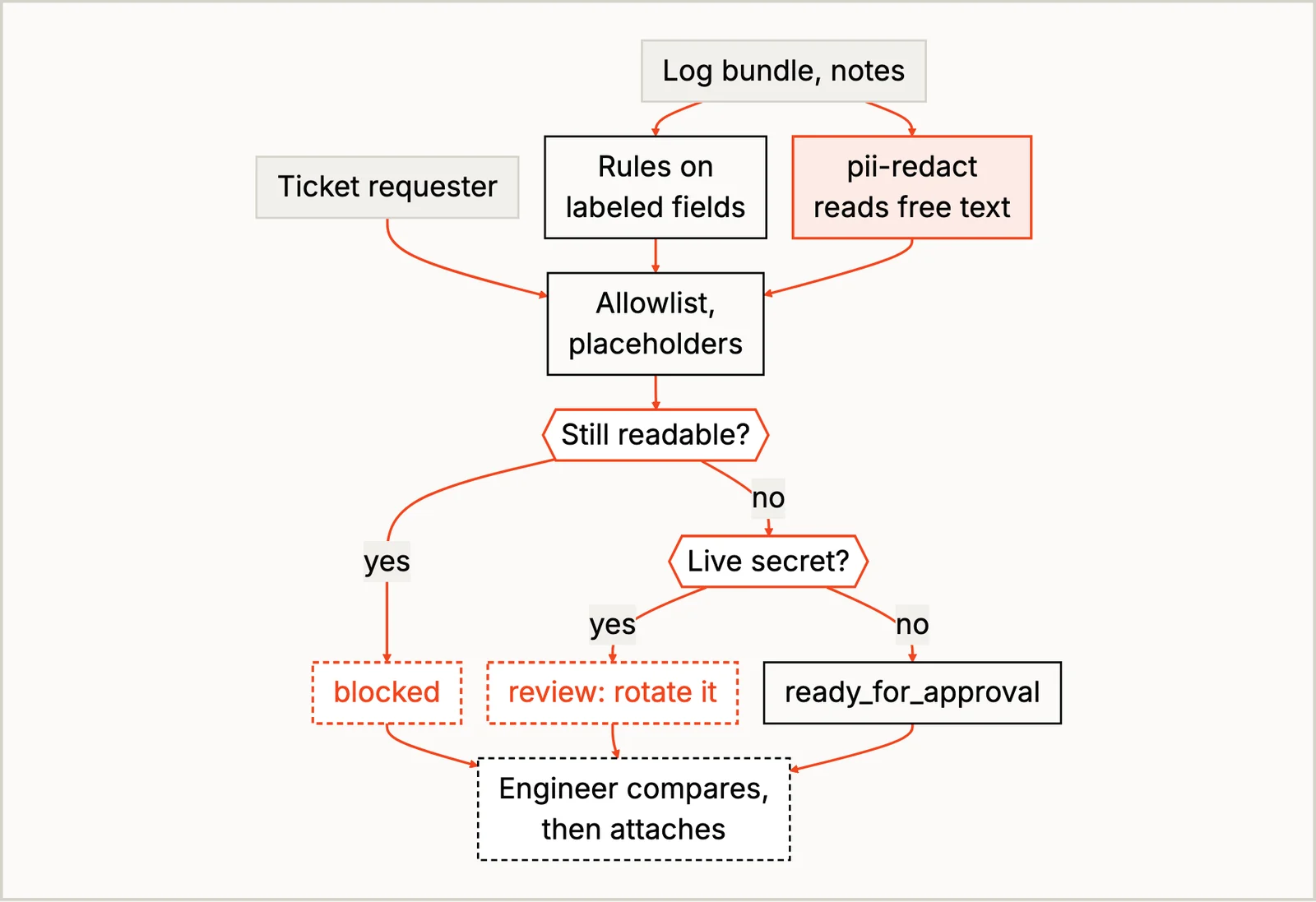
sre/redact_logs_before_sharing gives the labeled fields to plain rules: keys, tokens, session cookies and card numbers go, while hostnames, request IDs and the vendor’s own endpoints stay, because the vendor needs them. The free text goes to superlinked/pii-redact, SIE’s PII model, for what no field labels, like “Brightwater Ceramics (Delphine Marchetti)” in the on-call notes. A final sweep re-reads the cleaned files and blocks any file where a secret or a customer’s details are still readable, and the on-call engineer compares the original and the cleaned file before attaching anything. The gap I’d test on your own logs is a format the rules don’t know, like a double-encoded email (%2540), which would get past both the rules and the sweep.
After It’s Over: Draft the Postmortem
The last example is the postmortem. Two days after an incident, someone sits down to write it from the alert history, the deploy log and the incident channel. sre/draft_postmortem_from_incident_data builds the timeline in Python, because times and durations have one right answer. Qwen3.8-27B writes the narrative as strict JSON, where citations can only be real line IDs and owners can only be people in the Slack directory, and Python confirms every quote is in the line it cites. The test data has a trap in it, a deploy that landed almost 12 minutes after the alerts started, and the draft didn’t blame it.
The miss looks a lot like the runbook one. One contributing factor said the problem had gone unnoticed for “a month”. The log only said “since September”, and the model did the math itself. The quote under it was real, so the checks passed, but the month wasn’t in it. That’s why the postmortem owner reads every draft.
Where I’d Start: The Alerts No Routing Rule Matched
If you want one place to begin, I’d take the alerts that land in your shared queue because no route matched them and run them through the routing recipe, with every label looked up in the catalog first, the model only for alerts the catalog can’t place, and a reason on every row. I’d start there because it needs only your catalog and your alert labels, no runbooks or logs. The first thing you’ll learn is how many of those alerts are just a missing alias, and that list is a set of fixes that need no model at all.
Run Them Yourself
The easiest way to try these is on SIE Serverless, so you can run them before you set up any GPUs. You need uv and an SIE API key:
git clone https://github.com/superlinked/cookbook && cd cookbookcp .env.example .env # set SIE_API_KEYcd sre/route_alerts_to_owners # or any of the fouruv run recipe.pyI ran all four on SIE Serverless. Once you’ve seen the synthetic incident go through, point the routing recipe at your own unrouted alerts and service catalog and see what comes back. When you want the models in your own cloud, set SIE_BASE_URL in .env; the self-hosting guide has the setup.
Conclusion
Any on-call job in your week can be split the same way. Write down its steps, decide whether it’s a workflow, an agent or a mix, and give each step to the first thing that settles it: a lookup in your own systems, a small model for grouping, matching and redacting, a bigger model for the triage note and the postmortem, and the person on call for the decision. Then read the misses before you trust it, because in these recipes the misses that matter are the ones that pass every check, and the person at the end is the one who catches them.
If you have a queue like that, I’d love to hear what lands in it. Until next time.