
How to serve private document tools to any LLM with the SIE MCP server

Give any AI agent a private document toolbox that runs on your own models, in your own cloud.
This guide shows you how to stand up the SIE MCP edge: a Model Context Protocol (MCP) server that exposes document tools (parse, redact, extract, summarize, OCR, caption, structured output) to any agent, where the heavy work runs on open models you host on your own SIE cluster. Connecting an agent to this server lets it work over your private documents (contracts, NDAs, invoices, scans) without the raw bytes or the personal data ever leaving your cloud or reaching a frontier model API. The agent only ever gets a small, clean artifact back. That promise depends on one transport rule, covered honestly in how the bytes travel below.
Unlike a typical MCP server that wraps a local folder or a SaaS API and hands the model raw content to read, the SIE edge is model-backed: each tool runs open models on your own infrastructure and returns a small, processed result. Any MCP client can connect to it: Claude Code, claude.ai, Cursor, or any local-model host.
The tools work alongside a client’s other capabilities (web search, code execution, the client’s own file tools), so a single agent thread can call your private document tools and everything else it already has.
The one-line difference. A typical “filesystem MCP” hands the model your file and the model reads the bytes into its context. The SIE MCP edge processes the document on your cluster and returns a small artifact, so the model never ingests the raw file. That is where the ~85% token reduction, the context headroom, and the privacy come from. One transport rule makes it true: the file bytes have to reach the edge without passing through the model’s tool call. The section on how the bytes travel covers exactly how to do that, and what happens if you don’t.
Why I wanted this: cost, context, privacy, adaptability
I did not set out to build an MCP server. I wanted an agent that could work over my own documents, and for that, four things had to be true:
- Cheaper. Return a small artifact to the model instead of re-billing the whole document on every turn. A 40-page PDF re-enters the context (the text plus a rendered image of each page) on every follow-up question; clean markdown is roughly 85% fewer tokens.
- Sharper. The same 85% is a context-management win, not just a billing one. Models measurably degrade as their context fills: Chroma’s context-rot study found every one of 18 frontier models getting worse as input length grew, and the Lost in the Middle result showed accuracy dropping when the relevant passage sits mid-context. An agent that reads whole documents burns its window fast; one that reads artifacts keeps its context lean and dense, which should hold answer quality deeper into a session and push context compaction later. (The parse artifact is the near-lossless version of this; summaries and extractions trade detail for an even smaller footprint.)
- Private. The raw documents, the personal data inside them, and the cluster keys all stay inside my own cloud, and nothing sensitive goes to a frontier model API, provided the bytes reach the edge out of band (the one rule covered in how the bytes travel).
- Adaptable. Choose the models, route each job to the right one, and fine-tune an open model with a LoRA when the domain needs more accuracy, instead of being locked to one vendor.
With the bytes sent out of band, the SIE MCP edge satisfies all four at once: it returns artifacts (cheaper and sharper), runs the models in your own cloud (private), and serves whatever open or fine-tuned models you put on the cluster (adaptable).
How SIE MCP differs from a standard MCP server
Most MCP servers are thin tool wrappers (a local filesystem, a SaaS API, a database) that hand the model raw content to read. The SIE edge is model-backed: each tool runs open models on your own cluster and returns a small, processed artifact. The practical differences:
| Dimension | A standard MCP server | The SIE MCP edge |
|---|---|---|
| What it is | A tool wrapper, local files, a SaaS API, a database | A model-backed document edge |
| What does the work | Calls an external API or reads files; runs no models itself | Open models on your GPUs (docling, GLiNER, Qwen) behind each tool |
| What reaches the model | Raw content, file text, API JSON, read into its context | A small, processed artifact; the model never ingests the raw bytes |
| Where it runs | Local (stdio) or a third-party SaaS | In your VPC, on your cluster |
| Data residency | Data can leave to the provider or sit in the agent’s context | Raw bytes and PII stay in your cloud |
| Authentication | A per-server token or OAuth to the external service | A connector secret to the edge; the cluster key is held server-side, never sent to the client |
| One tool is | One API call | A multi-model pipeline (parse, detect, mask) |
| Token cost | Returns full content, a large context | Returns an artifact, ~85% fewer tokens |
It composes with the rest, too: any MCP client, including a local-model host, can connect to the SIE edge and gain these private document tools while running its own generation locally.
Use cases
Once the edge is connected, ask the agent to do real document work in plain language:
- Build a private knowledge graph: “Parse these contracts, pull the parties and amounts, and write linked notes.” (The shipped Obsidian example does this end to end.)
- Redact before the model sees it: “Scrub the PII from this NDA, then work from the redacted version.” The SSN is masked on your cluster; the agent only ever sees
[SOCIAL_SECURITY_NUMBER_1]. - Extract structured facts: “Pull every party, date, and amount from this MSA as JSON.”
- OCR a scan: drop a scanned form and get clean markdown back, via VL-OCR routing.
- Summarize on your own models: “Summarize this 40-page agreement” runs generation on Qwen on your cluster, not a frontier API.
How it works: three tiers
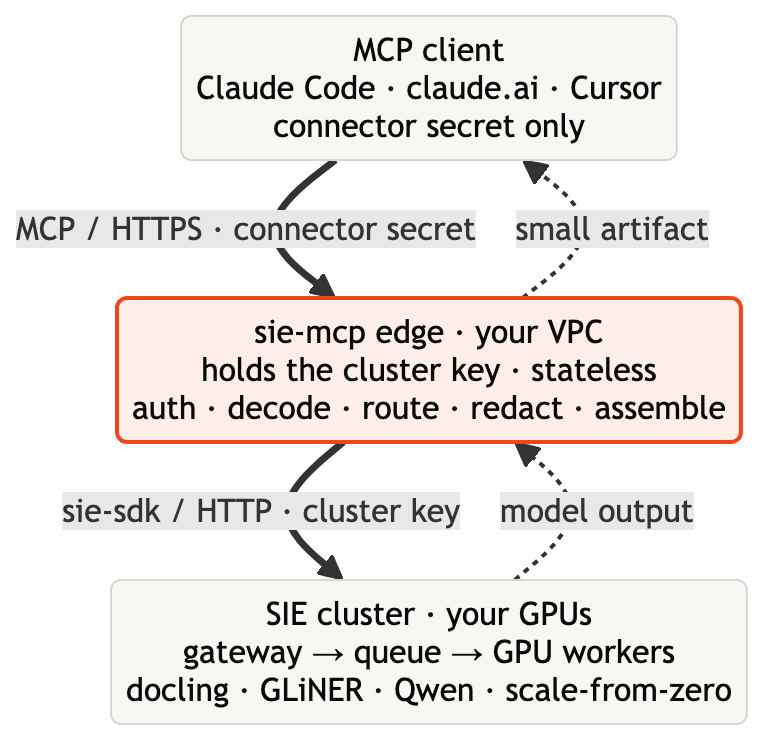
The agent holds only a connector secret. The edge holds the cluster key and is the only thing that talks to the cluster. The raw bytes reach the edge, never an external model API; only the small artifact crosses back.
Prerequisites
You stand up the edge once, then point any number of clients at it. You will need:
- A SIE cluster reachable over HTTP that serves the document models (
docling, a GLiNER PII model, and a generation model such asQwen/Qwen3.5-4B). See Step 1 below to bring one up, or use a hosted cluster and its API key. - Python 3.12 (for the edge) or Docker.
- An MCP client: Claude Code, claude.ai, Cursor, or any local-model host that supports custom HTTP MCP servers.
Run the SIE MCP edge
Step 1: Point at a SIE cluster
The edge runs every document tool on a SIE cluster. You need its endpoint URL and an API key.
If you already run a SIE cluster (a managed endpoint, or one your team hosts), grab its URL and key and move to the next step.
To run your own, the cluster is a single container. With a GPU:
docker run --gpus all -p 8080:8080 \ -v sie-hf-cache:/app/.cache/huggingface \ ghcr.io/superlinked/sie-server:latest-cuda12-defaultCPU-only (fine for trying the API, slow for real documents):
docker run -p 8080:8080 \ -v sie-hf-cache:/app/.cache/huggingface \ ghcr.io/superlinked/sie-server:latest-cpu-defaultFor a production deployment, use the Helm chart (oci://ghcr.io/superlinked/charts/sie-cluster). A locally-run container is reachable at http://127.0.0.1:8080; a hosted cluster gives you an https:// endpoint and a key.
Confirm the catalog has the models the edge needs:
curl -s -H "Authorization: Bearer $SIE_API_KEY" "$SIE_BASE_URL/v1/models" | grep -E "docling|gliner|Qwen3"
Step 2: Configure the edge
The edge needs three things: the cluster endpoint it should call, the API key for that cluster (held only here), and one or more connector secrets (the Bearer tokens you hand to agents). Generate a connector secret rather than inventing one:
# the SIE cluster the edge calls: the endpoint you hold an API key forexport SIE_BASE_URL="https://<your-sie-cluster-endpoint>"   # e.g. your managed/hosted clusterexport SIE_API_KEY="<cluster-api-key>"                       # the edge holds this; clients never see it
# a connector secret you generate; agents present it as their Bearerexport SIE_CONNECTOR_SECRET="$(openssl rand -hex 32)"export SIE_MCP_CONNECTOR_SECRETS="$SIE_CONNECTOR_SECRET:claude-code"   # secret[:user_id]
If you ran the cluster locally in the previous step, SIE_BASE_URL is http://127.0.0.1:8080 (and SIE_API_KEY can be omitted if that container has no auth).
Keep the keys straight.
SIE_API_KEYis the powerful credential: it can run inference on your GPUs. It stays on the edge. What you give a user is the connector secret, which only authorizes the document tools.
Optional routing and limits (sensible defaults shown):
export SIE_MCP_GENERATE_MODEL="Qwen/Qwen3.5-4B" # generation model for summarize/structuredexport SIE_MCP_MAX_DOCUMENT_BYTES=52428800 # 50 MiB capexport SIE_MCP_TIMEOUT_S=300 # wait-for-capacity timeoutLeave the generation GPU lane unset unless you know the resident pool. Pinning
SIE_MCP_GENERATE_GPUto a lane that doesn’t host the loaded model variant makes generation wait for that variant to load.
Step 3: Start the edge
The edge lives in the same repo as the cluster (packages/sie_mcp); it is not yet on PyPI, so you install it from a clone. Its dependencies, including the sie-sdk client, resolve from PyPI. With the three env vars exported:
git clone https://github.com/superlinked/sie && cd siepython3.12 -m venv .venv && source .venv/bin/activatepip install -e packages/sie_mcpsie-mcp serve --host 127.0.0.1 --port 8088That is all you need to run the demo. You can also run it as a container; the package ships a Dockerfile you build from the repo root:
docker build -t sie-mcp:local -f packages/sie_mcp/Dockerfile .docker run -p 8088:8088 \ -e SIE_BASE_URL -e SIE_API_KEY -e SIE_MCP_CONNECTOR_SECRETS \ sie-mcp:localFor a production deployment, the cluster’s Helm chart has an optional mcpEdge section that runs the same edge behind your ingress.
Verify it’s up:
curl -s http://127.0.0.1:8088/healthz # {"status":"ok"}curl -s -o /dev/null -w "%{http_code}\n" http://127.0.0.1:8088/mcp # 401 (no secret) = goodA 401 on /mcp without a token is correct: the connector-secret gate is working. In production, put the edge behind an ingress that terminates TLS so clients reach https://edge.your-vpc.internal/mcp.
Connect an agent
The edge speaks MCP over Streamable HTTP with a Bearer connector secret. Any MCP client connects the same way; here are three.
Claude Code
One command points Claude Code at the edge:
export SIE_MCP_URL="http://127.0.0.1:8088/mcp"        # your https ingress in productionexport SIE_MCP_CONNECTOR_SECRET="<the secret from Step 2>"
claude mcp add --scope user --transport http superlinked-docs \  "$SIE_MCP_URL" --header "Authorization: Bearer $SIE_MCP_CONNECTOR_SECRET"
Restart Claude Code, and the eight document tools (docs_to_markdown, redact_pii, and the rest) are live in any session. The tools are the substance: the redaction, parsing, and extraction all run on your cluster the moment the server is added. That alone is everything you need.
Building a model and skill pair to share? A skill is a small SKILL.md that teaches an agent when to reach for these tools (for example, “redact a contract before sending it to the model”). When you want to package one of those together with the connect instructions and ship it, generate a plugin pack. It writes a claude.ai-uploadable skill ZIP, Claude Code skill folders, and an INSTALL.md with the connect command filled in for your endpoint:
sie-mcp plugin-pack --cluster-label sie --mcp-url "$SIE_MCP_URL"Hand someone the pack, or install its skills locally:
mkdir -p ~/.claude/skills && cp -R dist/superlinked-docs-plugin/claude-code/* ~/.claude/skills/claude.ai (OAuth)
claude.ai connectors can’t take a static secret, so the edge ships an OAuth 2.0 bridge (RFC 9728 protected-resource metadata plus Dynamic Client Registration). Enable OAuth on the edge, add the connector in claude.ai with the edge URL, and complete the browser sign-in on first connect.
# on the edgeexport SIE_MCP_OAUTH_ENABLED=1export SIE_MCP_PUBLIC_URL="https://edge.your-vpc.internal"The OAuth bridge currently runs as a single worker (a shared session store is the scale-out follow-up). The connector-secret path has no such limit and scales horizontally.
Any MCP client
The edge is a plain HTTP MCP server with a Bearer header, so any client that supports a remote (HTTP/SSE) MCP server can use it: desktop apps, IDE assistants, terminal MCP hosts, or a local-model UI.
In the client’s MCP settings, add a custom server:
- Name:
SIE Docs - URL:
http://127.0.0.1:8088/mcp(or yourhttps://ingress in production) - Header:
Authorization: Bearer <your connector secret>
Test the connection, then save. The host’s model can now call docs_to_markdown, redact_pii, and the rest. If it’s a local model, your generation runs locally while document parsing and PII detection run on the SIE cluster.
Run it: the document pipeline
With Claude Code connected, the canonical run is four tool calls (parse, scrub, extract, summarize). None of them pull the raw file into the model’s context, provided the first call’s bytes are sent shell-side (the next section explains that rule):
docs_to_markdown { "document_base64": "<contract.pdf bytes>", "filename": "contract.pdf" }   -> { "markdown": "...", "metadata": { token_reduction: ~85% } }
redact_pii { "content": "<the markdown>" }   -> { "redacted_text": "...SSN [SOCIAL_SECURITY_NUMBER_1]..." }   # no PII map returned
extract_entities { "labels": ["person","organization","date","amount"], "content": "<redacted>" }   -> { "entities": [ ... ] }
summarize_document { "content": "<redacted>" }   -> { "summary": "..." }
The shipped example (packages/sie_mcp/examples/obsidian-contract-graph) turns a folder of synthetic legal documents into a linked Obsidian knowledge graph. Open its vault/ in Obsidian’s Graph View, launch Claude Code in the example folder, and run the prompts in its README.md.
Pre-warm generation before a live demo. The cluster scales models from zero, so the first
summarize_documentcall has to load the generation model. Fire one throwaway generation call a few minutes ahead so it’s resident, and the live call is fast.
How the bytes travel
A fair criticism came up early, and it deserves a straight answer: “if you connect this to Claude, doesn’t Claude read the file before passing it to MCP?”
For the plain inline path, yes. MCP tool arguments are generated by the model. If the agent reads a file, base64-encodes it, and calls docs_to_markdown with document_base64 filled in, that base64 passes through the model twice: once into its context (the output of the encode step) and once back out as the tool-call arguments, billed as output tokens. Base64 is encoding, not encryption, so on a hosted model those bytes did transit the frontier API. It is also a terrible token format: it inflates the file by a third, and on current frontier tokenizers base64 lands at roughly three characters per token (against about four for prose), so as a ballpark a 1.5 MB PDF becomes several hundred thousand tokens of base64. That is more than a 200k-token context window can hold at all, let alone save money or leave the model room to think.
So treat inline document_base64 as what it is: a demo transport. It is fine for a small file when you want to watch the pipeline end to end with zero extra setup, and that is all it claims to be. The cost and privacy story this post opened with holds when the bytes bypass the model’s context, and there are three ways they do:
- Send the bytes from the shell, not through the model. The edge runs stateless streamable HTTP, so a single authenticated POST can carry a
tools/callrequest with the base64 built shell-side; only the returned markdown ever enters the model’s context. The repo ships a ready-made caller,packages/sie_mcp/docs/examples/mcp_smoke.py: the agent runs it as a command with the file path, and the raw bytes go disk to edge directly. - A local-model host. The tool arguments still pass through the model, but the model is yours, so nothing leaves your network either way. The token cost lands on your own hardware instead of an API bill.
- An out-of-band upload endpoint (the clean fix). Upload the file to the edge with the connector secret, get back a short
document_id, and pass that to any tool in place ofdocument_base64. The model only ever handles the id and the artifact. This is where the edge design is headed; the tools’ input contract (exactly one ofcontent,content_base64,document_base64) was built to take a fourth member.
The ~85% figure comes from benchmarking the markdown artifact against native document ingestion (the text plus a rendered page image, re-entering context every turn). That comparison assumes the bytes reach the edge out of band. Inline base64 through a hosted model is never a token win at any file size; the win is entirely a property of the artifact.
The tools
The edge exposes eight tools. Each is a capability; the model behind it is a default you can override per call or via environment variables.
| Tool | What it does | Model / pipeline |
|---|---|---|
docs_to_markdown | PDF, DOCX, PPTX, XLSX, HTML, or scan to clean markdown | docling, VL-OCR for scans |
summarize_document | summarize a document or text | docling parse, then map-reduce over Qwen |
extract_entities | zero-shot entities (person, org, date, amount) | GLiNER |
redact_pii | mask PII; returns redacted text and counts only | GLiNER plus edge-side substitution |
answer_questions | grounded answers over supplied text | chunked retrieval plus generation |
describe_image | caption plus zero-shot tags for an image | Florence-2 / SigLIP / CLIP |
extract_structured | schema-valid JSON grounded in content | constrained generation |
generate_structured | constrained generation (json_schema, regex, grammar) | generation with a response_format |
Where LoRA fits
Because every tool runs on models on your own cluster, you are not stuck with what those models know out of the box. That is the adaptability promise from the top of this post paying off: when a domain needs more accuracy, fine-tune an open model with a LoRA and serve the adapted version from the same cluster. Nothing in the agent or the tool calls changes; the edge just routes to the better model.
The cost is small. In one of our retrieval experiments, a $0.80 LoRA trained for 41 minutes on a single L4 lifted in-domain legal retrieval by roughly 18% while holding general performance within about 2%. Once the serving layer is yours, adapting a model is a training run you control, not a vendor request you wait on.
Troubleshooting
401 Unauthorized: the connector secret in the client’sAuthorization: Bearerheader doesn’t matchSIE_MCP_CONNECTOR_SECRETSon the edge. Check both.document exceeds the 52428800-byte limit: the file is over the 50 MiB cap. Split it, or raiseSIE_MCP_MAX_DOCUMENT_BYTES.- A tool call hangs, then times out: no GPU capacity yet. The edge waits for a worker to scale from zero and times out after
SIE_MCP_TIMEOUT_S. Pre-warm the model, or raise the timeout. (This is the expected scale-to-zero behavior, not a bug.) - Generation is slow on the first call: cold start, the generation model is loading. Pre-warm it. If it never loads, check the cluster catalog has the model and that you haven’t pinned a GPU lane it doesn’t live on.
- Tools don’t appear in the client: confirm the URL is the edge’s
/mcpendpoint (not/healthzor a docs page) and that the client’s auth header is set.
Security notes
- Hand out the connector secret, never
SIE_API_KEY. The cluster key stays on the edge. - The raw document and its PII never leave your cloud, provided the bytes reach the edge shell-side or via upload rather than inline through a hosted model’s tool call (see how the bytes travel). They’re processed by open models on your cluster, not sent to a frontier model API.
redact_piireturns masked text and counts but never the placeholder-to-original map, so the response can’t be used to recover the PII.- Keep human confirmation on for tools that touch private data, and be cautious combining document tools with web search: prompt-injected content can try to trigger tool calls.
- Rotate connector secrets that have been shared in chat or logs. Revoke one by removing it from
SIE_MCP_CONNECTOR_SECRETSand restarting the edge.
The SIE MCP edge is open source. The server, the example, and the cluster all live in github.com/superlinked/sie, so you can read exactly what runs, fork it, and deploy it in your own cloud. The point is simple: your agents get a document toolbox as capable as a frontier API, while the documents, the PII, and the models stay on your side of the wire.