---
title: Choosing Between SIE Serverless, SIE Cluster and SIE Local
description: "Decide where your small models run from the workload: whether you've picked the models, what your data rules and infra team allow, how spiky the traffic is and where the data sits."
canonical_url: https://superlinked.com/blog/choosing-where-small-models-run
last_updated: 2026-11-11
---
Teams put models to work in very different situations. A data scientist tries a few models on a sample in a notebook. A nightly batch job [reads every scanned document](/ocr) that came in that day. A search request in your product has to be [reranked](/rerank) in a few hundred milliseconds. An [agent](/blog/small-open-models-as-agent-tools) calls small models as its reading tools, a regulated company can't let its data leave its own cloud, and a plant may have no internet connection at all. Each of those pulls the models toward a different place.
So say your team has decided that a job should run on small, task-specific models. Then someone in a meeting asks where the models would run. A vendor's API? Your own cloud? The GPU box under the desk of the one person who knows CUDA? It's a fair question, and it usually gets answered by whoever has the strongest opinion about Kubernetes.
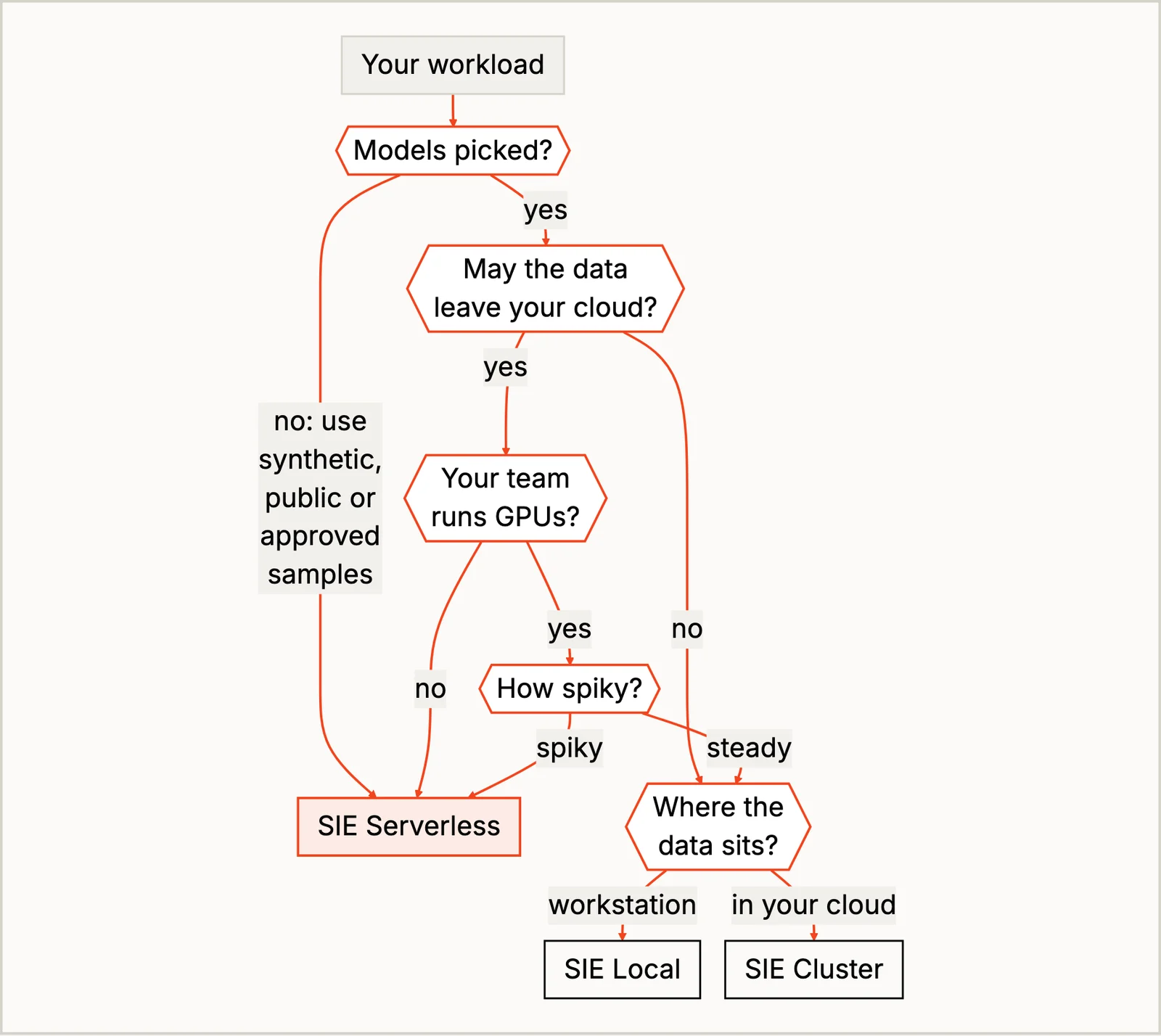
I'd rather answer it from the workload. There are four questions I go through, in order: have you picked the models yet, what your data rules and your infra team allow, how spiky the traffic is, and where the data already sits. The answers point at one of the three places SIE runs, [SIE Serverless](/serverless), SIE Cluster or SIE Local. I'll start with why the choice is cheaper to make than it looks, then walk the questions, put the three side by side, and place one cookbook recipe end to end. The [Should You Self-Host Inference?](/blog/should-you-self-host-inference) post covers the break-even math, so I'll only touch on it.
## Your Pipeline Stays Put, Only the Models Move
Any job like this has two parts: your pipeline (the code that reads the data, calls the models, applies your rules and writes the results) and the models themselves. The pipeline runs wherever you already run code, which is a notebook while you're researching and a cron job, an Airflow workflow, a queue worker or your product's backend in production. Choosing where the models run doesn't change any of that, because the models are a service your pipeline calls.
SIE gives you three places to put that service. With SIE Serverless, Superlinked runs the GPUs and you pay for what you use. With SIE Cluster, you run SIE in your own cloud with Helm. With SIE Local, SIE runs on a machine you control.
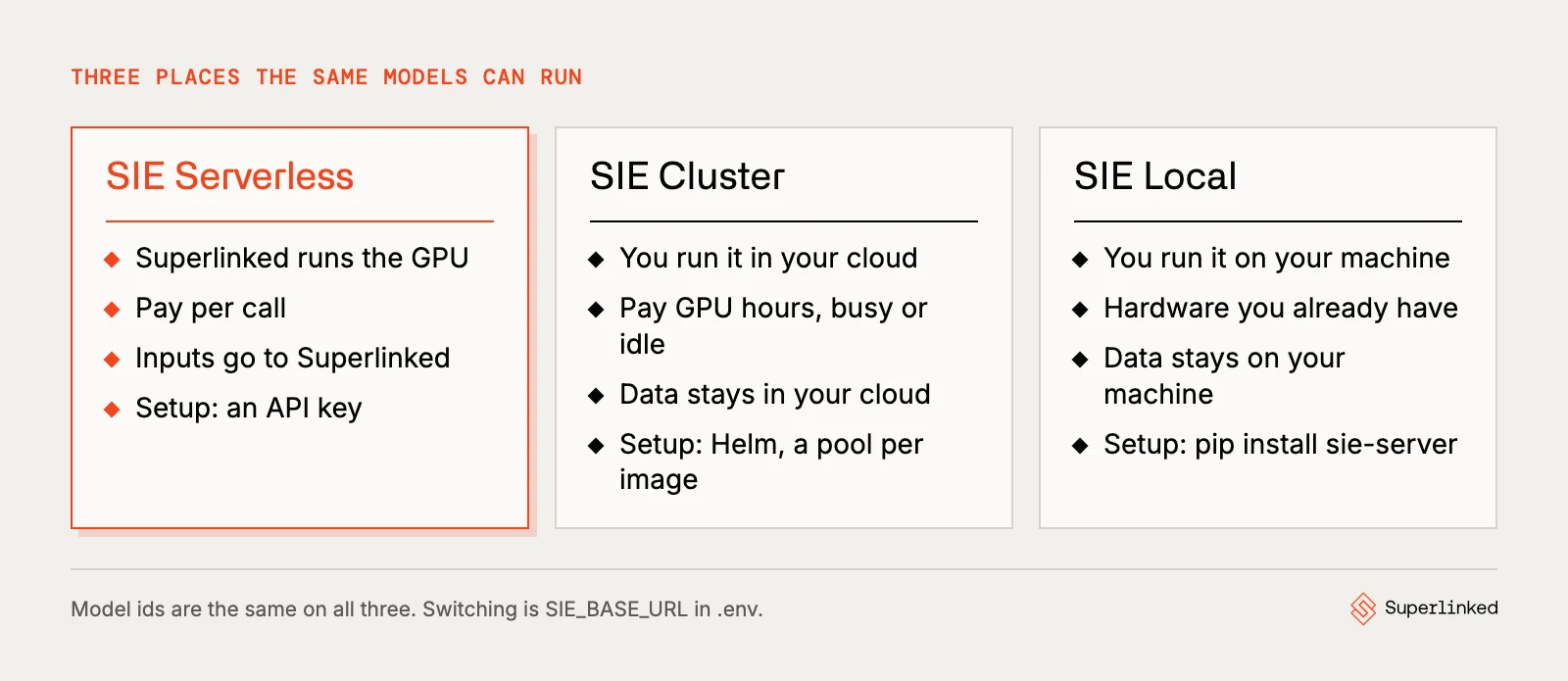
The client code is the same in all three, and so are the model ids, with one exception in the cookbook: `Qwen/Qwen3-Embedding-4B` runs on SIE Serverless but has no published image in SIE v0.10.1, so on your own servers you'd swap in `Qwen/Qwen3-Embedding-8B` and recheck your similarity thresholds. Apart from that, the code change for a move is one line in your configuration:
```bash
# SIE Serverless
SIE_API_KEY=
# SIE Local (or https:// for SIE Cluster)
SIE_BASE_URL=http://localhost:8080
```
Easy peasy. That's what lets you start in one place and move later without rewriting your pipeline. The move itself takes more than that line (setting up the servers, routing between them if your models need more than one, and rechecking your thresholds, all covered below), but none of it touches your pipeline code. (One gotcha: the cookbook recipes send whatever `SIE_API_KEY` sits in `.env` to that URL, so take your SIE Serverless key out when you switch.)
## How I'd Decide, Question by Question
### Have You Picked the Models Yet?
This one comes first because you can answer it before anyone has an opinion. If you haven't picked the models, you're still investigating, and that's where I'd use SIE Serverless almost every time, with samples your data rules let leave your cloud (synthetic, public or approved ones). You don't know which models you'll keep, so there's nothing to size a GPU for, and trying another model is changing a model id:
```python
# pseudocode: comparing candidates for one step on your own samples
for model in ["lightonai/LightOnOCR-3-4B", "lightonai/LightOnOCR-2-1B"]:
results = run_step(model, sample_invoices)
compare(results, what_a_person_decided)
```
On your own hardware, trying five models means finding GPU room for all five. The cookbook's invoice recipe shows why it's worth trying more than one: on one synthetic invoice with a blank tax line, [LightOnOCR-3-4B](/models/lightonai-lightonocr-3-4b) wrote in a plausible tax amount, and [LightOnOCR-2-1B](/models/lightonai-lightonocr-2-1b) left the blank alone and sent the invoice to review. That's one made-up case, not a benchmark, but it's the kind of difference you want to find before anyone buys hardware.
### What Your Data Rules and Infra Team Allow
SIE Serverless sends your inputs to Superlinked, and some models may run on GPUs from Superlinked's partners through [SIE Relay](/docs/cloud/sie-relay/), so your inputs can reach them too. SIE Cluster keeps them in your cloud, and SIE Local keeps them on a machine you control. Your IT security team decides which of those your data may use, not me, and it's the first question I'd take to them. I'd keep work whose data your rules let leave your cloud on SIE Serverless (tagging internal tickets, anything on public documents), and in regulated industries, where the data often can't leave your cloud, SIE Cluster or SIE Local is the usual answer. That's the same reason companies like Latham & Watkins bought their own servers; its CIO told the FT "we don't want to put it to any cloud vendor" ([FT, via Latham](https://www.lw.com/admin/upload/SiteAttachments/Latham-Buys-Nvidia-Servers-to-Set-Up-In-House-AI-Systems.pdf)). [Who Owns the Tokens](/blog/who-owns-the-tokens) goes into the ownership side of it.
Keeping data in takes a little setup on your own servers too (telemetry and model downloads both reach outside by default), and the [across-industries post](/blog/small-open-models-across-industries#training-and-hosting-your-own-models) covers it. And any part of a pipeline that calls a frontier model sends its inputs out whatever you do with SIE. The cookbook's agent recipes, including the insurance, legal, KYC and counterparty-news agents, run their loops on Claude through the Anthropic API.
Then be honest about what your infra team can run. SIE Cluster is Helm and GPU nodes. If your team already runs Kubernetes with GPU nodes, that's one more Helm release. If nobody does, it's a project, and someone will be on call for it. A small team usually has better things to do than size node pools, and I'd stay on an API key until there's steady load and a customer asking where the data goes.
### How Spiky Your Traffic Is
With SIE Serverless you pay for what you use and nothing in between, and with SIE Cluster you pay for GPU hours, busy or idle. A job that runs a few times a day, or an [insurance](/insurance) claims queue that's quiet for weeks and floods after a storm, fits SIE Serverless well, as long as you can live with a cold start (the first call to a model nobody's been using can take a few minutes). The more of the day a GPU stays busy, the better SIE Cluster looks.
SIE Serverless bills each model in its own unit (input tokens for most, pages or pairs for a few), not per call, and the rate is on the model's [page](/models). [`Qwen/Qwen3-Embedding-4B`](/models/qwen-qwen3-embedding-4b), for example, is $0.06 per 1M input tokens. The self-hosting post puts an on-demand L4 at roughly $0.39 to $1.00 an hour (June 2026 rates), so an L4 left up all day costs $9.36 to $24, which buys 156 to 400 million tokens of that embedding model on SIE Serverless. That's a break-even on GPU rent only. Below that a day, SIE Serverless is cheaper for it; above it the L4's rent is, as long as one L4 keeps up, which I haven't measured. The people who run the GPU cost money too, so the real crossover sits higher.
**Pro-tip:** count what each run uses from day one, in the units its models are billed in. A call count alone won't tell you where the two cross.
### Where the Data Already Sits
The last question is where the data is and how much of it there is. A data scientist working through a sensitive dataset that already sits on a workstation wants the models next to the data, and that's SIE Local: `pip install "sie-server[local]"` and `sie-server serve` on the machine they already use, as long as the models fit one SIE image (more on that below). A production job that runs every night over everything the company received that day wants the models in your cloud next to the pipeline, with room to scale, and that's SIE Cluster.
## The Three Side by Side
| | SIE Serverless | SIE Cluster | SIE Local |
| --- | --- | --- | --- |
| Best for | Trying models, spiky work, data your rules let leave, small teams | Production at scale in your cloud, regulated data | Data science on data that's already local |
| Who runs the GPUs | Superlinked | Your team, with Helm | Whoever owns the machine |
| Where inputs go | To Superlinked | Stays in your cloud | Stays on that machine |
| What you pay for | What you use, per model's unit | GPU hours, busy or idle | The machine you have |
| Which models | The SIE catalog | The catalog, plus your own LoRA adapters | Models from one SIE image per server |
| Model versions | Whatever Superlinked has deployed | You pin them | You pin them |
On your own servers you also take on the mechanics Superlinked handles for you on SIE Serverless. SIE ships its models in container images, each holding a group of models whose dependencies fit together, and one SIE server runs one image. If your pipeline's models live in two images, you need two servers, plus something that sends each model's calls to the right one, because your pipeline has one `SIE_BASE_URL`. SIE Cluster's gateway does that routing and SIE Local doesn't, so one SIE Local server only covers recipes whose models fit one image. That's 15 of the cookbook's 46 recipes; 29 need two or more, and the cookbook's [compatibility table](https://github.com/superlinked/cookbook/blob/main/CHOOSING_WHERE_MODELS_RUN.md#first-check-what-your-recipe-needs) lists which. Several small models also share one GPU's memory, and a model that isn't loaded has to load before it answers, so you pin the ones you call often to keep them loaded. And a score threshold you tuned on one GPU can move on another (SIE's own tests saw `Qwen/Qwen3-Reranker-4B` move by up to 0.097 on an L4), so recheck your cutoffs where you'll run. The cookbook's [CHOOSING_WHERE_MODELS_RUN.md](https://github.com/superlinked/cookbook/blob/main/CHOOSING_WHERE_MODELS_RUN.md) and [SELF_HOSTING.md](https://github.com/superlinked/cookbook/blob/main/SELF_HOSTING.md) go through all of it, recipe by recipe.
## One Recipe, Placed: The Invoice Check
Here's how the questions play out for the [cookbook's invoice check](https://github.com/superlinked/cookbook/tree/main/insurance/check_invoice_against_claim). The job: a repair shop finishes and sends an invoice, and a claims processor opens it on one screen and the claim on the other to check that it's the right claim, the right shop, the arithmetic adds up and the total is within what the adjuster authorized. The recipe does that every night as a workflow: an OCR model reads each page, an extraction model points at the fields, and plain Python does every check. On ten invoices that's 30 SIE calls.
Have the models been picked? This is where the blank tax line turned up, on SIE Serverless, before anyone sized anything. What do the data rules allow? Invoices carry the insured's name and address, so plenty of insurers will want them in their own cloud. How spiky is it? A nightly batch of a few dozen calls never keeps a GPU busy, so on cost alone it stays on SIE Serverless. Where does the data sit? In the claims system, and if that's in your cloud, it's one more reason to keep the models next to it.
So it lands on SIE Serverless if your data rules let invoices leave your cloud, and on SIE Cluster if they don't. Cluster because it's a production job that runs every night, and because its OCR and extraction models come from two images, which SIE Cluster's gateway serves behind one `SIE_BASE_URL`. You'd be paying for GPU hours that sit mostly idle, and that's the price of keeping the data in.
The same folder has an agent for the special investigations unit (SIU), who look back over one repair shop's year when someone refers it. That job has no fixed steps, so Claude runs the loop and calls the invoice check as a tool, and code checks what it writes. It runs a few times a month, costs about $0.09 a job in Claude tokens on top of the same SIE calls, and its inputs go to Anthropic whichever place you pick for SIE. So the workflow and the agent in one folder get placed separately, each by its own answers. ([When to Use a Workflow and When to Use an Agent](/blog/agentic-vs-workflows-small-models) has more on deciding which one a job needs.)
## Run It Yourself
Every cookbook run so far, mine included, was on SIE Serverless, so that's where I'd start too. Grab an [SIE API key](https://console.superlinked.com/console/keys) and run the invoice check:
```bash
git clone https://github.com/superlinked/cookbook && cd cookbook
cp .env.example .env # set SIE_API_KEY
cd insurance/check_invoice_against_claim
uv run recipe.py
uv run --group agent agent.py # the SIU agent; also needs ANTHROPIC_API_KEY in .env
```
Then try a recipe from your own industry and see what it costs per run. When one of your answers gives you a reason to move, [SELF_HOSTING.md](https://github.com/superlinked/cookbook/blob/main/SELF_HOSTING.md) has the Docker and Helm setup. I haven't run the recipes on SIE Cluster or SIE Local myself yet, so the self-hosting parts here come from the SIE docs, not from my measurements.
## Conclusion
Start from the workload, not the pricing page. Ask whether you've picked the models, what your data rules and infra team allow, how spiky the traffic is and where the data sits, in that order, and let the answers pick SIE Serverless, SIE Cluster or SIE Local. Since the code change is one line, you can start on SIE Serverless and move once you have a reason; the setup on your own servers is the part to plan for.
If you've already placed one of your workloads, I'd love to hear where it landed and why. Until next time.